31
5
1
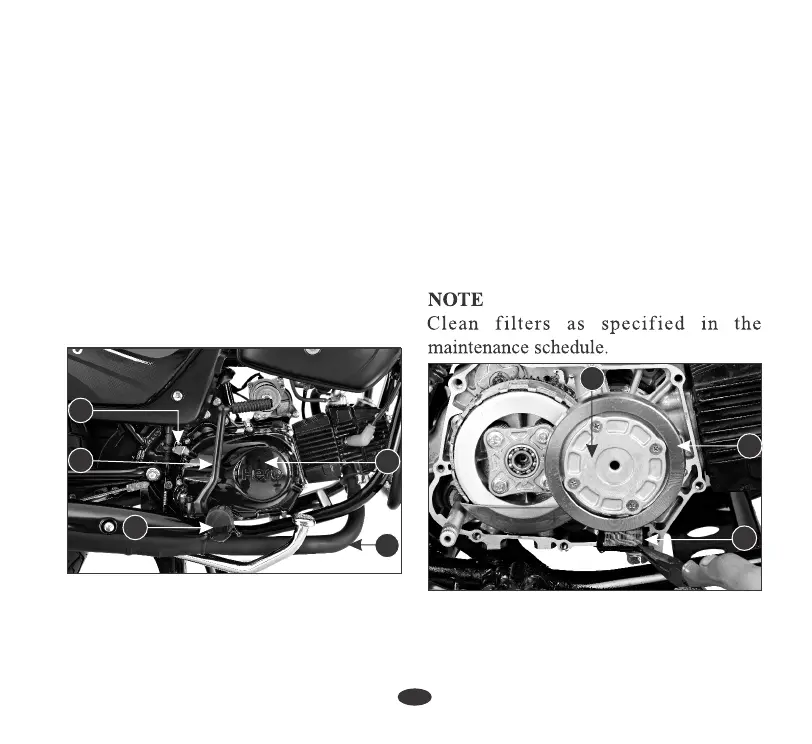
(4) Rider foot rest
(5) Right Crankcase Cover
(1) Kick Starter Pedal
(2) Clutch Cable
(3) Muffler
(8) Centrifugal Filter
(7) Centrifugal Filter Cover
(6) Oil Filter Screen
2
1. Drain the engine oil thoroughly.
3. Remove the oil filter screen (6) and
wash it in clean non flammable or high
flash point solvent (kerosene).
4. Reinstall the oil filter screen with the
sharp edged side facing inwards.
2. Remove the kick starter pedal (1),
disconnect the clutch cable (2), remove
the muffler (3), remove the right side
rider footrest (4) and remove the right
crankcase cover (5).
7. Fill the crankcase with clean engine oil as
per specification.
5. Remove centrifugal filter cover (7) &
clean the centrifugal filter (8) with non
flammable or high flash point solvent
(kerosene).
6. Reinstall the centrifugal filter cover,
right crankcase cover, kick start pedal &
clutch cable.
6
8
7
3
4
OIL FILTER SCREEN &
CENTRIFUGAL FILTER



 To Next Page