9/28
SET *START BY* METHOD (
A/C S
TART /
S
TOP C
ONTROL
)
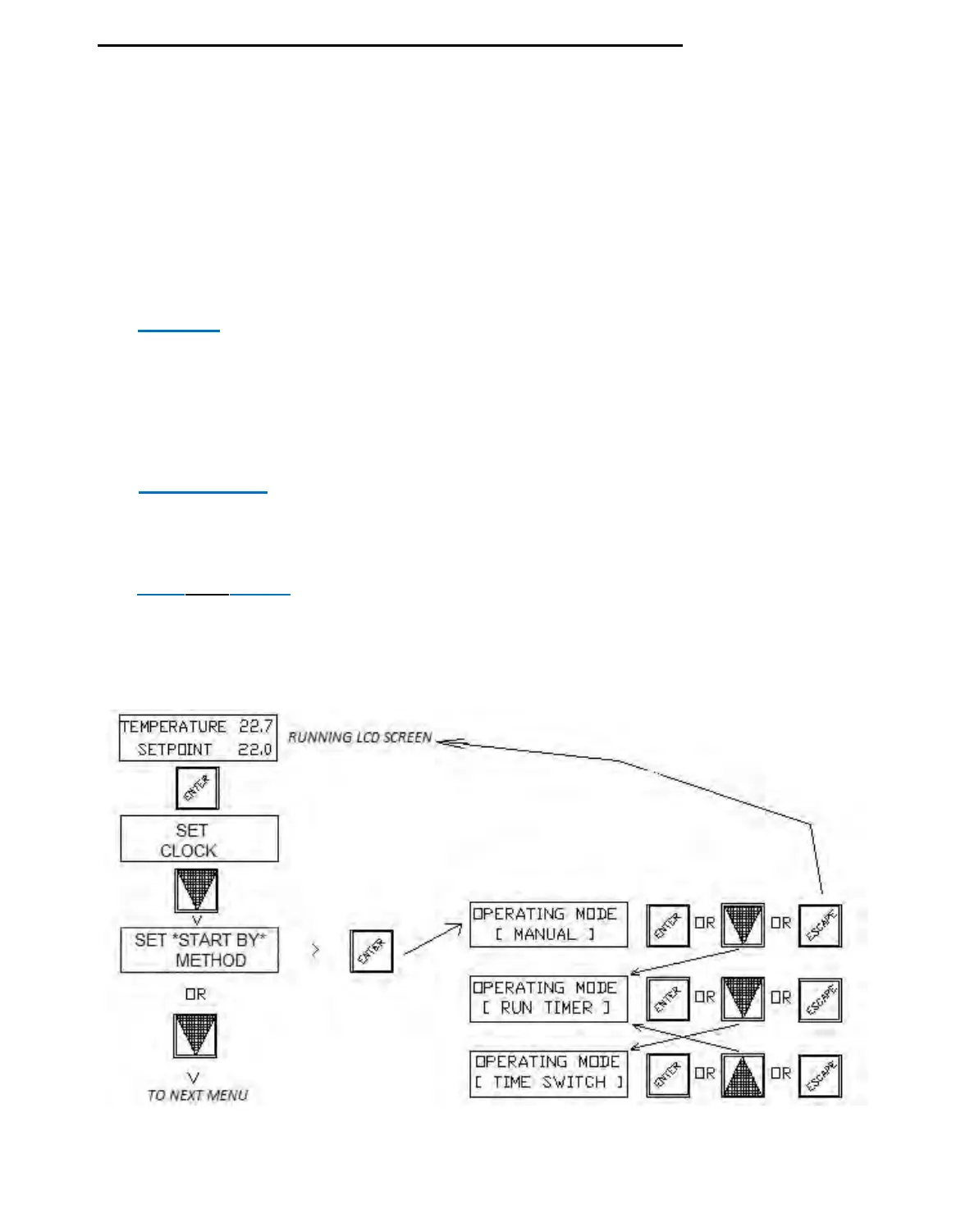
To set the A/C system "START
BY" method, press the fascia button labeled “ENTER”
then press the DOWN arrow button once to have the LCD display show the 2nd item in the
menu tree (after SET CLOCK) :
“
SET START BY METHOD "
Press the ENTER button to open this menu & see the existing setting, use the UP &
DOWN buttons to cycle through the 3 choices :
“MANUAL”, “TIME SWITCH” or “RUN TIMER”.
Select your choice by pressing the “ENTER” button. The display will then return to this
parent menu. Exit to the normal running screens by pressing the “ESC” button or scroll to
another main menu item to edit or check using the “UP” or “DOWN” arrow buttons.
1.) MANUAL - System ON/OFF state set only by an external “System Switch” or
external interlock wired in parallel with the 2 sensor
wires connected to our
passive temperature sensor or alternatively shorting the controllers D1 & M
terminals which has the same affect, results in a “System Off” mode, with all
relays and analogue outputs de-energized, Opening the switch allows 24/7
operation until the switch or interlock is closed again.
2.) TIME SWITCH (1) System
enabled by the controllers internal main 7 day Time Switch,
which can be programmed for a total of 18 possible switching events for
individual or groups
of days (allowing multiple on/off times per day).
3.) RUN (for) TIMER System operati
on triggered by a momentary on/off pulse from a
switch wired in parallel with the 2 (passive) sensor wires or across the
controllers D1 & M terminals.
Adjust the timer for the required time i.e. 8 hours.
HEVAC CONTROL AGENCIES PTY LTD. 7/54 HOWLEYS RD. NOTTINGHILL, VIC. 95627888 www.hevac.com.au
22/10/19


 To Next Page