11
english
12
english
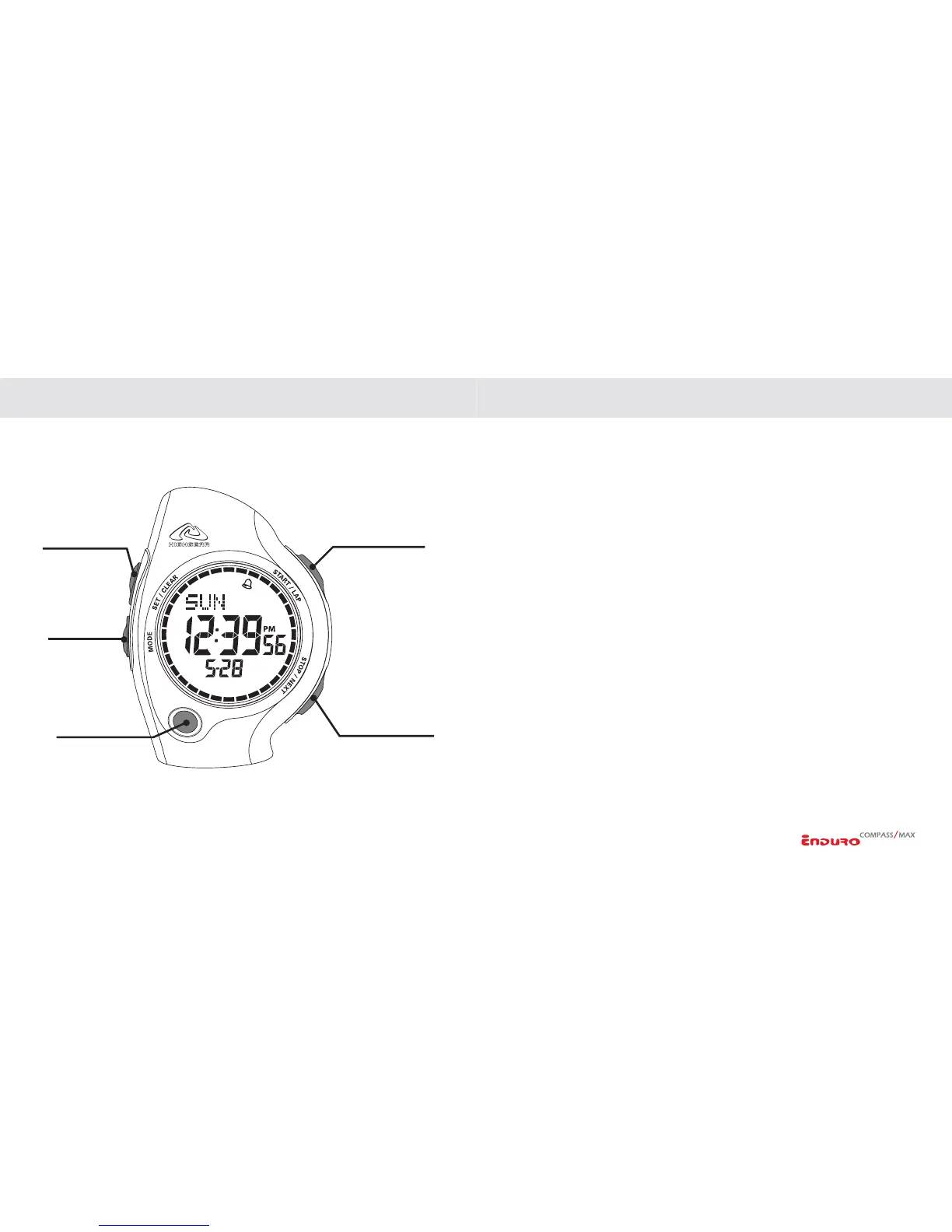
SET/CLEAR KEY
MODE KEY
EL/LIGHT KEY
STOP/NEXT KEY
START/LAP KEY
KEYS AND THEIR FUNCTIONS KEYS AND THEIR FUNCTIONS
The Enduro has 5 individual keys. Each key has several functions. The drawing identifies
the keys and their names as used in this manual.
MODE KEY
- Advances display through the various
operational modes
- Selects variable in setting mode
SET / CLEAR KEY
- Enter/Exit setting sequence for each
function
- Clear Chronograph and memories
- Enter Compass Calibration sequence
(ENDURO COMPASS ONLY)
- Quick Access to Compass when operating
in Chronograph or Timer modes
(ENDURO COMPASS ONLY)
START / LAP KEY
- View/Select Time 1 / Time 2 in Time mode
- Increases variable in Setting sequence
- Start/Lap/Split action in Chronograph
mode
- Starts recall and scrolls through
information in Memory mode
- Starts Timer(s)
- Turns Daily Alarm On/Off
- Activates compass reading in Compass
mode
(ENDURO COMPASS ONLY)
- Selects Key Beep On/Off in Time setting
sequence
STOP / NEXT KEY
- Stops Chronograph
- Stores Chronograph data to memory
- Decreases variable in Setting sequence
- Advances to next data file in Review mode
- Stops Timer
- Activates compass reading in Compass
mode
(ENDURO COMPASS ONLY)
- Scrolls through Daily Alarms
- Selects Key Beep On/Off in Time setting
sequence
EL / LIGHT KEY
- Activates EL/Backlight
- Hold 3 Sec. Activates/deactivates
Automatic Backlight


 To Next Page