English
35
○
Always charge the battery at a temperature of 0°C – 40°C. A temperature of less
than 0°C will result in over charging which is dangerous. The battery cannot be
charged at a temperature higher than 40°C.
The most suitable temperature for charging is that of 20°C – 25°C.
○
Using an exhausted battery will damage the charger.
PRIOR TO OPERATION
Check the work area to make sure that it is clear of debris and clutter.
Clear the area of unnecessary personnel. Ensure that lighting and ventilation is adequate.
HOW TO USE
1. Mounting and dismounting of the bit
(1) Mounting the bit
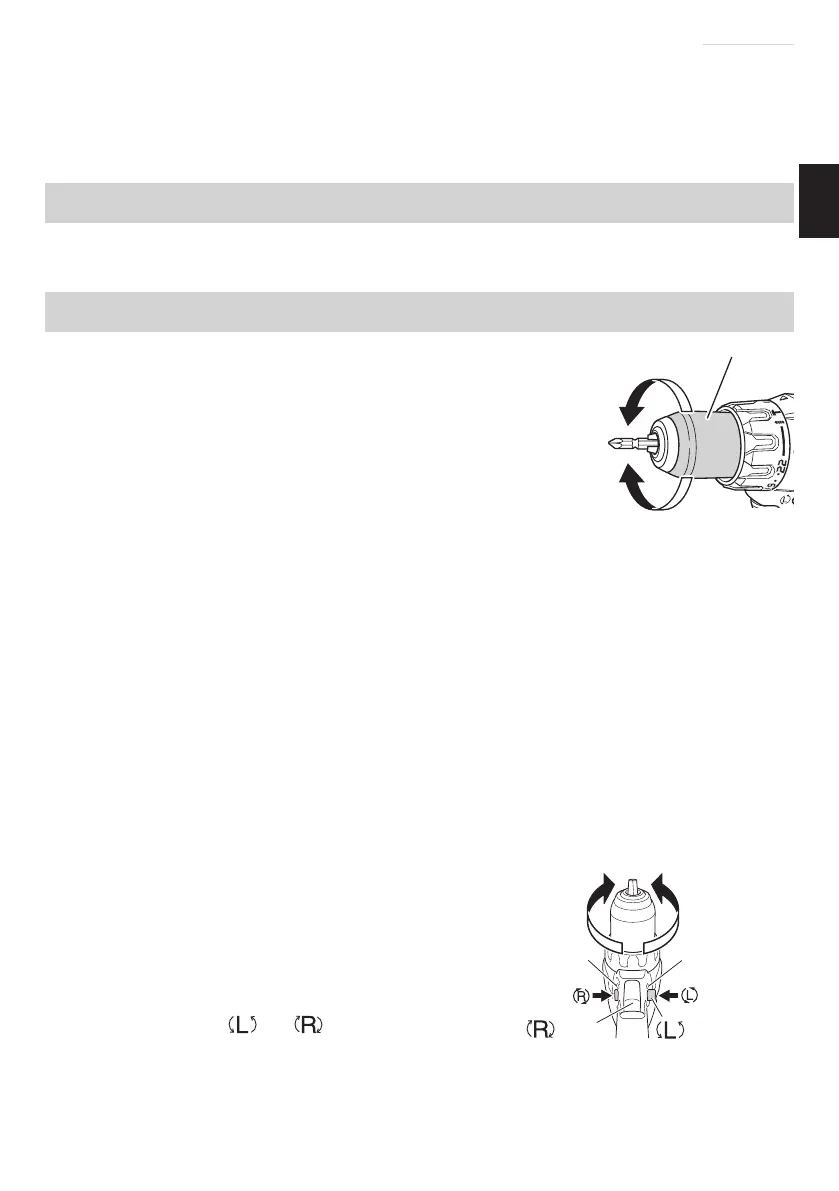
Loosen the sleeve by turning it toward the left (in the
counterclockwise direction as viewed from the front) to open the
clip on the keyless chuck. After inserting a driver bit, etc., into the
keyless drill chuck, and tighten the sleeve by turning it toward the
right (in the clockwise direction as viewed from the front). (See
Fig. 6)
NOTE
If the sleeve becomes loose during operation, tighten it further.
The tightening force becomes stronger when the sleeve is tightened.
(2) Dismounting the bit
Loosen the sleeve by turning it toward the left (in the counterclockwise direction as viewed
from the front), and then take out the bit etc. (See Fig. 6)
NOTE
○
If the sleeve is tightened in a state where the clip of the keyless chuck is opened to a
maximum limit, a click noise may occur. This is the noise that occurs when the loosening of
the keyless chuck is prevented and is not a malfunction.
○
When it is no longer possible to loosen the sleeve, use a vise or similar instrument to
secure the bit. Set the clutch mode between 1 and 11 and then turn the sleeve to the loose
side (left side) while operating the clutch. It should be easy now to loosen the sleeve.
2. Confi rm that the battery is mounted correctly.
3. Check the rotational direction
The bit rotates clockwise (viewed from
the rear side) by pushing the R-side of the
selector button.
The L-side of the selector button is
pushed to turn the bit counterclockwise.
(See Fig. 7) (The
and marks are
provided on the push button.)
CAUTION
The push button cannot be switched while the power tool is turning. To switch the
push button, stop the power tool, then set the push button.
Fig. 6
Sleeve
Tighten
Loosen
Selector buttonTrigger switch
mark mark
Fig. 7
000BookDS14DBSLChS.indb35000BookDS14DBSLChS.indb35 2017/12/088:45:042017/12/088:45:04



 To Next Page