English
36
4. Change rotation speed
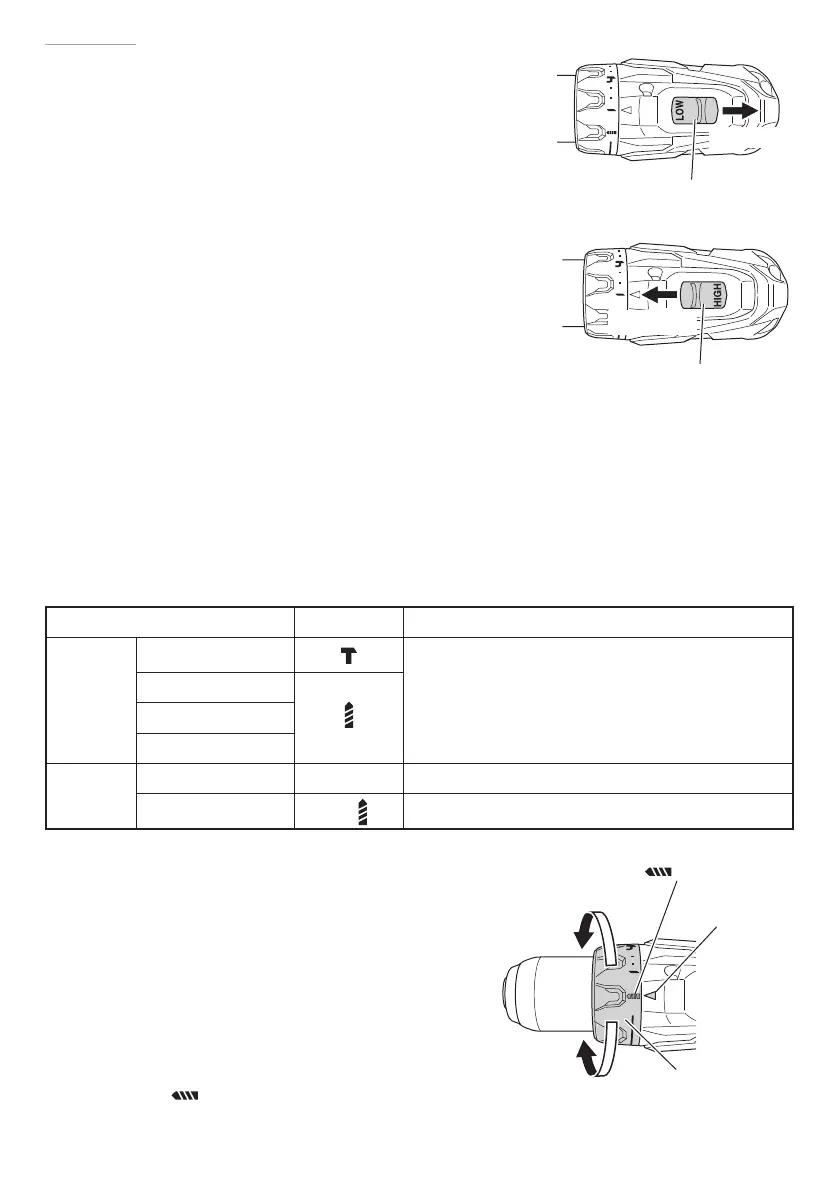
Operate the shift knob to change the rotational speed.
Move the shift knob in the direction of the arrow (See Figs.
8 and 9).
When the shift knob is set to “LOW”, the drill rotates at a
low speed. When set to “HIGH”, the drill rotates at a high
speed.
CAUTION
○
When changing the rotational speed with the shift
knob, confi rm that the switch is off .
Changing the speed while the motor is rotating will
damage the gears.
○
When a large force is required for operation
(operations indicated in the following chart) set
the shift knob to “LOW”. If “HIGH” is set and the
unit is used, it may cause the motor to burn out or
malfunction prematurely.
5. The scope and suggestions for uses
The usable scope for various types of work based on the mechanical structure of this unit is
shown in Table 4.
Table 4
Work Cap position Suggestions
Drilling
Brick (DV18DBSL)
Use for drilling purpose.
Wood
Steel
Aluminum
Screw
tightening
Machine screw 1 – 22 Use the bit or socket matching the screw diameter.
Wood screw
1 –
Use after drilling a pilot hole.
6. Confi rm the clutch dial position (See Fig. 10)
<DS14DBSL / DS18DBSL>
The tightening torque of this unit can be adjusted
according to the clutch dial position, at which the
clutch dial is set.
(1) When using this unit as a screwdriver, line up the
one of the numbers “1, 4, 7 ... 22” on the clutch
dial, or the dots, with the triangle mark on the
outer body.
(2) When using this unit as a drill, align the clutch dial
drill mark “
” with the triangle mark on the outer
body.
Fig. 8
Shift knob
Low speed
Fig. 9
Shift knob
High speed
Fig. 10
mark
Clutch dial
Weak
Strong
Triangle mark
000BookDS14DBSLChS.indb36000BookDS14DBSLChS.indb36 2017/12/088:45:042017/12/088:45:04


 To Next Page