English
37
CAUTION
○
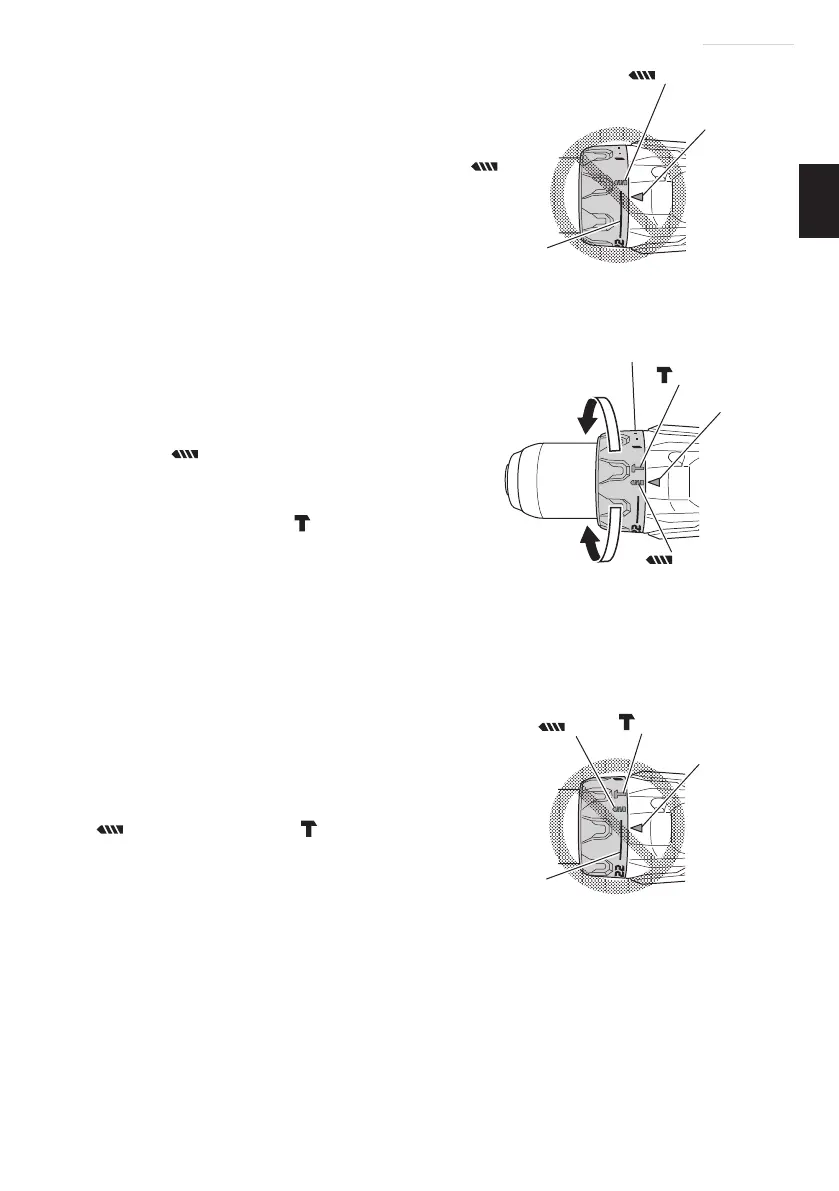
The clutch dial cannot be set between the
numbers “1, 4, 7 ... 22” or the dot.
○
Do not use with the clutch dial set at the line
between the number “22” and the drill mark “
”.
Doing so may cause damage (See Fig. 11).
<DV18DBSL> (See Fig. 12)
The three modes of screwdriver, drill and impact drill
can be switched by the position of the clutch dial in this
unit.
(1) When using this unit as a screwdriver, line up the
one of the numbers “1, 4, 7 ... 22” on the clutch
dial, or the dots, with the triangle mark on the outer
body.
(2) When using this unit as a drill, align the clutch dial
drill mark “
” with the triangle mark on the outer
body.
(3) When using this unit as an impact drill, align the
clutch dial hammer mark “
” with the triangle
mark on the outer body.
CAUTION
○
The clutch dial cannot be set between the
numbers “1, 4, 7 ... 22” or the dot.
○
Do not use with the clutch dial number at “22”
and the line at the middle of the drill mark. Doing
so may cause damage. (See Fig. 13)
7. Rotation to Impact changeover (DV18DBSL)
The “Rotation (Rotation only)” and “Impact (Impact +
Rotation)” can be switched by aligning the drill mark
“
” or the hammer mark “ ” with the triangle mark
on the outer body.
○
To make holes in the metal, wood or plastic, switch to
“Rotation (Rotation only)”.
○
To make holes in bricks or concrete blocks, switch to
“Impact (Impact + Rotation)”.
CAUTION
Do not use the Cordless impact drill in the “Impact” setting if the material can be
bored by rotation only. Such action will not only reduce drill effi ciency, but may
also damage the drill tip.
Fig. 11
Triangle mark
Line
mark
Weak
Strong
mark
Clutch dial
mark
Triangle mark
Fig. 12
Fig. 13
Triangle mark
Line
mark
mark
000BookDS14DBSLChS.indb37000BookDS14DBSLChS.indb37 2017/12/088:45:052017/12/088:45:05


 To Next Page