English
40
13. How to use the LED light
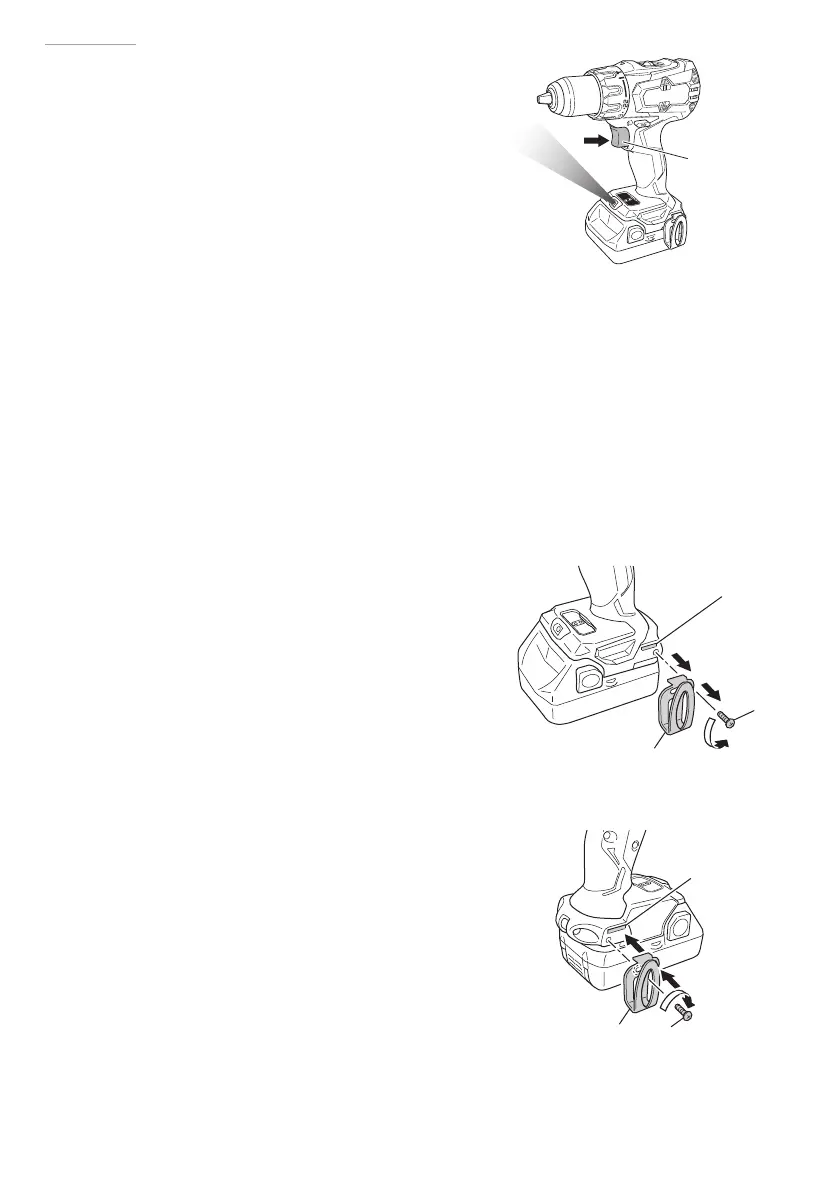
While the switch is pulled, the LED light will
automatically light up the tip portion of the tool.
(Fig. 15)
The LED light will automatically turn off 10
seconds after the switch is released.
The LED light also functions as a warning signal
that lights up during use.
For details, see “15. LED light warning signals”.
CAUTION
○
Do not expose directly your eye to the light
by looking into the light.
If your eye is continuously exposed to the light, your eye will be hurt.
○
Wipe off any dirt or grime attached to the lens of the LED light with a soft cloth,
being careful not to scratch the lens.
Scratches on the lens of the LED light can result in decreased brightness.
14. Using the hook
The hook is used to hang up the power tool to your waist belt while working.
CAUTION
○
When using the hook, hang up the power tool
fi rmly not to drop accidentally.
If the power tool is dropped, it may lead to an
accident.
○
When carrying the power tool with hooked to
your waist belt, do not fi t any bit to the tip of
power tool. If the sharp bit such as drill is fi tted
to the power tool when carrying it with hooked
to your waist belt, you will be injured.
○
Install securely the hook. Unless the hook is
securely installed, it may cause an injury while
using.
(1) Removing the hook.
Remove the screws fi xing the hook with screw driver.
(Fig. 16)
(2) Replacing the hook and tightening the screws.
Install securely the hook in the groove of power tool and
tighten the screws to fi x the hook fi rmly. (Fig. 17)
Switch trigger
Fig. 15
Fig. 16
Screw
Groove
Hook
Screw
Groove
Hook
Fig. 17
000BookDS14DBSLChS.indb40000BookDS14DBSLChS.indb40 2017/12/088:45:062017/12/088:45:06


 To Next Page