
 Need help?
Do you have a question about the HIKVISION DS-3E1106HP-EI and is the answer not in the manual?
This document provides a Quick Start Guide for the Hikvision 100 Mbps Hi-PoE Switch, specifically the DS-3E1XXXHP Series. These switches are Layer 2 Hi-PoE devices designed to offer advanced Power over Ethernet (PoE) capabilities, including an extend mode that supports transmission distances of up to 300 meters. They are built for high-performance access and are suitable for small-scale Local Area Network (LAN) device access. The switches support various management features such as Hi-PoE, client management, network topology management, and port management.
The Hikvision 100 Mbps Hi-PoE Switch serves as a central point for connecting and powering network devices. Its primary function is to provide advanced PoE power supply, enabling connected devices like network cameras, NVRs, or other switches to receive both data and power through a single Ethernet cable. This simplifies installation and reduces cabling requirements, especially in scenarios where power outlets are scarce or inconvenient. The "Hi-PoE" designation indicates enhanced PoE capabilities, which may include higher power budgets per port or specialized power delivery for specific Hikvision Hi-PoE PTZ cameras. The extend mode feature is particularly useful for deployments requiring longer cable runs, pushing the boundaries of standard Ethernet distances.
The switch facilitates network topology management, allowing users to visualize and understand the layout of their connected devices. Port management features enable granular control over individual ports, which can be crucial for optimizing network performance and security. Client management is also supported, suggesting that the switch can interact with and be managed by client software, likely Hikvision's iVMS-4200.
The switch is designed for straightforward installation and operation. It supports both desk-mounted and wall-mounted installations, providing flexibility for different deployment environments. For wall mounting, users need to check the distance between the hanging holes on the rear cover, insert two M4 screws into the wall (ensuring correct spacing and protrusion), and then align and hang the device. Proper ventilation is emphasized, requiring at least 10 cm distance around the device for heat dissipation.
Connecting the switch to other devices is done via standard RJ45 ports using network cables. The switch also features a grounding terminal, which is crucial for protecting the device from lightning-induced overvoltage and overcurrent, thereby enhancing personal safety. Two grounding methods are described: connecting to an existing grounding bar or burying an angle steel or steel pipe into the earth if no grounding bar is available.
Powering on the device involves using the attached power adapter and cord. It is important to ensure that the operating power supply complies with rated input standards, and that all port and grounding cables are correctly connected. A critical caution is provided regarding outdoor cabling, advising the connection of a lightning rod and arrester to the cable. Furthermore, it explicitly states that PoE power supply lines and strong wires should not be wired together to prevent damage to PD equipment or switch ports.
Device management is primarily performed through the iVMS-4200 software. Before devices can be added and managed, they must be activated by creating a password. The activation process involves entering the Device Management page, selecting the inactive device from the online device list, and then setting a strong password. The software also allows for adding devices, either individually or in batches, by specifying the device name, IP address, port number, and user name. The option to synchronize device time with the PC running the client is also available during the adding process.
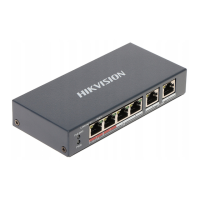
The front panel of the switch features several indicators:
The switch includes both Hi-PoE ports, specifically designed for Hi-PoE PTZ cameras (with varying max power depending on temperature), and standard PoE ports for general PD devices. Gigabit RJ45 ports are also available for uplink connections. A reset button on the rear panel allows users to restore all switch configurations to default settings.
The manual emphasizes several safety instructions and cautions that contribute to the longevity and safe operation of the device. It highlights that the product is Class A and may cause radio interference, requiring users to take adequate measures. Electrical safety regulations of the nation and region must be strictly followed. The socket-outlet should be easily accessible and the device must be connected to an earthed mains socket-outlet.
Regarding battery safety (if applicable), the manual warns against incorrect battery replacement, disposal into fire or hot ovens, mechanical crushing, exposure to high or low temperatures, and advises proper disposal of used batteries according to instructions.
For operational safety, it notes that the device has double pole/neutral fusing, meaning parts may remain energized after fuse operation. It is suitable for mounting on concrete or other non-combustible surfaces. Proper ventilation is critical, and openings should never be blocked. No naked flame sources should be placed on the device, and it should not be exposed to dripping or splashing liquids. Users are advised to wait half an hour after switching off before handling the cover area to avoid burns.
The importance of strong passwords is stressed for security, recommending a minimum of 8 characters including at least three kinds of categories (upper case, lower case, numbers, and special characters). Regular password changes are also advised, especially in high-security systems. The responsibility for proper configuration of passwords and other security settings lies with the installer and/or end-user.
The manual also provides guidance on obtaining more information, directing users to scan a QR code for iVMS-4200 software operations, implying that the software itself will offer further maintenance and configuration options. The reset button on the rear panel serves as a direct maintenance feature, allowing for a quick return to factory defaults if configuration issues arise.
 General
| PoE Standard | IEEE 802.3af/at |
|---|---|
| PoE Power Budget | 60 W |
| Power Supply | AC 100-240V, 50/60Hz |
| Operating Temperature | 0°C to 40°C |
| Ports | 6 |







 To Next Page