The DS-K1108A Series Card Reader is a high-performance access control device designed for secure and reliable card reading. It features a 32-bit high-speed processor, enabling efficient communication with access controllers via either RS-485 or Wiegand protocols. The device is built with a tamper-proof module to protect against malicious damage, ensuring enhanced security. Its physical construction utilizes PC+ABS material, providing water and dust resistance, making it suitable for use in various environments.
Key Features and Specifications:
- Processor: 32-bit high-speed processor.
- Communication Protocols: Supports RS-485 and Wiegand protocols for flexible integration with access control systems.
- Tamper-Proof: Includes a built-in tamper-proof module for enhanced security against physical tampering.
- Material: Constructed from PC+ABS material, offering water and dust resistance.
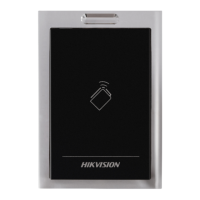
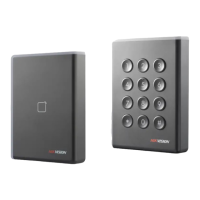
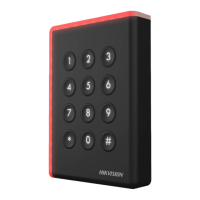
- Models: Available in several models, including DS-K1108AE, DS-K1108AEK, DS-K1108AM, and DS-K1108AMK. Some models may include a keypad for additional input.
- Power Supply: Designed to be powered by an external 12 VDC power supply (range: -10% to +10%), which should be non-switched and linear. If powered by the controller, the power supply distance is recommended to be no longer than 100m.
- Card Security: Supports M1 card encryption function (configurable via DIP switch) and can disable door opening via NFC card for enhanced security. It can also be configured to read card numbers and enable door opening via NFC card.
- Wiegand Protocol Options: When Wiegand protocol is selected, it can be configured for 26-bit or 34-bit Wiegand protocols.
- RS-485 Address: Configurable RS-485 address using DIP switches (1 to 4).
- Matched Resistance: An option to enable matched resistance for RS-485 protocol, configurable via DIP switch.
- LED Indicator: Provides visual feedback on device status, including power-on, valid/invalid operations, and communication status.
- Sound Prompts: Emits various sound prompts for different operations and events, such as card presentation, key presses, authentication status, and alarms.
Installation and Wiring:
The card reader's rear view reveals a DIP switch, a debugging port, and wiring terminals. Proper installation involves setting the DIP switches according to the desired communication mode (RS-485 or Wiegand) and other functionalities.
-
DIP Switch Configuration:
- Switches 1-4: Used to set the RS-485 address.
- Switch 5: Configures card security (M1 card encryption, NFC door open/read card No.). For DS-K1108AE/AEK models, this DIP switch is reserved.
- Switch 6: Selects between Wiegand protocol (1) and RS-485 protocol (0).
- Switch 7: When Wiegand protocol is selected (Switch 6 is 1), this switch determines the Wiegand protocol type (26-bit for 1, 34-bit for 0).
- Switch 8: Enables (1) or disables (0) matched resistance for RS-485 protocol.
-
Cable Description: The device uses 10 cables with specific functions:
- Orange: Wiegand ERR (available for Wiegand protocol)
- Brown: Wiegand OK (available for Wiegand protocol)
- White: Wiegand W1 (available for Wiegand protocol)
- Green: Wiegand W0 (available for Wiegand protocol)
- Blue: RS-485-
- Yellow: RS-485+
- Red: PWR (+12 VDC)
- Black: GND
- Gray: TAMPER Control
- Purple: Beep Control (available for Wiegand protocol)
-
RS-485 Communication Mode Wiring:
- Set DIP switch No. 6 to 0.
- Set DIP switches No. 1-5 for RS-485 address and reading card mode.
- Connect Yellow (RS485+), Blue (RS485-), Black (GND), and Red (PWR) cables to the corresponding terminals on the controller.
-
Wiegand Communication Mode Wiring:
- Set DIP switch No. 6 to 1.
- Set DIP switches No. 5 and 7 for reading card mode and Wiegand protocol.
- Connect Black (GND), Red (PWR), Green (W0), White (W1), Purple (Beep), Orange (Red LED), Brown (Green LED), and Gray (Tamper) cables to the corresponding terminals on the controller.
Usage Features:
- Card Presentation: The primary method of access, where a card is presented to the reader.
- Keypad Input (for models with keypad): Allows for PIN entry or other numerical inputs.
- Authentication Modes: Supports multiple authentication modes, including Card Only, Card + Password (where the LED flashes green prompting for password after card presentation), and potentially others depending on controller integration.
- Sound Prompts:
- One Beep: Indicates presenting card, pressing keys, pressing key too long, time out, or prompt for password entry after card presentation.
- Two Rapid Beeps: Indicates valid operation of pressing keys or swiping card.
- Three Slow Beeps: Indicates invalid operation of pressing keys or swiping card.
- Rapidly Continuous Beeps: Indicates tamper-proof alarm.
- Slowly Continuous Beeps: Indicates buzzer alarm or that the card reader is unencrypted.
- LED Indicator Status:
- Flashing Green (1 time) then Flashing Red (3 times): Power on.
- Flashing Green: Prompt for password entry (Card + Password authentication).
- Solid Green (2 seconds): Valid operation of pressing keys or presenting card.
- Solid Red: Card reader is working normally.
- Flashing Red (3 times): Invalid operation of pressing keys or presenting card.
- Flashing Red: For RS-485 protocol, indicates registering failed or card reader is offline.
Maintenance and Preventive Tips:
- Power Supply: Ensure the card reader is powered by a 12 VDC non-switched and linear power supply. If powered by the controller, keep the distance under 100m.
- Cabling: Use RVVP cable above 0.5 for communication between the controller and card reader to ensure proper communication. For long-distance transmission, connect the shield of the cable to the GND of both controller and card reader terminals to reduce noise.
- Environmental Protection: If installed outdoors or in environments prone to moisture, install a waterproof shield.
- Installation Distance: When installing multiple card readers, maintain a distance of over 30 cm between them.
- Physical Handling: Avoid dropping the device or subjecting it to physical shock. Do not expose it to high electromagnetism radiation or install it on vibrating surfaces.
- Environmental Conditions: Do not place the device in extremely hot, cold, dusty, or damp locations. Avoid direct sunlight, low ventilation, or heat sources like heaters or radiators, as this can cause fire danger or affect sensor endurance.
- Cleaning: Use the provided glove when opening the device cover to avoid direct contact, as acidic sweat can erode the surface coating. Clean internal and external surfaces with a soft, dry cloth; do not use alkaline detergents.
- Packaging: Retain all original packaging for future use, especially for returns or repairs, to prevent damage during transportation.
- Battery: Improper use or replacement of the battery may lead to an explosion hazard. Replace only with the same or equivalent type and dispose of used batteries according to manufacturer instructions.
- Card Management: Take care of your card and report loss promptly.
- Security: For higher security, utilize multiple authentication modes.
- Card Type Selection: Choose an appropriate card type based on card performance and usage scenarios, as multiple card types are supported.
- Troubleshooting: If smoke, odors, or noise occur, immediately turn off the power and unplug the cable, then contact the service center. Do not attempt to disassemble the device yourself, as unauthorized repair voids responsibility.

 Need help?
 General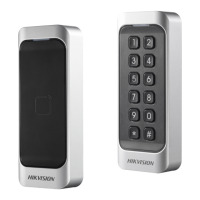


 To Next Page