Part 3 - Conguration
59
Select Save after making changes to register the NVR's
name to the FEN server.
If FEN has been congured correctly, the FEN server's
help desk information will be displayed in the Help
Desk eld the next time you access the FEN Setup
screen.
Notication Setup
Schedule
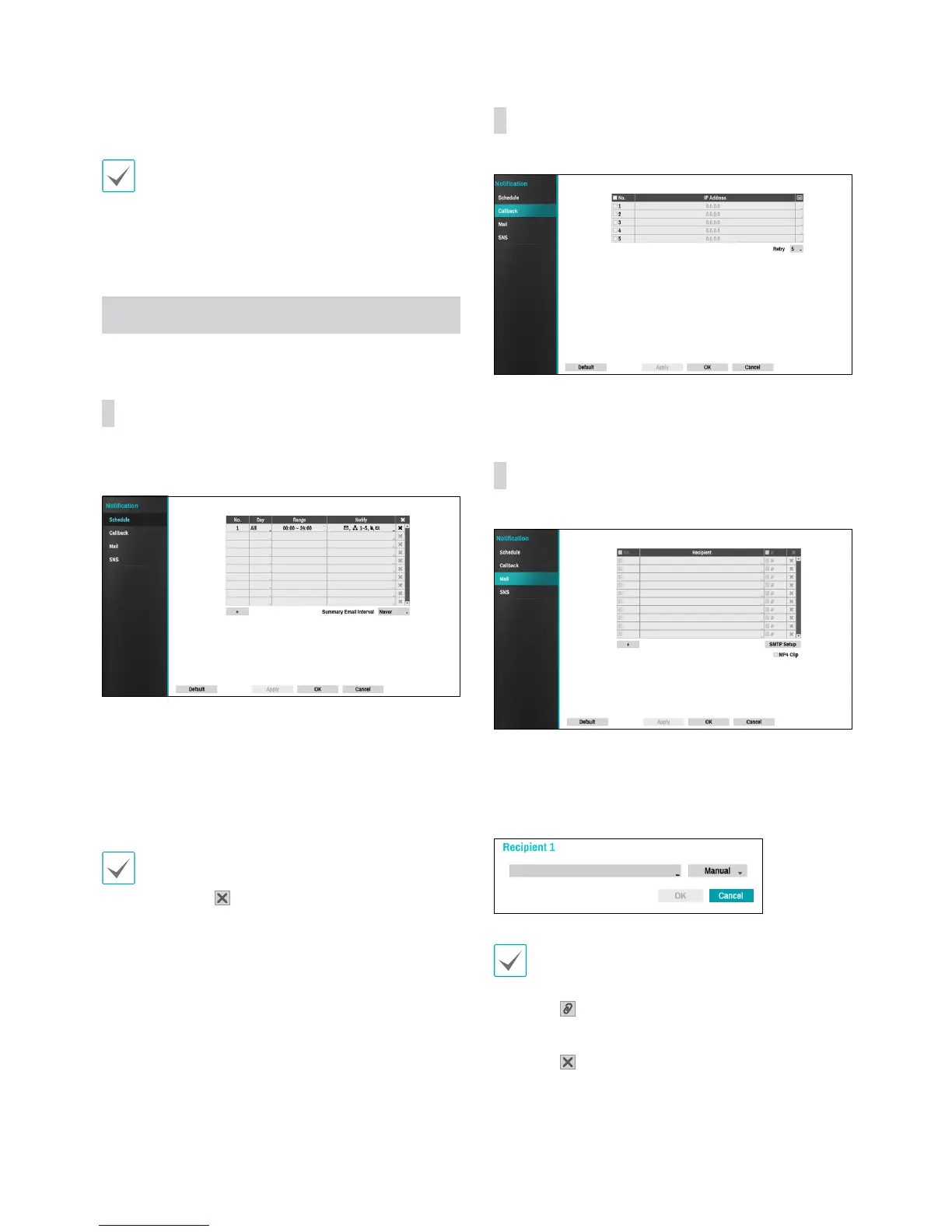
Select the + icon at the lower left corner of the screen to
add a notication schedule.
• Day: Add dierent schedules for dierent days of the
week.
• Range: Change the event notication time frame.
• Notify: Select which notications to generate when
an event occurs. Select Mail, LAN 1 through 5, SNS,
and/or Alert Window.
• In order to use the Notication (Callback) feature,
the NVR must be registered on the remote program.
• Select the
icon to delete the existing schedule.
• Summary Email Interval: Transmit event summary
emails to a remote destination at specied intervals.
Callback
Congure Callback settings.
Enter the IP address of the receiving server and set
Retry to between 1 and 10 in case of connection failure.
Mail
Congure Mail settings.
Select the + icon at the bottom left corner of the screen
to add a mail account.
Select Recipient and then enter the mail address and
server information.
The recipient's mail address must be in the correct
email format and contain the @ symbol.
Select the icon to attach event recordings to
outgoing mails.
Select the
icon to delete the account.Select MP4 Clip
to attach event recordings to outgoing mails.


 To Next Page