Turns the media player ON or OFF.
They are reserved buttons with different functions in different menus, e.g.
Using Green button can bring up operation menu in media library menu.
Ejects the disc of a CD/DVD/BD-ROM drive attached to the media player.
Turns ON or OFF the VFD light on the front panel of the media player.
Sets the time period for auto-power-off.
Switches to the Setup Menu directly for changing system settings.
Switches among NTSC, PAL, 480p, 576p, 720p50/60Hz, 1080i50/60Hz and
1080p50/60Hz video output modes.
Switches among 16:9, 4:3 Letter Box and 4:3 Pan Scan aspect ratios.
Bring up Bookmark list to play the video from the position where the playback
was stopped last time.
Zoom in/out the playing photo or video
Available photo zoom scales: 2x, 4x, 8x and 16x.
Available video zoom scales: 1x, 2x, 3x, 4x and 8x.
Switches repeat option among Chapter, Title or Offset.
Enter MOVIE library.
Enter MUSIC library.
Enter PHOTO library.
Switches among audio tracks.
Switches among subtitle tracks.
Press to mute audio output, and press again to resume.
It is a multifunction button with different functions in different menus.
In Movies, Music, Photo or File Manager mode, press MENU to show
options.
When playing movies, music or photo, press MENU to show the playback
menu.
When playing DVD/BD media files, press MENU to show DVD/BDMV
navigation menu, subtitle setup menu, TV output resolution menu etc.
Increases or decreases the volume.
Switches to Main Menu
Returns to the previous menu.
Turns off the subtitle, audio track and time seek menu when playing movie.
Navigates and high-lightens menu items or media files.
Confirms the selection or start to playback
Displays the media file information such as the title, format, and so on.
During video playback, shows the search operation menu.
In the media library mode, shows the file searching menu.
In the WIFI setup menu, re-scan the wireless network.
Changes page in file browser.
Jumps to the previous/next chapter during BD/DVD playback
Plays the previous/next file during file playback,.
Jumps to the previous/next picture in photo slide show.
Enter HIMEDIA online video service
Fast rewinds the current playback.
Presses repeatedly to switch among different fast rewind speeds.
Plays the selected item.
Pauses/Resumes the current playback.
Stop the current playback
Fast forwards the current playback.
Presses repeatedly to switch among different fast forward speeds.
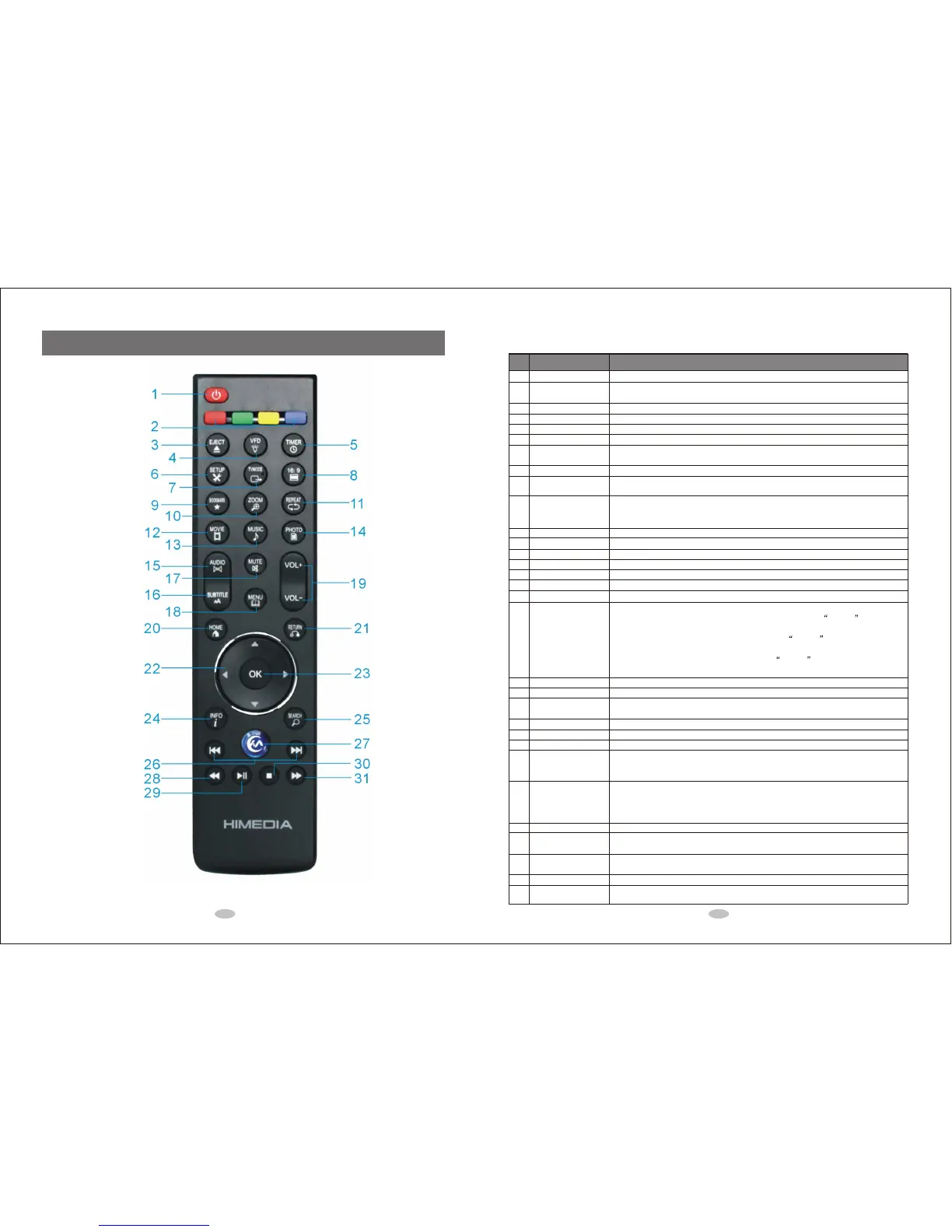
POWER
COLOR buttons
EJECT
VFD
TIMER
SETUP
TV MODE
16:9
BOOKMARK
ZOOM
REPEAT
MOVIE
MUSIC
PHOTO
AUDIO
SUBTITLE
MUTE
MENU
VOL+/VOL-
HOME
RETURN
Directional Keypad
OK
INFO
SEARCH
PAGE UP/PAGE
DOWN
Internet Media Service (IMS)
RWD
PLAY
STOP
Forward
1
2
3
4
5
6
7
8
9
10
11
12
13
14
15
16
17
18
19
20
21
22
23
24
25
26
27
28
29
30
31
Seq. Button Description
2.2 Remote Control Overview
2.0 Remote Control
2.1 Picture
5 6



 To Next Page