WARNING: To reduce the risk of personal injury, do not bend the
blades while installing, balancing the blades, or cleaning the fan.
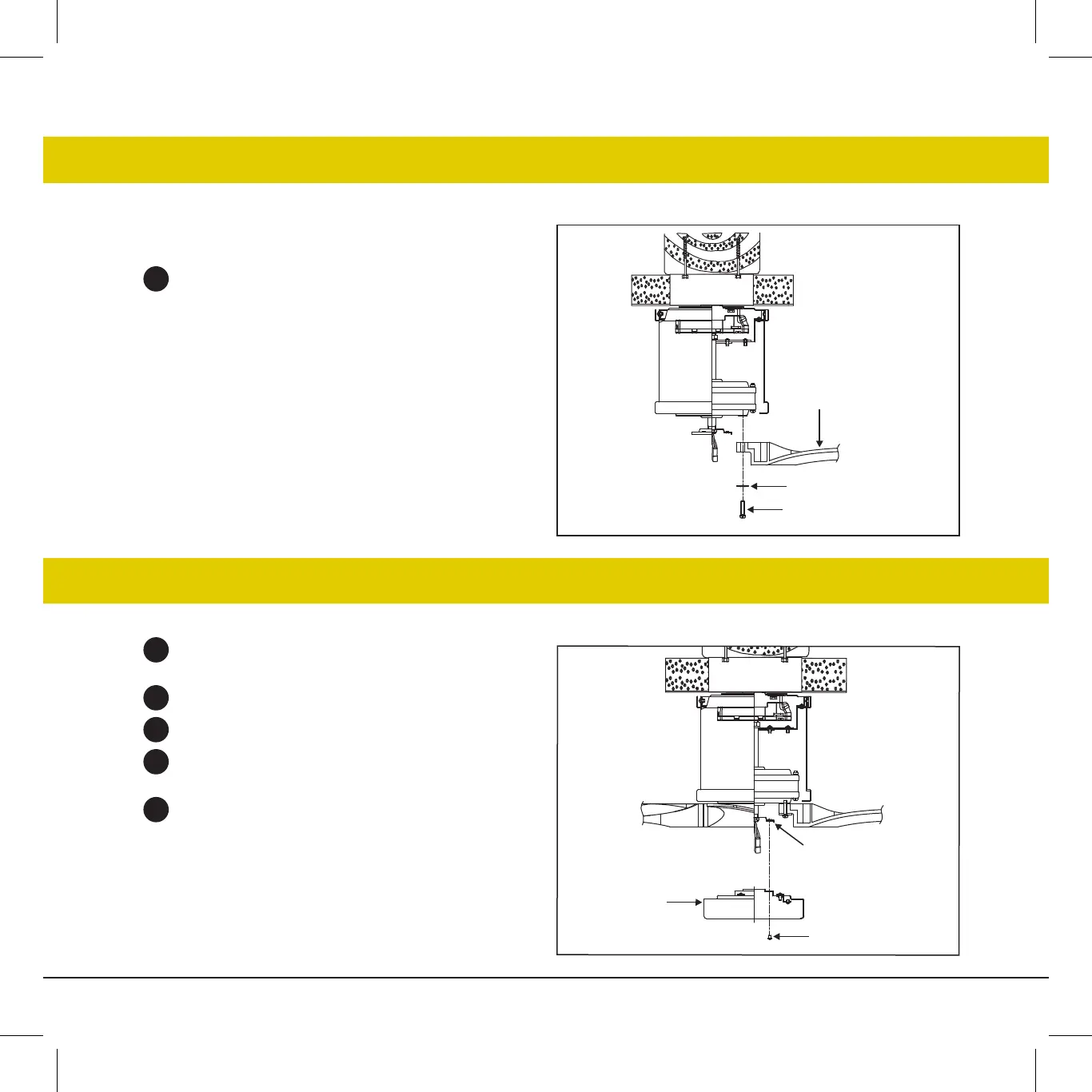
Fasten blade to motor with provided blade support plates
and screws. Repeat procedure for remaining blades. Make
sure screws are TIGHT! Loose motor screws can contribute
to unnecessary hum during operation.
INSTALLATION OF THE BLADES
INSTALLING THE ADAPTER PLATE
©2021 Hinkley Lighting, Inc.
|
hinkley.com
|
09
1
2
3
4
5
Remove one of the three screws on the mounting hub
located on the fan motor.
Loosen the other two screws.
Install adapter plate to mounting hub.
Line up the two slotted holes with the two loose screws on
the mounting hub located on fan motor.
Re-install the third screw removed and tighten all three.
1
Fig. 1
Fig. 1
Screws
Blade support plates
Blades
Mounting hub
Screws
Adapter plate



 To Next Page