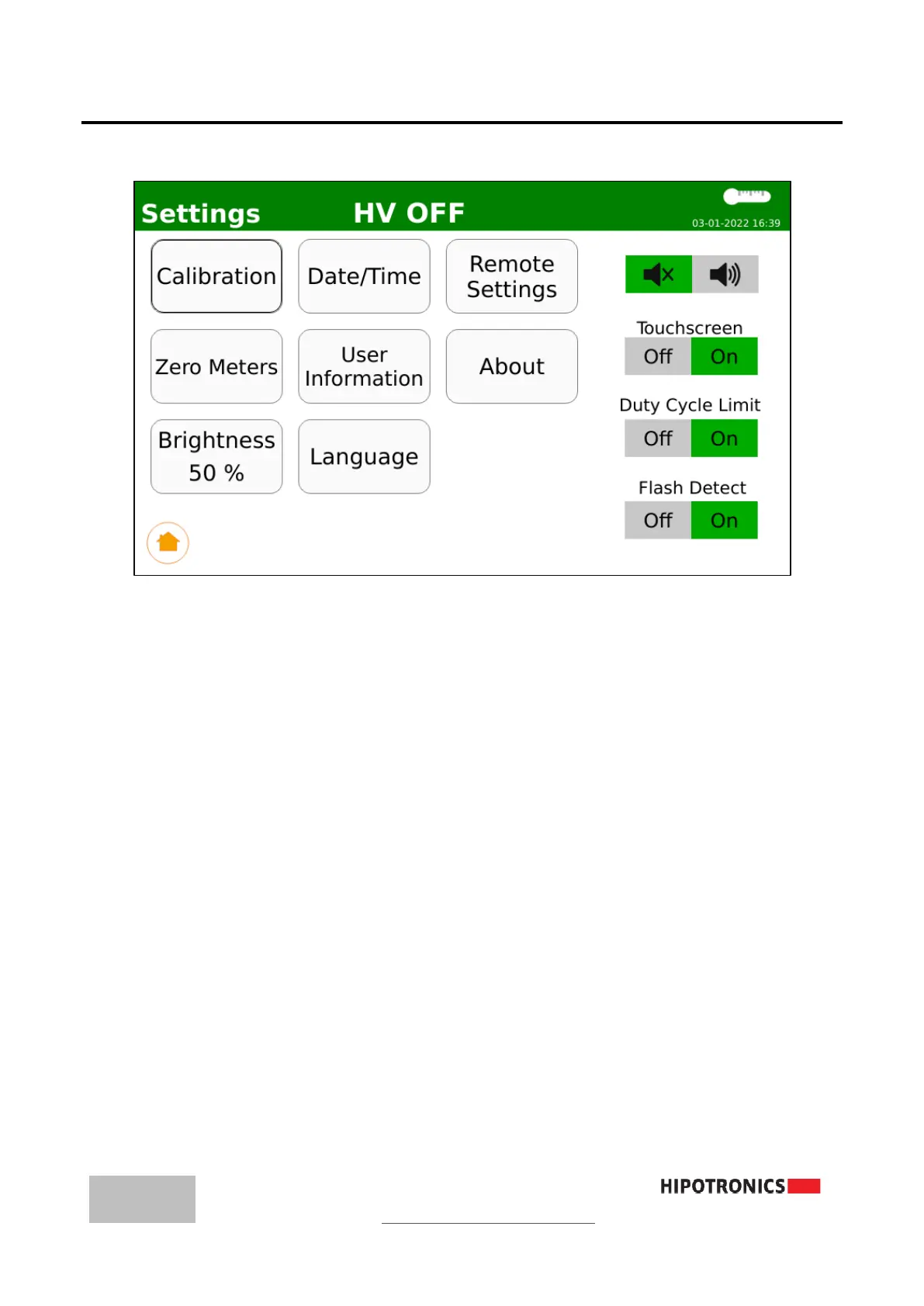
6.3 Settings
Calibration: To proceed to the Calibration menu, a prompt will appear for a passcode.
Please contact Hipotronics for this information.
Zero Meters: Tare the voltage and current meters. Please make sure nothing is connected
to the output cable and return port when this button is pressed.
Brightness: Adjust the screen brightness level
Date/Time: Edit the system date and time
User Information: Enter any identifier information for this particular unit
Language: Select the system display language
Remote Settings: Configure the WiFi-Direct settings to connect to HIPODirect
About: Unit Specific Information
Buzzer Audio: Select to disable/enable the internal buzzer which will beep while High
Votlage is on.
Touchscreen: Select to disable/enable the touchscreen. If disabled, the unit will only be
operable via the encoder knob.
Duty Cycle Limit: Select to enable the feature that automatically ends a test once the rated
duty cycle limit has been reached. It is highly recommended that this feature remains on for
the protection and longevity of the unit.
Flash Detect: Select to enable the feature that automatically ends a test once a flashover
or DUT failure is detected. It is highly recommended that this feature remains enabled for
the protection and longevity of the unit.



 To Next Page