9
Remote Control
1
3
6
7
2
4
5
8
9
1
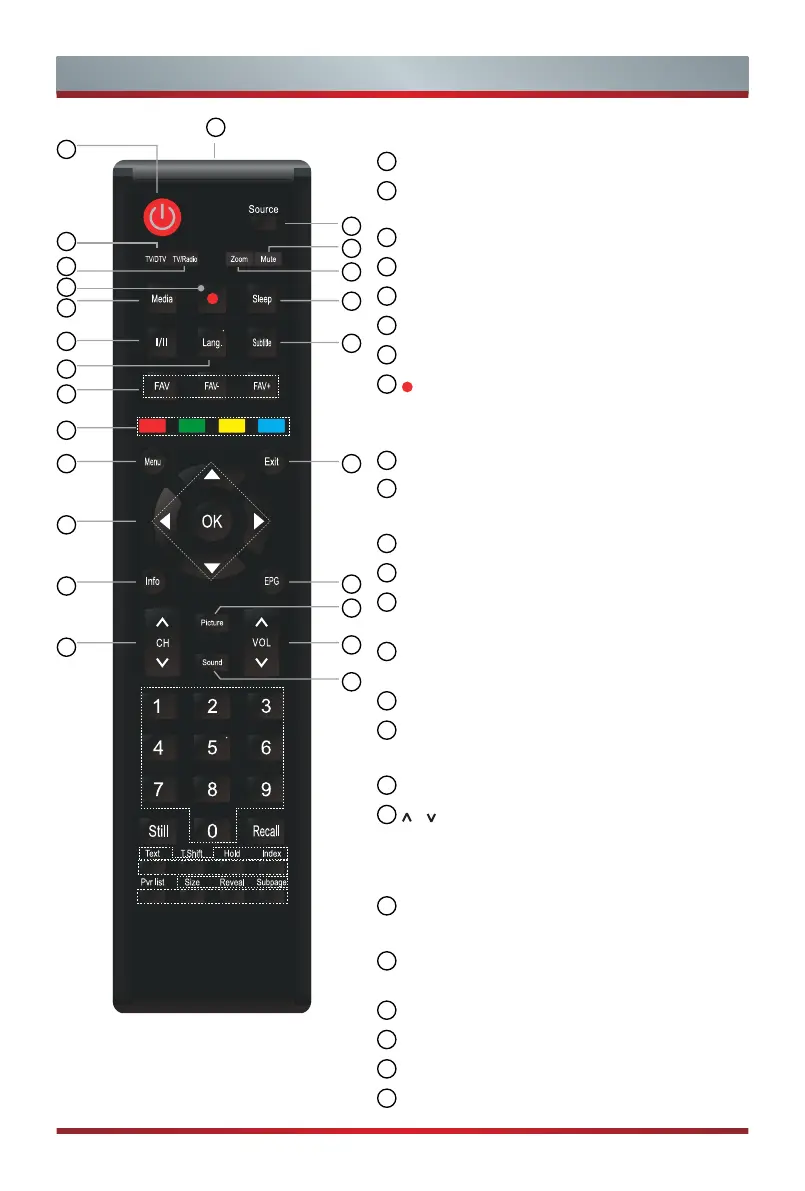
Remote sensor window
2
POWER: Switch the TV on or into standby
mode
3
Source: Select input sources
4
TV/DTV: Enter the TV/DTV source
5
TV/Radio: Enter the TV/Radio source
6
Mute: Mute or restore the TV sound
7
Zoom: Select the screen aspect ratio
8
: Start recording
NOTE: The information here will vary depending
on the remote control model
.
9
Media: Enter USB-Digital media player mode
10
Sleep: Set TV sleep time to turn off
automatically at appointed time
11
I/II: Select Stereo or Mono in ATV mode
12
Lang.: Select audio Language
13
Subtitle: Activate or deactivate the subtitle
mode
14
FAV/FAV-/FAV+: Fast access to favorite
program that you saved
15
Special function buttons
16
Menu: Display the quick setup menu/returns
to the previous menu
17
Exit: Exit the menu
18
/ / < / >/
OK: Allows you to navigate the
OSD menus and adjust the system settings to
your preference/Confirm the selection in the
OSD menus
19
Info: Display the current program
information
20
EPG: Display the Electronic Program Guide (DTV
mode)
21
CH
+
/
-
: Switch channel
22
Picture: Fast access to picture setting menu
23
VOL
+
/
-
: Adjust the volume
24
Sound: Fast access to sound setting menu
10
11
12
14
15
16
18
19
21
13
17
20
22
23
24



 To Next Page