2
Installing the Stand or Wall mount bracket
Base Stand
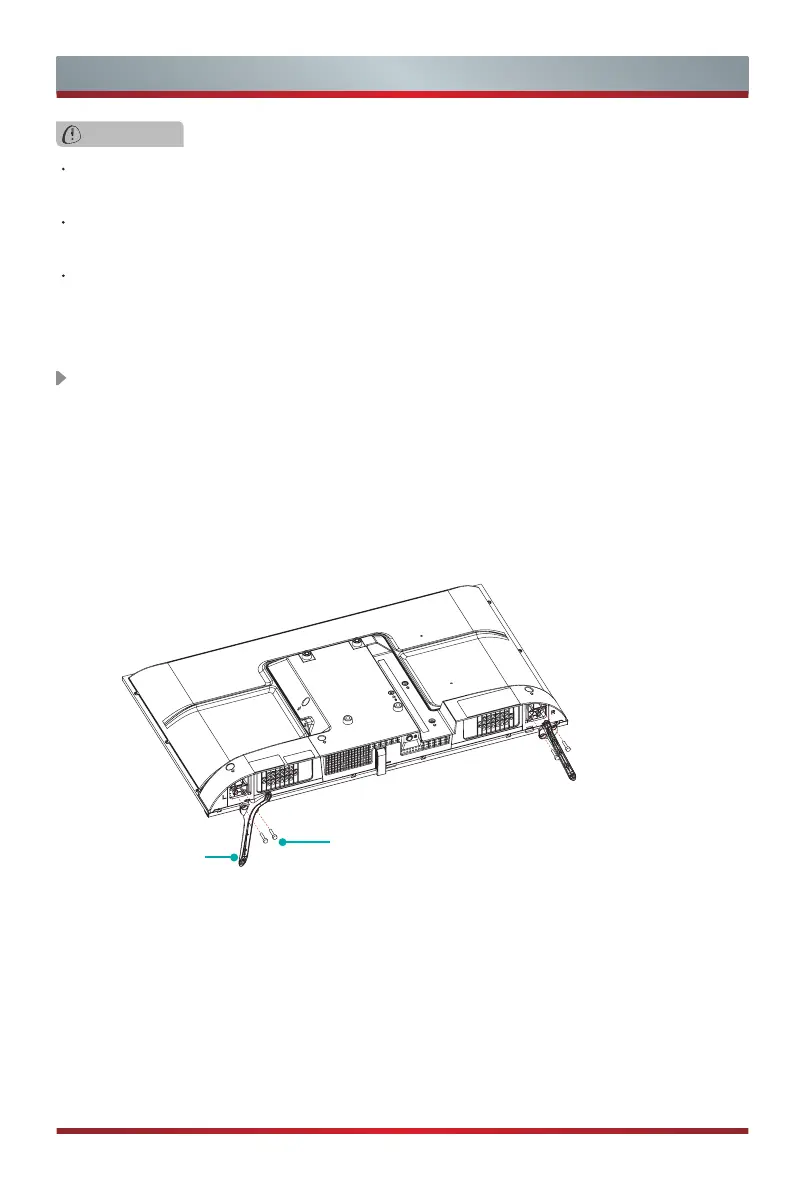
Screws:
(ST4 x 14F) x 4 (32")
(ST4 x 20F) x 4 (40")
CAUTION
Be sure to disconnect the A/C power cord before installing a stand or wall mount
brackets.
The display on your TV is fragile. Make sure the TV screen is not scratched or
damaged by hard objects or from pressure.
After the installation is complete, make sure the TV is steady on a table or firmly
attached to a wall mount, before removing all protective film, if any.
Follow the illustrations and textual instructions below to complete the installation steps:
1. Carefully place your TV face-down on a soft, flat surface to prevent damage to the
TV or scratching to the screen.
2. Remove the Base Stand from the accessory bag and then insert the stands into the
bottom slots of the TV.
3. Secure the Base Stand to the TV with the screws in accessory tightly.
Installing the Stand



 To Next Page