11
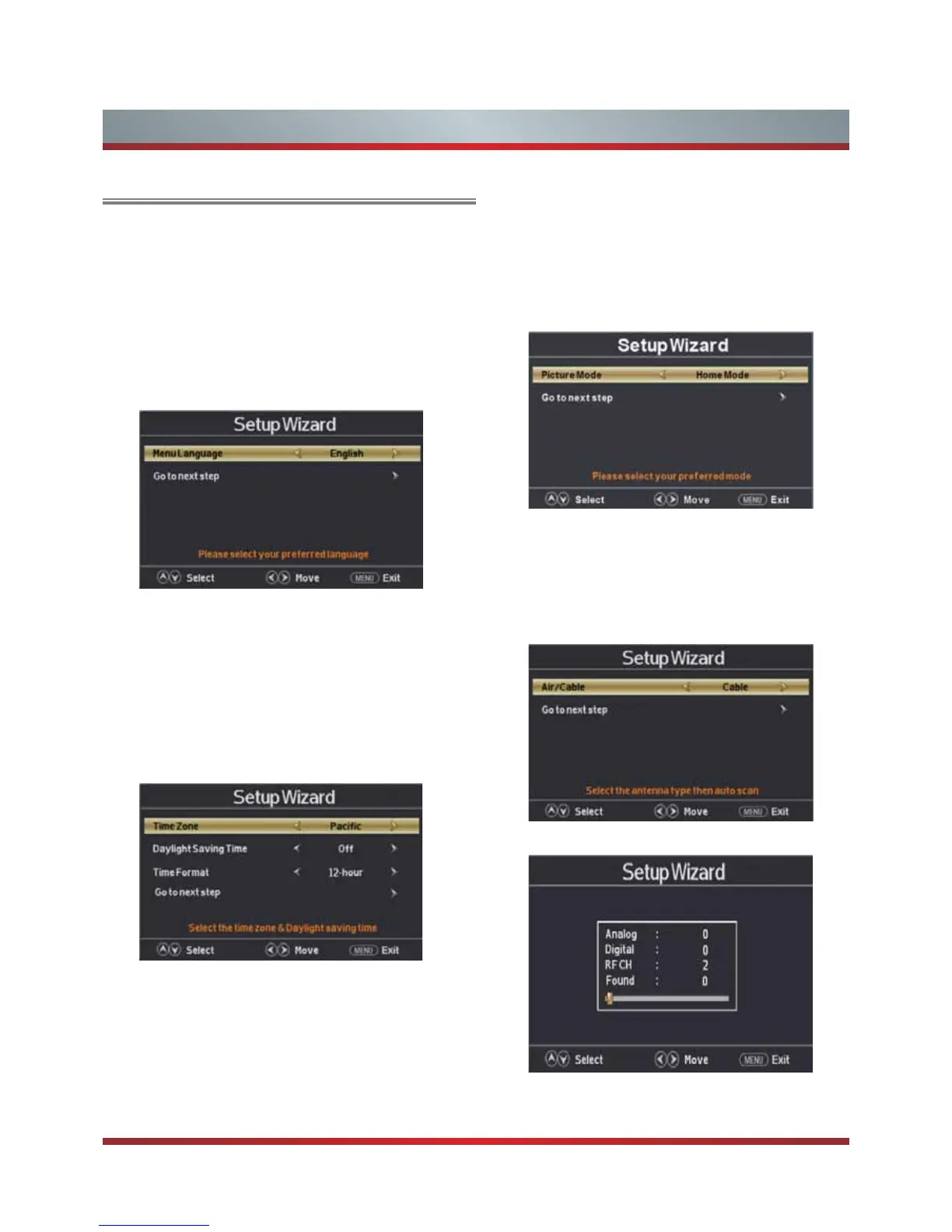
Auto Scan
Press ◄ / ► button on the remote control to select the
antenna type,Air or Cable.
Press ▼ / ▲ button on the remote control to select go to
next step and press OK /► button to start auto scan.
Basic Features
Turning your TV for the First Time
The Initial Setup menu appears the first time you turn on the
TV. It will assist you to specify the Energy Saving mode.
Connect your TV’s power cord to a power outlet, then press
power. The Initial Setup screen opens.
Select Language
Press ◄ / ► button on the remote control to select the
language to be used for menus and message.
Press ▼ / ▲ button on the remote control to select go to
next step and press OK /► button to go.
Select Time
Press ▼ / ▲ button on the remote control to select the time
zone, daylight saving time and time format you want to.
Press ◄ / ► button on the remote control to adjust.
Press ▼ / ▲ button on the remote control to select go to
next step and press OK /► button to go.
Press ◄ / ►button on the remote control to select Home
Mode or Retail Mode.
Press ▼ / ▲ button on the remote control to select go to
next step and press OK / ► button to go.
Select Picture Mode



 To Next Page