15
Basic Features
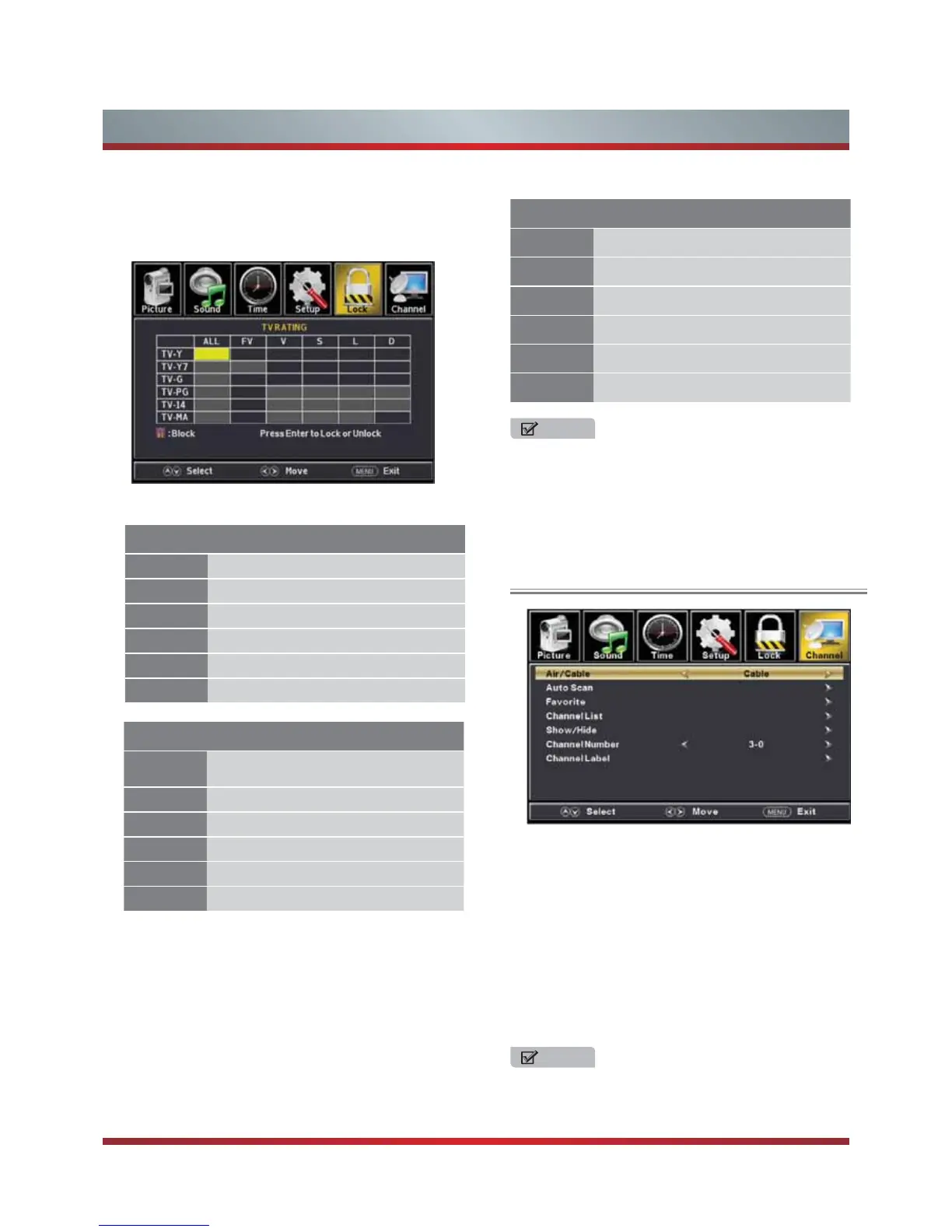
For the United States, the rating setting basically include
the following options: TV, MPAA.
TV - The TV rating compose of two aspects: age-based
and content-based.
U.S. TV Ratings
Age Defined as
TV-Y All children
TV-Y7 Directed to older children
TV-G General audience
TV-PG Parental Guidance suggested
TV-14 Parents Strongly cautioned
TV-MA Mature Audience only
MPAA - This system defines the rating control which come
from MPAA rules
Contents Defined as
A
All of the ratings below that rating set
blocked automatically
D Suggestive dialogue
L Strong language
S Sexual situations
V Violence
FV Fantasy Violence
Rating Defined as
G General audience
PG Parental Guidance suggested
PG-13 Parents strongly cautioned
R Restricted
NC-17 No one 17 and under admitted
X Adult audience only
U.S. Movie Ratings
Using the Channel Menu
You can adjust:
Air/Cable - Select signal type.
Auto Scan - Automatically search for channels.
Favorites - Add channels to create a favorite list.
Show/Hide - Show or hide the channels in your program list.
Channel No. - Show the channel number.
Channel Label - Create label for channel,up to 7 characters.
DTV Signal - Display signal strength of selected digital
channels.Only DTV channel is available.
NOTE
When the input sonrce is AV / COMPONENT / HDMI /
VGA/ MEDIA, the CHANNEL MENU is unavailable.
NOTE
The content ratings will increase depending on the level
of the age-based rating. For example, a program with a
TV-PG V rating may contain moderate violence, while a
TV-14 V rating may contain intense violence. So locking
a higher level option will automatically cause locking the
options that has more sensitive level.



 To Next Page