Trouble
Analysis
A sound of flowing water
Caused by the flow of refrigerant in
the air conditioner, not a trouble.
Defrosting sound in heating mode.
Cracking sound is heard
The sound may be generated by the
expansion or contraction of the front
panel due to change of temperature.
Spray mist from the outlet
Mist appears when the room air
becomes very cold because of cool air
discharged from indoor unit during
COOLING or DRY operation mode.
The compressor indicator
(red) lights on constantly,
and indoor fan stops.
The fresh air function fails
to start
The unit is shifting from heating mode
to defrost.The indicator will lights off
within ten minutes andreturns to
heating mode.
The reason may be that the sealing
bag of the purification filter element is
not removed (to ensure the effect of
the filter element, the purification filter
element is packed in a sealed plastic
bag when delivered). In this case,
please carry out check and remove
the sealing bag of the purification filter
element.
1. The outdoor temperature is too low.
This is normal. To prevent the fresh air
function from greatly reducing the
indoor temperature when the outdoor
temperature is too low, the fresh air
function is forced not to start. After the
outdoor temperature reaches the
standard, the fresh air function will
start automatically (if you do not desire
the fresh air function to start
automatically, please disable the fresh
air function manually).
2. The air conditioner is malfunctioning.
Contact with after-sales personnel for
inspection and maintenance.
The symbols may be different from these models, but the functions are similar.
Example:
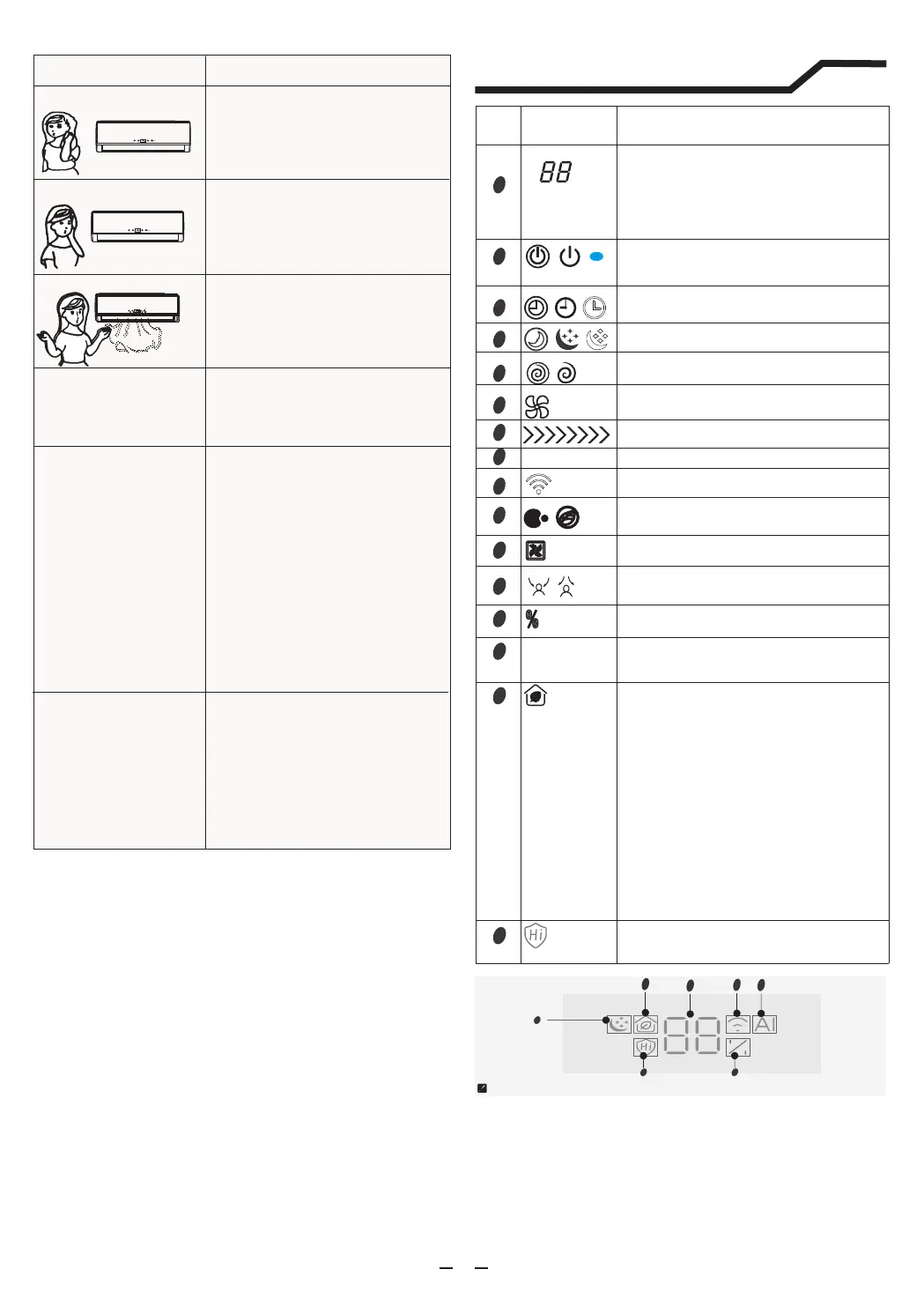
Display introduction
7
9
11
12
13
14
15
16
1
5
8
6
3
4
10
2
Temperature indicator
It shows FC after 200 hours of usage as
reminder to clean the filter.After filter cleaning
press the filter reset button located on the
indoor unit behind the front panel in order to
reset the display.(optional)
Display set temperature.
Running indicator
It lights up when the AC is running.
It flashes during defrosting.
Timer indicator
It lights up during set time.
Sleep indicator
It lights up in sleep mode
Compressor indicator
It lights up when the compressor is on
Mode indicator
Heating displays orange,others display white
Fan speed indicator
Smart WIFI indicator
It lights up during WIFI is on
NANOE indicator
It lights up in NANOE mode.
FAN ONLY mode indicator
It lights up in FAN ONLY mode
Airflow Follow You/Airflow Avoid You
indicator
Humidity indicator
.It lights up in humidity mode
Hinano indicator
.It lights up in Hinano mode
1. If the icon lights up, it indicates that the fresh air
function is acting. Red, yellow and green icon
indicators respectively indicate the high, medium
and low levels of CO2 concentration in the room.
2. If the icon flashes for 10 seconds and then goes
out during the activation of the fresh air function, it
indicates that the activation conditions of the fresh
air function are not met (that is, the outdoor
temperature is too low or the communication of the
indoor unit is abnormal). After the activation
conditions are met, the fresh air icon will light up
automatically.
3. If the icon flashes continuously in yellow during
the activation of the fresh air function, it indicates
that the purification filter element needs to be
replaced. After replacement, it is necessary to
cancel the flashing by pressing the SUPER
button for about 5 seconds of the remote controller
Fresh air indicator
Artificial Intelligence Smart Running
Indicator
It lights up in AI mode
Signal Receptor
AI
13
The noise of the fresh air
function is too large and
the air volume is too
small.
4
1
15
14
9
13
16




 To Next Page