EasyManua.ls Logo

Hisense AX5100G - User Manual

Hisense AX5100G
24 pages
Print Icon
To Next Page IconTo Next Page
Loading...
Before using the soundbar, please read this manual thoroughly and retain
it for future reference.
340W
Max Audio Power
Model: AX5100G
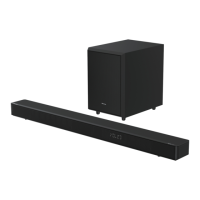
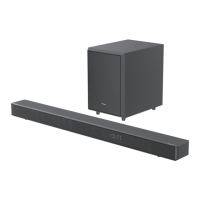
5.1CH Soundbar with Wireless Subwoofer

Other manuals for Hisense AX5100G

Questions and Answers

  • L
    lwhiteAug 1, 2025
    What to do if the subwoofer of my Hisense AX5100G Speaker System is idle?
    • J
      jason28Aug 2, 2025
      If the subwoofer of your Hisense Speaker System is idle or its indicator light isn't on, unplug the power cord from the mains socket and plug it back in after 4 minutes to reset the subwoofer.
  • A
    Alexander PalmerAug 9, 2025
    Why is my Hisense Speaker System remote control not working?
    • H
      Hannah BryantAug 9, 2025
      If the remote control for your Hisense Speaker System isn't working, try the following: * Reduce the distance between the remote control and the unit. * Ensure the battery is inserted with the correct polarities (+/-) as indicated. * Replace the battery. * Aim the remote control directly at the sensor on the front of the unit.
  • A
    Amanda WilliamsAug 16, 2025
    How to fix a Hisense AX5100G Speaker System with no power?
    • W
      wwattsAug 17, 2025
      If your Hisense Speaker System has no power, check these things: * Ensure that the AC cord of the unit is properly connected. * Ensure that there is power at the AC outlet. * Press the standby button to turn the unit on.
  • B
    Brittany SimmonsOct 25, 2025
    What to do if my Hisense AX5100G Speaker System has no sound?
    • J
      Joseph PattersonOct 25, 2025
      If your Hisense Speaker System isn't producing sound, there are several things you can check: * Ensure the unit is not muted. Press the mute or VOL+/– button to resume normal listening. * Try switching the soundbar to standby mode and then back on again using the button on the unit or the remote control. * Unplug both the soundbar and the subwoofer from the mains socket, then plug them back in and switch on the soundbar. * Make sure the audio setting of the input source (e.g., TV, game console, DVD player, etc.) is set to PCM or Dolby Digital mode when using a digital connection like HDMI, OPTICAL, or COAXIAL. * If the subwoofer is out of range, move it closer to the soundbar, ideally within 5 meters. * If the soundbar has lost connection with the subwoofer, re-pair the units ...

Summary

Important Safety Instructions

General Safety Guidelines

Read and follow all safety and operating instructions before using the unit.

Warnings and Precautions

Adhere to all warnings, including those regarding electrical shock, battery usage, and proper disposal.

Whats in the Box

Included Accessories

Lists all components included in the soundbar package, such as the main unit, subwoofer, and cables.

Identifying the Parts

Connections

HDMI eARC;ARC Connection

Instructions for connecting the soundbar to a TV using the HDMI eARC/ARC port.

Connecting Power Supply

Steps for connecting the power supply to the soundbar, subwoofer, and rear speakers.

Speaker Pairing

Subwoofer and Rear Speaker Pairing

Instructions for automatically and manually pairing the subwoofer and rear speakers with the soundbar.

Basic Operation

Input;Output Operation

Digital and Analog Input Operation

Guide for connecting and operating the soundbar using OPTICAL, COAXIAL, HDMI eARC, and AUX inputs.

Bluetooth Operation

Pairing Bluetooth Devices

Step-by-step instructions for pairing Bluetooth-enabled devices with the soundbar.

USB Operation

Troubleshooting

Common Issue Resolution

Troubleshooting guide for common problems like no power, remote issues, no sound, and subwoofer connectivity.

Specifications

Hisense AX5100G Specifications

General IconGeneral
TV Sound ShareNo
Equalizer modesBass, Movie, Music
Audio output channels5.1 channels
Soundbar mode controlYes
Number of speakers7
Soundbar speaker RMS power340 W
Subwoofer typeActive subwoofer
Subwoofer connectivityWireless
Woofer diameter (subwoofer)214 \
Product colorBlack
Volume controlButtons
Country of originChina
Audio formats supportedALAC, FLAC, MP3, MP4, WAV, WMA
Audio system6
Wireless technologyBluetooth, WIFI
AUX in-
Bluetooth version5.0
Connectivity technologyWired & Wireless
Digital audio coaxial in0
Power sourceAC
Power consumption (typical)0 W
Cables includedAC, Optical
Number of satellite speakers2
Package depth454 mm
Package width1000 mm
Package height237 mm
Package weight11700 g
Weight and Dimensions IconWeight and Dimensions
Depth90 mm
Width920 mm
Height60 mm
Weight2 g
Cord length1 m
Subwoofer depth304 mm
Subwoofer width214 mm
Subwoofer height294 mm
Subwoofer weight4 g

Related product manuals