EasyManua.ls Logo

Hisense HS212F - User Manual

Hisense HS212F
16 pages
Print Icon
To Next Page IconTo Next Page
Loading...
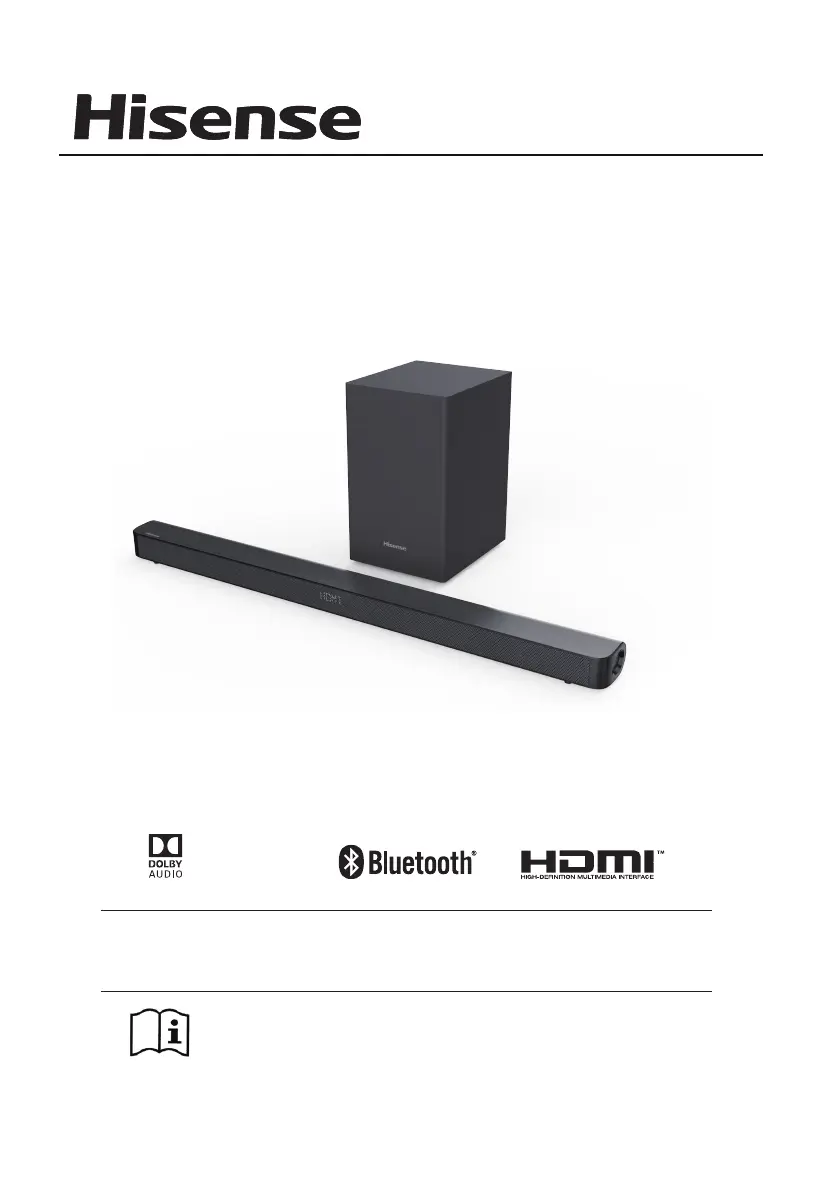
USER MANUAL
Before using the sound bar, please read this manual
thoroughly and retain it for future reference.
Model: HS212F
2.1 CH SoundBar with Wireless Subwoofer
Manufactured under license
from Dolby Laboratories. Dolby,
Dolby Audio, and the double-D
symbol are trademarks of Dolby
Laboratories.

Other manuals for Hisense HS212F

Questions and Answers

  • P
    perkinstristanJul 28, 2025
    What to do if my Hisense Stereo System has no sound?
    • E
      Evan HawkinsJul 28, 2025
      If your Hisense Stereo System has no sound, there are several things you can check: * First, increase the volume using the VOL + button on the remote or the soundbar. * Make sure the soundbar isn't muted by pressing the MUTE button on the remote. * Try setting the TV output to PCM. * If connected to a TV, try connecting directly to your Blu-ray player or other source, as some TVs don't pass through digital audio. * Also, your TV might be set to variable audio output; change it to FIXED or STANDARD (refer to your TV's manual). * If you're using Bluetooth, ensure the volume on your source device is turned up and that the device isn't muted.
  • M
    Melvin WestAug 4, 2025
    How to fix Hisense Stereo System when it has no power?
    • M
      Maria MorganAug 5, 2025
      If your Hisense Stereo System isn't powering on, make sure the AC cord is properly connected to the unit and that the AC outlet has power. If both are fine, press the STANDBY button to turn the unit on.
  • K
    Kevin BryantAug 12, 2025
    Why doesn't my Hisense Stereo System remote control work?
    • P
      Patty GoodAug 12, 2025
      If the remote control for your Hisense Stereo System isn't working, try these steps: * Reduce the distance between the remote and the unit. * Ensure the batteries are inserted with the correct polarities (+/-) as indicated. * Try replacing the batteries. * Make sure you're aiming the remote directly at the sensor on the front of the unit.
  • L
    Linda ClarkAug 20, 2025
    What to do if the subwoofer is idle on my Hisense Stereo System?
    • I
      Isaiah RodriguezAug 20, 2025
      If the subwoofer of your Hisense Stereo System is idle or its indicator light is off, unplug the power cord from the mains socket and plug it back in after 4 minutes to reset the subwoofer.

Summary

Important Safety Instructions

General Cautions and Warnings

Covers general safety precautions, warnings about electric shock, and battery handling.

Product Disposal and Environmental Responsibility

Guidance on responsible disposal of the product and batteries for environmental safety.

FCC Compliance Information

Details US regulatory compliance for digital devices and radio frequency energy.

Industry Canada Compliance Notice

Details Canada regulatory compliance for license-exempt radio apparatus.

Whats in the Box

Identifying the Parts

Main Unit Components

Details the display window, control buttons, and various input/output sockets on the soundbar.

Wireless Subwoofer Components

Identifies the pair indicator, reset button, and power socket on the subwoofer.

Remote Control Operations

Preparing the Remote Control

Guidance on how to prepare and use the remote control for operation.

Replacing Remote Control Batteries

Step-by-step instructions for replacing the batteries in the remote control.

Battery Precautions

Important safety guidelines and precautions for handling and using batteries.

Placement and Mounting

Placement Options

Guidance on where to place the soundbar unit, either on a table or wall-mounted.

Wall Mounting Instructions

Instructions and notes for safely mounting the soundbar unit to a wall.

Connections

Optical Connection

Instructions for connecting the soundbar to a TV via an optical audio cable.

AUX Connection

Instructions for connecting the soundbar to a TV or external device using an AUX audio cable.

HDMI ARC Connection

Guide for connecting the soundbar to a TV using an HDMI ARC cable for audio return.

Setup and Pairing

Coaxial Connection

Instructions for connecting the soundbar to a TV using a coaxial audio cable.

Power Connection

Guidance on connecting the soundbar and subwoofer to the mains power supply.

Subwoofer Pairing

Steps for automatic and manual pairing of the wireless subwoofer with the main unit.

Basic Operation

Standby and Power Management

How to turn the unit on/off, auto wake, and automatic power off features.

Mode Selection and Volume Adjustment

Selecting playback modes, adjusting volume, bass, treble, and brightness.

Sound Effects and Surround Sound

Adjusting sound effects via EQ and enabling/disabling surround sound.

Bluetooth Operation

Pairing Bluetooth Devices

Step-by-step guide to pairing Bluetooth devices with the soundbar for wireless audio playback.

Listening to Bluetooth Audio

How to play music from a connected Bluetooth device and control playback.

USB Operation

Playing Music from USB

Instructions for inserting a USB device and playing music files.

USB Playback Tips

Information on supported USB device capacity, file formats, and compatibility.

Troubleshooting Common Issues

No Power or Remote Control Issues

Solutions for power-related problems and non-responsive remote controls.

No Sound and Bluetooth Pairing Problems

Troubleshooting steps for no audio output and difficulty finding the Bluetooth name.

Subwoofer Not Working

Guidance on how to reset the subwoofer if it is idle or its indicator is not lit.

Product Specifications

Soundbar and Subwoofer Details

Technical specifications including power supply, dimensions, weight, and frequency response.

Wireless and Amplifier Specifications

Details on Bluetooth version, wireless transmission power, and amplifier output power.

Remote Control Specifications

Information on the remote control's operating distance, angle, and battery type.

Hisense HS212F Specifications

General IconGeneral
Colorblack
Audio Channels2.1
Subwooferincluded
RMS Power120 watts
HDMI Inputs1
HDMI Outputs0
USB Ports1
Bluetoothyes
Remote Controlyes
Weight and Dimensions IconWeight and Dimensions
Depth2.2 inches
Height3.3 inches
Width37.8 inches
Net Weight3.8 pounds
Subwoofer Depth8.3 inches
Subwoofer Height13.3 inches
Subwoofer Width9.8 inches
Subwoofer Weight10.5 pounds

Related product manuals