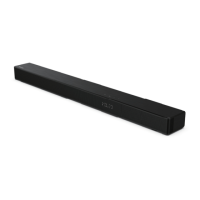
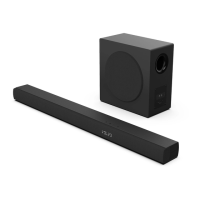
This document describes the Hisense HS2000 2.1 Soundbar with built-in Subwoofer.
Function Description:
The Hisense HS2000 is a 2.1 channel soundbar designed to enhance audio output from various devices, including TVs, game consoles, DVD players, and Bluetooth devices. It features a built-in subwoofer for improved bass performance and supports multiple audio input options. The soundbar can be operated via its physical buttons or a remote control. It includes features like surround sound, equalizer (EQ) effects, and adjustable bass/treble. The device also supports Hisense EzPlay for integrated control with compatible Hisense TVs via HDMI ARC, allowing TV remote control of soundbar settings.
Important Technical Specifications:
- Model: HS2000
- Power Supply: 100-240V~50/60Hz
- Power Consumption: 50 W (Operating), < 0.5 W (Standby)
- USB:
- 5V 500mA
- Hi-Speed USB (2.0)
- Supports FAT32 / FAT16
- Maximum 32GB capacity
- Supported audio formats: WAV / WMA / MP3 / FLAC
- Dimensions (WxHxD): 800 x 60 x 105 mm (31.5" x 2.4" x 4.1")
- Net Weight: 2.22 kg
- Audio Input Sensitivity: 700mV
- Frequency Response: 40Hz - 20KHz
- Operating Temperature: 0°C - 45°C
- Wireless Specification (EU):
- Bluetooth Version / Profiles: V 5.3 (A2DP, AVRCP)
- Bluetooth Frequency Range: 2400 MHz ~ 2483.5 MHz
- Bluetooth Max. Transmitting Power: ≤ 5 dBm
- Amplifier (Max Audio Power):
- Total: 240 W
- Soundbar: 60 W x 2 + 120 W (built-in Subwoofer)
- Remote Control:
- Distance/Angle: 19.7 feet (6m) / 30°
- Battery Type: AAA (1.5V x 2)
- Audio Technologies: Dolby Audio, DTS
Usage Features:
- Connectivity:
- HDMI ARC: Connects to ARC-compliant TVs for audio return channel functionality. Supports HDMI-CEC for integrated control with TV remote. Requires HDMI 1.4 or higher cable.
- OPTICAL: Connects to TV's optical audio output.
- COAXIAL: Connects to TV's coaxial audio output.
- AUX: 3.5mm input for connecting external audio devices (e.g., TV headphone socket, audio output sockets).
- USB: For playing music files from USB storage devices.
- Bluetooth: For wireless audio streaming from Bluetooth-enabled devices (e.g., smartphones, tablets, laptops).
- Operation Modes:
- Standby/ON: Power on/off the soundbar.
- Auto-Standby: Automatically enters standby mode after 15 minutes of no audio input or disconnection. Can be activated/deactivated.
- Auto-Wake: Automatically switches on when audio input is detected from a connected TV or external device. Can be activated/deactivated.
- Mode Selection: Easily switch between AUX, OPTICAL, COAXIAL, HDMI ARC, Bluetooth, and USB modes using the SOURCE button.
- Audio Control:
- Volume Adjustment: Increase or decrease volume using VOL+/- buttons.
- Mute: Temporarily silence the soundbar.
- Surround Sound: Turn surround sound effect ON/OFF.
- Equalizer (EQ) Effects: Select from preset sound effects like music, movie, news, game, sport, and night.
- Bass/Treble Adjustment: Fine-tune bass and treble levels.
- Brightness Adjustment: Adjust the LED indicator brightness.
- Voice Prompts: Enable or disable voice prompts for operational feedback.
- Remote Control: Full-function remote control for convenient operation from a distance. Includes dedicated buttons for power, source selection, surround sound, EQ, volume, mute, playback control (for BT/USB), bass, treble, and dimmer.
- LED Indicators: Front-facing LEDs indicate the current mode (Red for Standby, Green for AUX, Blue for BT, Orange for OPTICAL, Light blue for COAXIAL, White for HDMI ARC, Yellow for USB).
- Placement and Mounting:
- Can be placed on a table in front of the TV.
- Wall-mountable below a wall-mounted TV using the included wall mount kit. Wall mounting requires drilling and proper installation by qualified personnel. Suggested wall mounting height: ≤ 1.5 meters.
- Hisense EzPlay Function: When connected to a compatible Hisense TV via HDMI ARC, a Soundbar Setting menu appears on the TV, allowing control of soundbar features using the TV remote.
- Roku TV Ready: Simple setup, one remote control, and quick settings when used with a Roku TV.
Maintenance Features:
- Battery Replacement: Easy replacement of AAA batteries in the remote control.
- Troubleshooting Guide: Provides solutions for common issues like no power, remote control not working, no sound, and Bluetooth pairing problems.
- Factory Reset: Option to reset the soundbar to its default settings.
- General Care:
- Avoid spilling water or liquids on the remote control or unit.
- Do not place the remote control on wet objects or under direct sunlight/excessive heat.
- Remove batteries from the remote control during long periods of disuse to prevent corrosion.
- Ensure proper ventilation around the unit.
- Do not attempt to repair the system yourself to maintain warranty validity.
- Audio Format Compatibility: The soundbar may not decode all digital audio formats from the input source. Users are advised to set the audio output of the source device (TV, game console, DVD player) to PCM or Dolby Digital for HDMI ARC / OPTICAL / COAXIAL inputs to avoid muting.
- USB Device Compatibility: Supports USB devices up to 32GB. May not be compatible with certain types of USB storage devices, extension cables, hubs, or multi-functional card readers. Do not remove the USB device while it is being read.

 Need help?
 General

 To Next Page