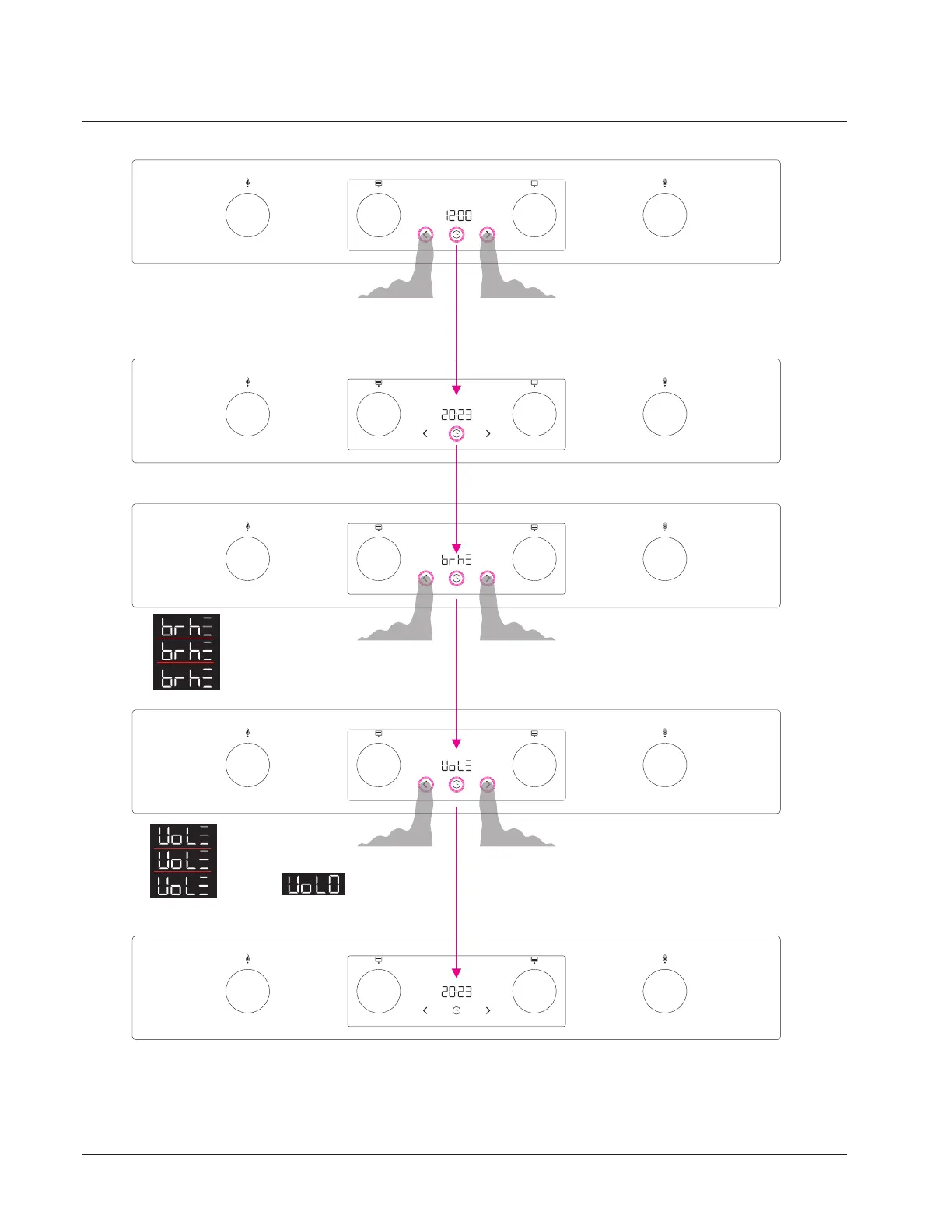
By pressing the decrease or increase touch keys World time can be selected.
Pre-set time is 12:00. With one press , the value can be increased by 1 minute,
by holding the touch key (2 sec) values start automatically increasing
first up to full value later for 10 minutes, later for 1 hour.
Function is the same ifor increase or decrease the value.
Example: 00:07, 00:08, 00:09, 00:10, 00:20...01:00,02:00.
1.
By pressign the time touch key World time is confirmed,
display goes to next screen(Brightness).
2.
By pressing the decrease or increase touch keys brightness
level (low, mid, high) can be selected. Pre-set Brightness is Medium.
1.
2.
By pressign the time touch key Brightness level is confirmed,
display goes to next screen (Volume settings).
Minimum
Medium
Maximum
By pressing the decrease or increase touch keys Volume level
(low, mid, high, off) can be selected. Pre-set Volume is Medium.
1.
2.
By pressign the time touch key Volume level is confirmed,
display goes to next screen (World time settings).
Minimum
Medium
Maximum Off
In stanby World time is active. Touch keys are not active-only time touch key if pressing and holding the
touchkey for 3 sec the settings menu can be activated. Settings menu is the same like Starting Wizzard
where brightness, volume and world time can be adjusted.
Hisense Display-Starting Wizzard - World time Set
Hisense Display- Starting Wizzard - World time Set
Hisense Display-Starting Wizzard - Brightness Set
Hisense Display-Starting Wizzard - Volume Set
Hisense Display-Standby
Using your Freestanding Cooker
15



 To Next Page