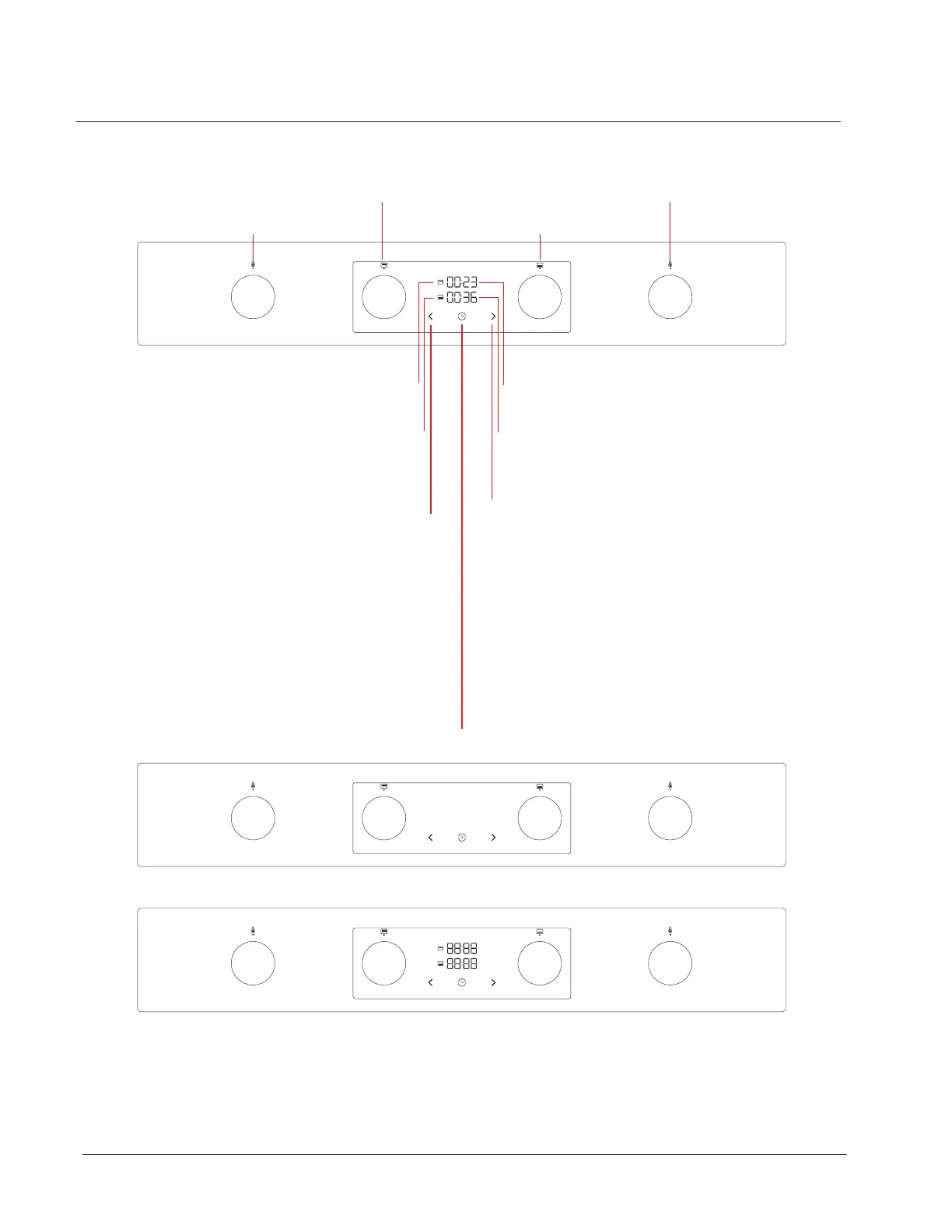
Time Digits - Bottom oven
Illuminated digits, 7 segments, without touch.
llluminated icon, without touch, illuminated50%, 75%,100%, blinking
Upper Oven icon - time related
Illuminated icon, without touch,
illuminated50%, 75%,100%, blinking
Bottom Oven icon - time related
Illuminated icon, without touch,
illuminated50%, 75%, 100%, blinking
Decrease function - time related
Touch key, printed icon.
With one press, the value can be reduced by 1 minute,
by holdingthe touch key (2 sec) values start automatically
decreasing first up to full value later for 10 minutes, later for 1 hour.
Example: 02:02, 02:01, 02:00,01:50, 01:40...00:00.
Time function for bottom and upper oven
Touch key, printed icon.
Function is avalible only if bottom or upper
oven program is selected. With one press time function for
bottom or upper oven can be activated. If only one oven is
running (bottom or upper) by activation the time function the
duration digits are automaticaly connected and starts blinking
periodically. By pressing the decrease or increase touch keys
duration can be selected. By no touch (8 sec) time function/digits
dissapere, world time is visible again. When time function is
selected time digits start decreasing automaticaly withoutconfirmation.
When reach the end time 00:00 function automaticaly finish theprogram
and complete the process. Time function in running can be canceled/deleted
by simmultynuesly touch on decrease and increase touch key or by setting
the 00:00 value. After this time digits dissapere by not ouch for 8 sec.
automaticaly.If the time function is activated for both ovens (bottom/upper)
both time values are active.By pressing the time touch key we can toggle
between upper or bottom time value.
Time Digits - Bottom oven
Illuminated digits, 7 segments, without touch.
llluminated icon, without touch, illuminated50%, 75%, 100%, blinking
Increase function - time related
Touch key, printed icon. With one press, the value can be increased by 1
minute, by holding the touch key (2 sec) values start automatically
increasing first up to full value later for 10 minutes, later for 1 hour.
Example: 00:07, 00:08, 00:09,00:10,00:20...01:00, 02:00.
Upper oven temp.
Upper oven systems
Bottom oven systems
Bottom oven temp.
Hisense Display- Off mode, out of electricity
Hisense Display- All content activated
Using your Freestanding Cooker
Control Panel
14



 To Next Page