WiFi connection
ConnectLife
You can remote control this dishwasher with your smartphone/tablet. Connect the dishwasher to your
wireless network to be able to remote control and start the dishwasher using the ConnectLife app.
The app can be used to find information, change settings, start a program and monitor the dishwasher.
(The dishwasher can always be used without the app.)
WiFi
Preparations
• Your smartphone/tablet must be connected to the internet.
• The router in your wireless network must be connected to the internet and the dishwasher must
be in range of your wireless network.
• Use your smartphone/tablet to download the ConnectLife app from the appropriate app store or
scan the QR code below.
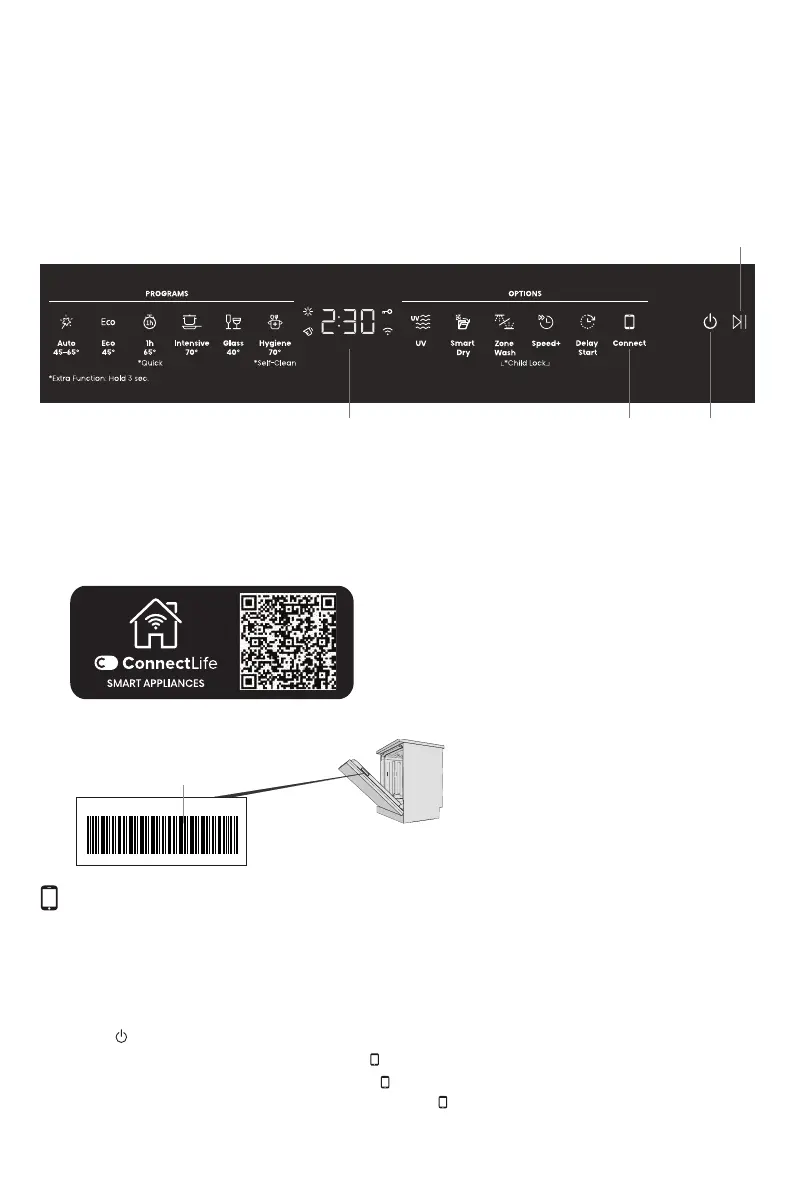
Display
Start/Pause/Stop
On/Off
• You will find the dishwasher serial number on the serial number plate.
Batch No.:XXXXX
XXXX
serial number
Connect to a network and pair
Connect the dishwasher to your wireless network and pair with your smartphone/tablet.
• Open the ConnectLife app and register an account.
• Go to Appliances. Click on Add appliances or the + button. Select Home appliances.
• Scan the dishwasher serial number code (see the serial number plate). Follow the further
instructions in the
app.
•
Press on the dishwasher.
•
On the dishwasher's control panel: Press to activate the WiFi module.
•
On the dishwasher display: Press and hold until the buzzer sounds three times to start
connecting. C appears on
the display, then release , after which the display starts counting
down.
21



 To Next Page