7
Shortcuts Instructions
California’s Golden Parks
7:00 PM Mon. 31 Dec. 7:30PM-8:00PM California’s Gold
Cable
Subtitle DTV 16:9 1080i
2/4 Original Audio Stereo
mpeg
7:00PM 7:30PM
2 3 4
9
10
51
6
8
7
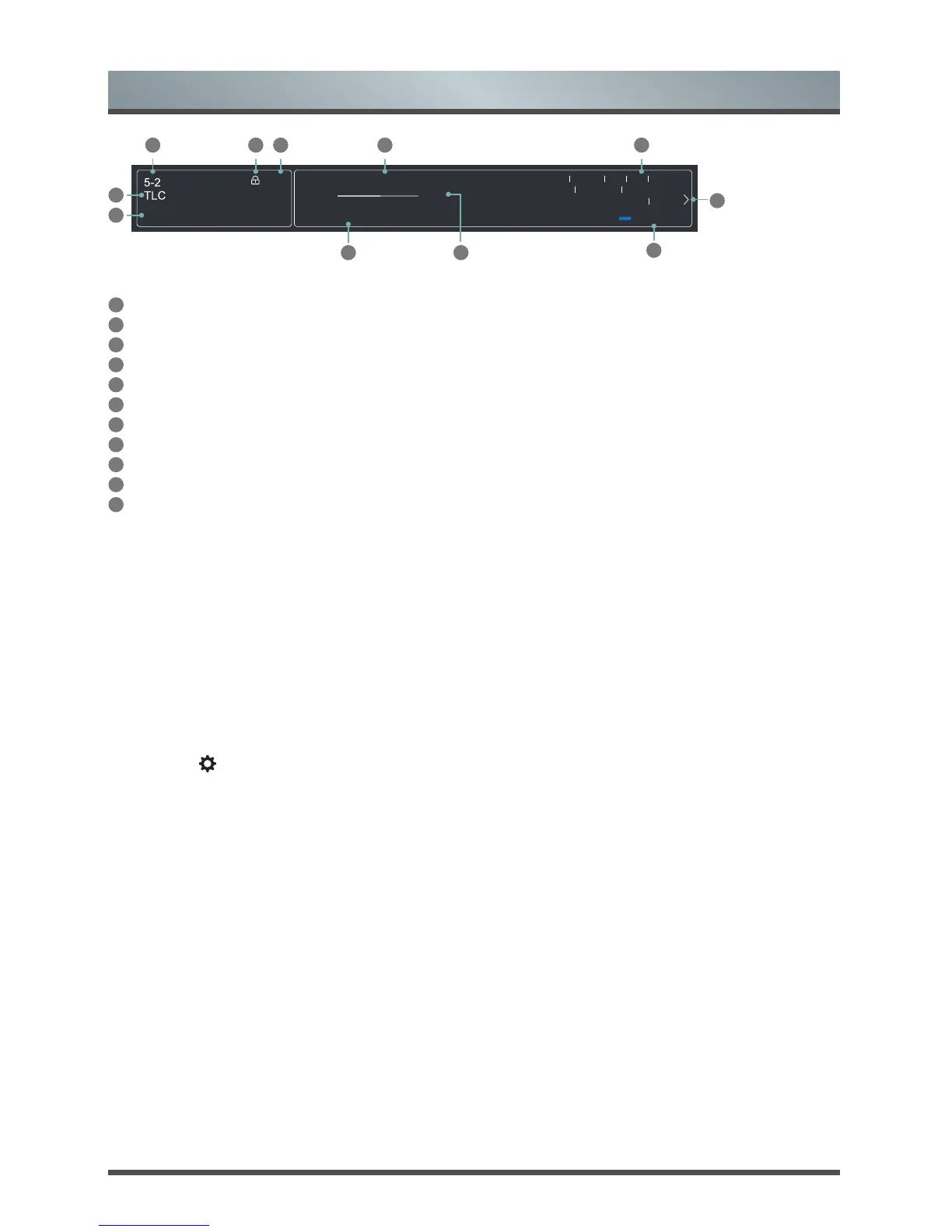
The information banner displays the following information:
1
Channel number
2
Lock status
3
Input
4
Program name
5
Show identification
6
Channel name
7
Current date and time
8
Prompt
9
Beginning and end time of the next program
10
Start/Stop time progress bar of the current program
11
More info
If you are watching a particular channel, you can also press the up arrow button of your remote to view
channel information.
Viewing a channel list
After you have done an automatic channel scan (if you’re using an antenna) or receiving your channels
through a cable provider, you can view your list of channels by pressing [OK] on your remote. You will see the
channel list display on the right side of the screen.
Creating a Favorites List
To quickly access your most-watched channels, you can create a Favorites List.
To create your Favorites List:
1. Press the [
] button on your remote.
2. Press the
[v]
button to select
Settings
, and then press [OK] button to enter the Settings menu.
3. Select
Channels
> Channel Edit
> FAV
> Edit > Add channels.
4. Using the
[
v
/ v]
buttons of your remote, select a channel and press
[OK]
button.
A heart-shaped indicator will appear beside the channel as confirmation that it has been successfully added.
Viewing your Favorite list
To view channels that you’ve added to your Favorites List, press [OK] on your remote to call out the channel
list.
The channel list appears on the right side of the screen and heart-shaped icons are shown next to the
channels that make up your Favorites List.
11
More Info


 To Next Page