Connection
Establishing a Wired Internet Connection
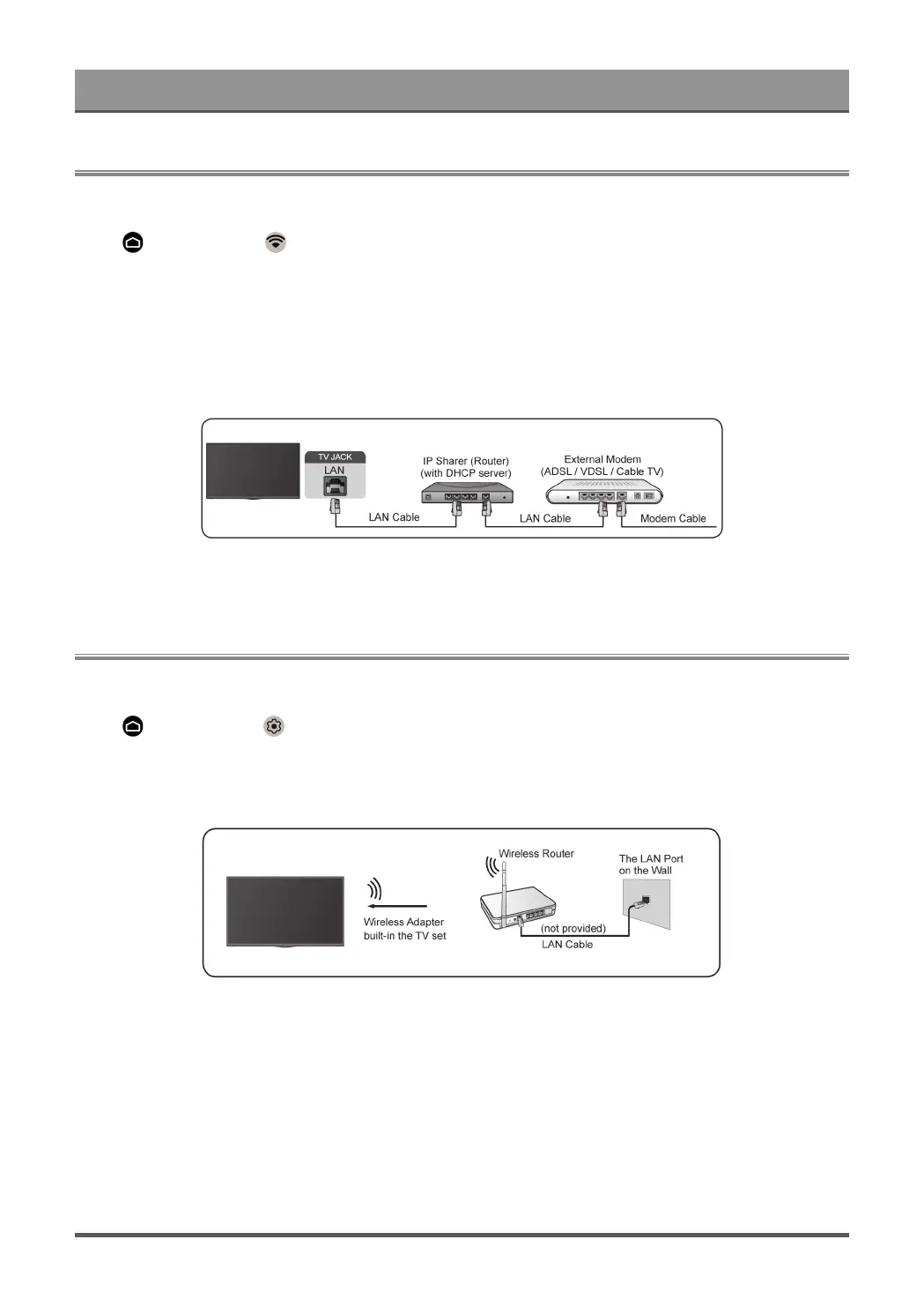
Connecting to a wired (Ethernet) network
Press button to select icon to enter Network & Internet.
To get access to the Internet in a wired way, it is recommended to use a modem or router that supports
Dynamic Host Configuration Protocol (DHCP). Modems and routers that support DHCP automatically provide
the IP address, subnet mask, gateway, and DNS, so you don't have to enter them manually. Most home
networks already have DHCP.
See the illustration below.
Establishing a Wireless Internet Connection
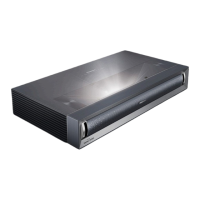
Connecting to a wireless network
Press button to select icon, and select Network & Internet > Wi-Fi
To connect to an available wireless network, make sure that you have the wireless router’s SSID and
password before attempting to connect.
To get access to the Internet in a wireless way:
1. Turn on your Wi-Fi.
2. The list of networks will display automatically.
3. Select a wireless network from the list, input the password.
4. If the network connection does not appear in the list, select See all to display all the list, or select Add new
network to input a Wi-Fi name, select the type of security mode, and enter password.
7


 To Next Page