21 EN
To set the Parental Control
1
In the Lock menu, press ▲ or ▼ to select “Parental Control”
then press ◀ or ▶ to set to “On”.
2
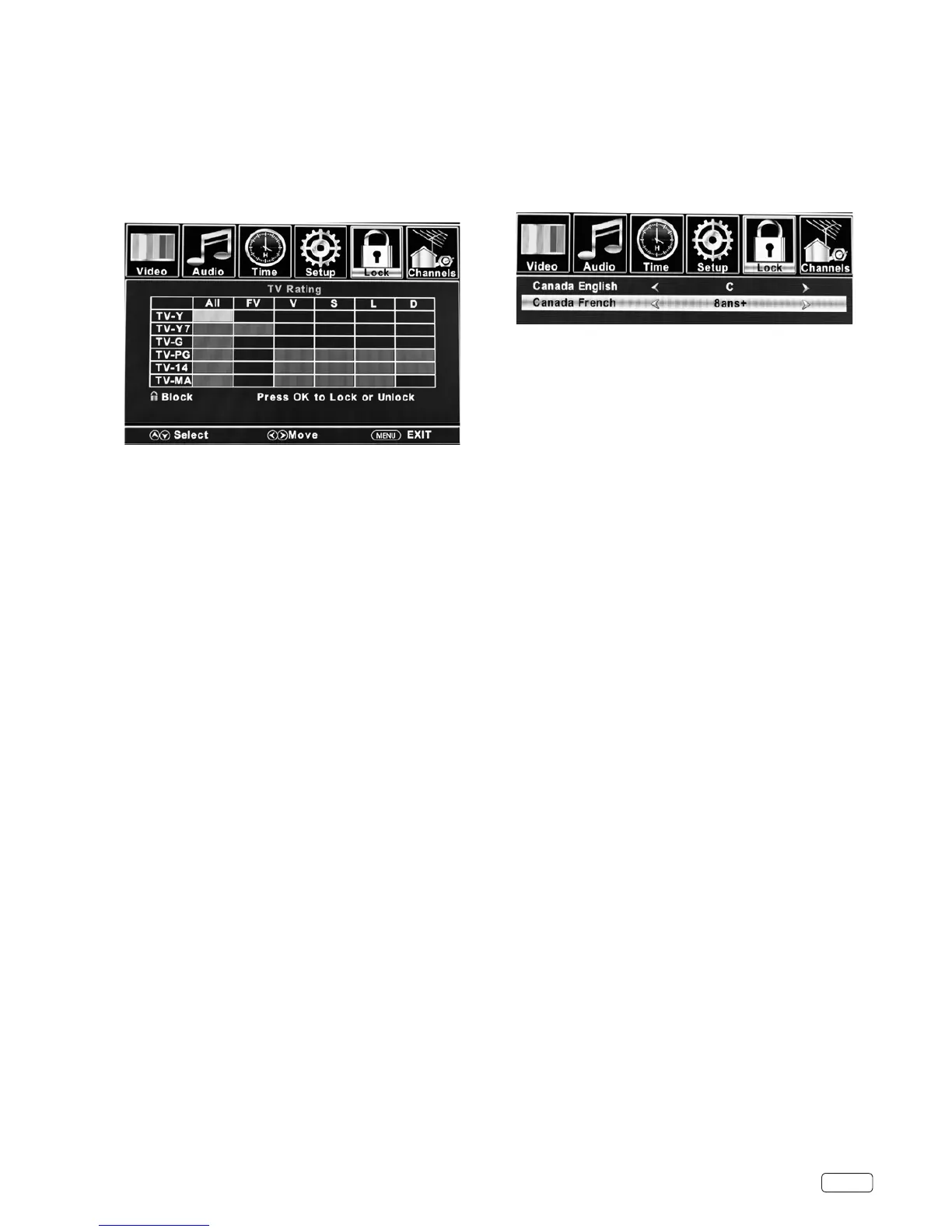
Press ▲ or ▼ to select “US Rating”, then press ▶ or OK.
3
Press ▲ or ▼ to select which rating will be used, then press
◀/▶ or OK. Each rating below will appear.
TV
You can set the rating using age level and genre.
Age:
T V-Y
: All children
TV-Y7 : 7 years old and above
TV-G : General audience
TV-PG : Parental guidance
TV-14 : 14 years old and above
TV-MA : 17 years old and above
Genre:
FV
: Fantasy Violence
D : Dialogue
L : Language
S : Sex
V : Violence
Press ▲/▼ to select the desired rating, then press SELECT.
Movie
O
: None
G : All ages
PG : Parental guidance
PG-13
: Parental guidance
less than 13 years old
R : Under 17 years old parental guidance
suggested
NC-17
: 17 years old and above
X : Adult only
Press ◀/▶ to select the desired rating.
4
Press EXIT to return to normal viewing.
Parental Control function is activated now.
Canada English ratings
You can set the rating using age level.
O
: Exempt
C : Programming intended for children under age 8
C8+ : Programming generally considered acceptable for
children 8 years and over to watch on their own
G : General Audience
PG : Parental Guidance
14+ : Programming contains themes or content which
may not be suitable for viewers under the age of 14
18+ : Adult
Canada French ratings
O : Exempt programming
G : General: All ages and children, contains minimal
direct violence, but may be integrated into the plot in
a humorous or unrealistic manner.
8ans+
: General but inadvisable for young children: May be
viewed by a wide public audience, but could contain
scenes disturbing to children under 8 who cannot
distinguish between imaginary and real situations.
Recommended for viewing with parent.
13ans+
: Over 13 years: Could contain scenes of frequent
violent scenes and therefore recommended for
viewing with parent.
16ans+
: Over 16 years: Could contain frequent violent scenes
and intense violence.
18ans+
: Over 18 years: Only for adult viewing. Could contain
frequent violent scenes and extreme violence.
4
Press EXIT to return to normal viewing.
Parental Control function is activated now.
NOTE:
• The Parental Control function is activated only on programs and
input sources that include a rating signal.
Canadian rating systems
1
In the Lock menu, press ▲ or ▼ to select “Parental Control”
then press ◀ or ▶ to set to “On”.
2
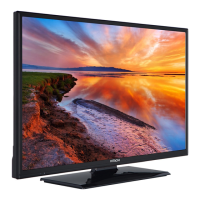
Press ▲ or ▼ to select “Canada Rating”, then press ▶ or OK.
3
Press ▲ or ▼ to select “Canada English” or “Canada French”,
then press ◀ or ▶ to select the desired rating.


 To Next Page