Englsh
2
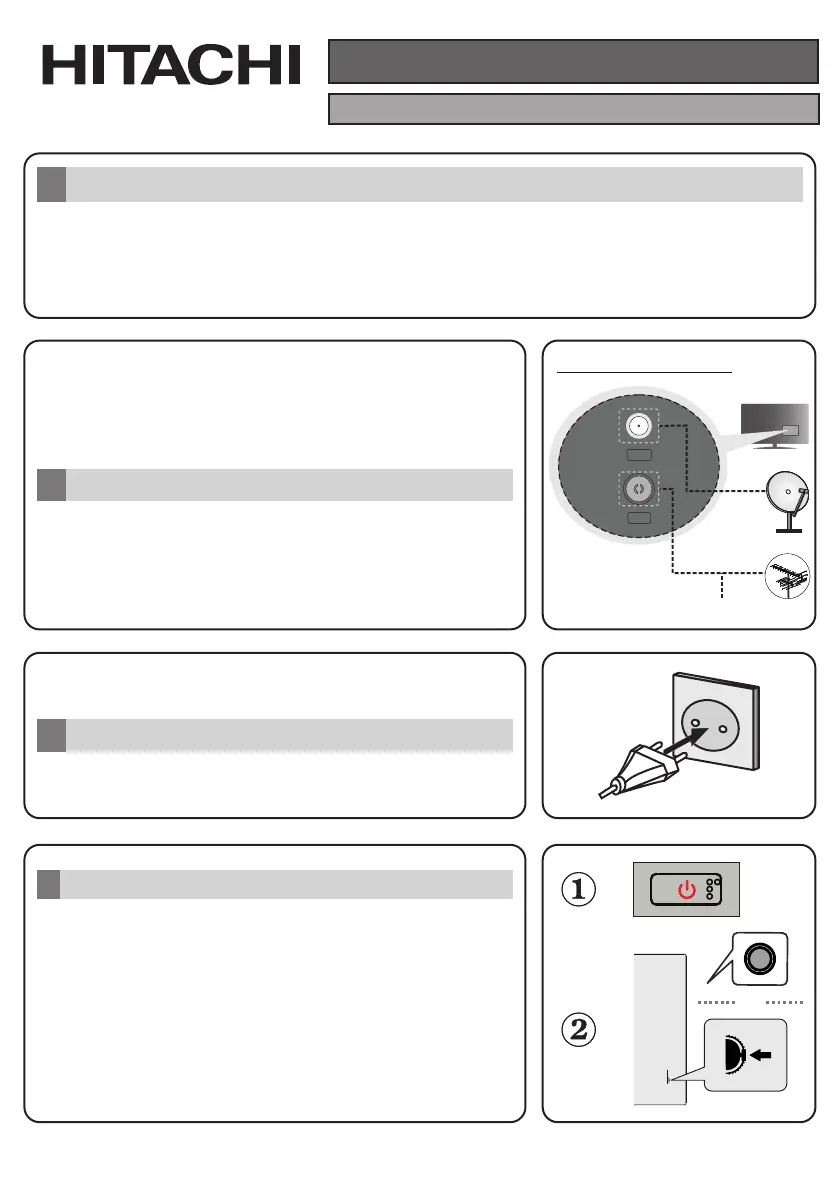
Connect the antenna to your TV
3
Connect the TV to the mans socket
Insert the batteres nto the Remote Control
1
Remove the screw that secure the battery compartment cover on the back side of the remote
control first. Lift the cover gently. Insert two 1.5V - size AAA batteries. Make sure the (+) and (-)
signs match (observe correct polarity). Do not mix old and new batteries. Replace only with same or
equivalent type. Place the cover back on. Then screw the cover back on again.
After pluggng the power cable to the mans socket outlet the
TV wll swtch on automatcally. If the TV is in standby mode
the standby LED lights up.
To swtch on the TV from standby mode ether;
1. Press the Standby button on the remote control.
2. Press the control button on the TV or press the centre of
the control swtch on the TV n.
Swtch the TV on
4
Quck Start Gude
REAR SIDE OF THE TV
SATELLITE
AERIAL
CABLE
or
LAN
ANT


 To Next Page