EasyManua.ls Logo

Hitachi 55E31 - How to Attach the Stand; How to Remove the Stand

Hitachi 55E31
31 pages
Print Icon
To Next Page IconTo Next Page
To Previous Page IconTo Previous Page
Loading...
7 EN
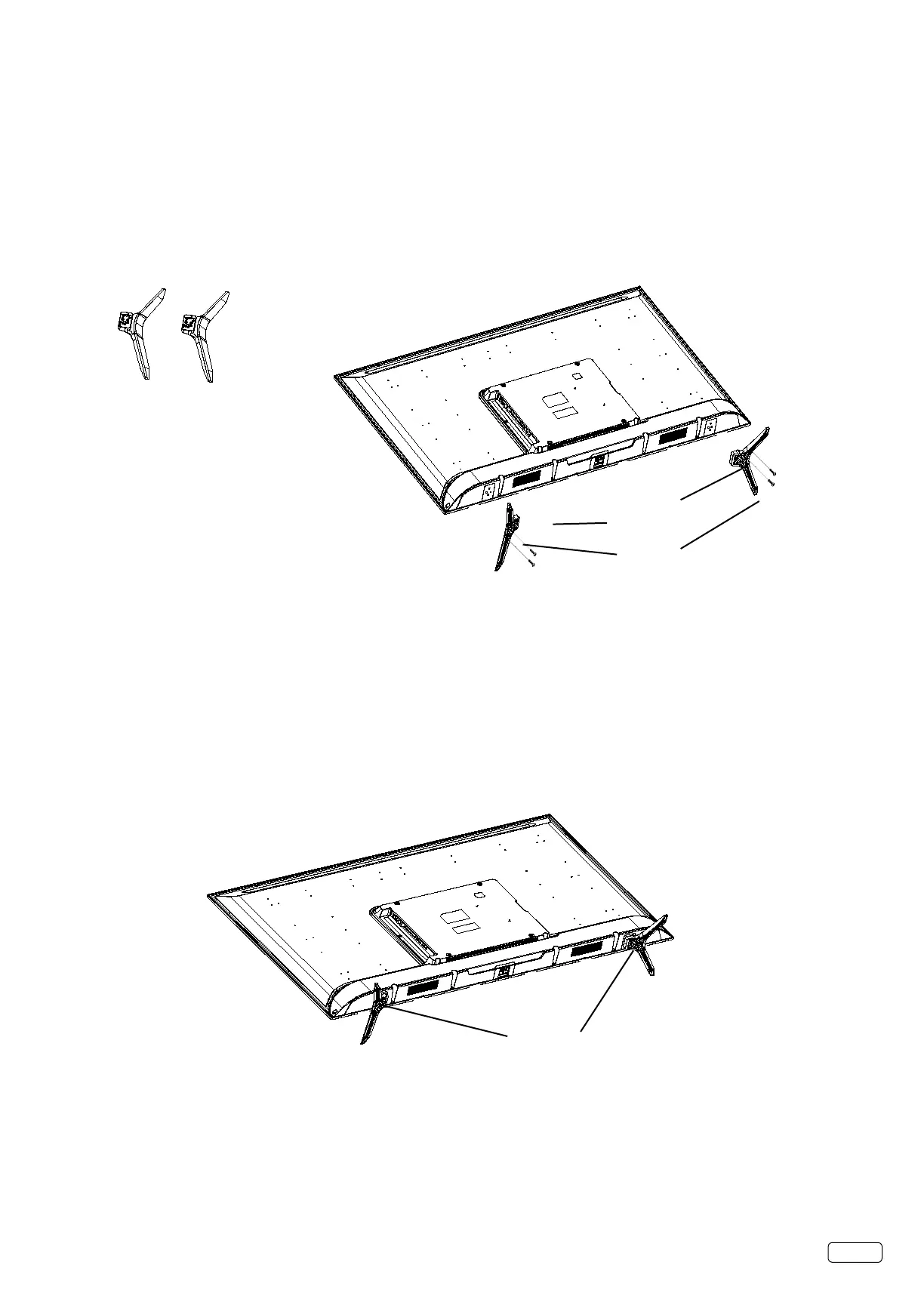
How to attach the stand
NOTE:
• AssuretheACcordisnotconnectedtoanACoutlet.
• Beforebeginningthisprocess,makesurethatyouhaveaclean,safe,andcushionedspacetoworkattoavoidanydamagetothe
unit.
• DonottouchorpresstheLEDscreen,theglassmightbreakunderpressure.
CarefullyplacetheTVscreenface-downonaclean,cushionedsurface.

 



L
R


How to remove the stand
Whenyoutransportthisproduct,removethestandandpackitatagainstthebackoftheunitinthecarton.Toremovethestand,
performtheabovestepsinreverseorder.
WhenyoumounttheTVonthewall,removebothstands(RandL).
TodisconnectthestandremovethescrewsfromthebottomofTV.


Related product manuals