GB-6
Hints and TipsBasic Operation
Connecting to a
Computer
Product Overview
Specications and
Safety Warning
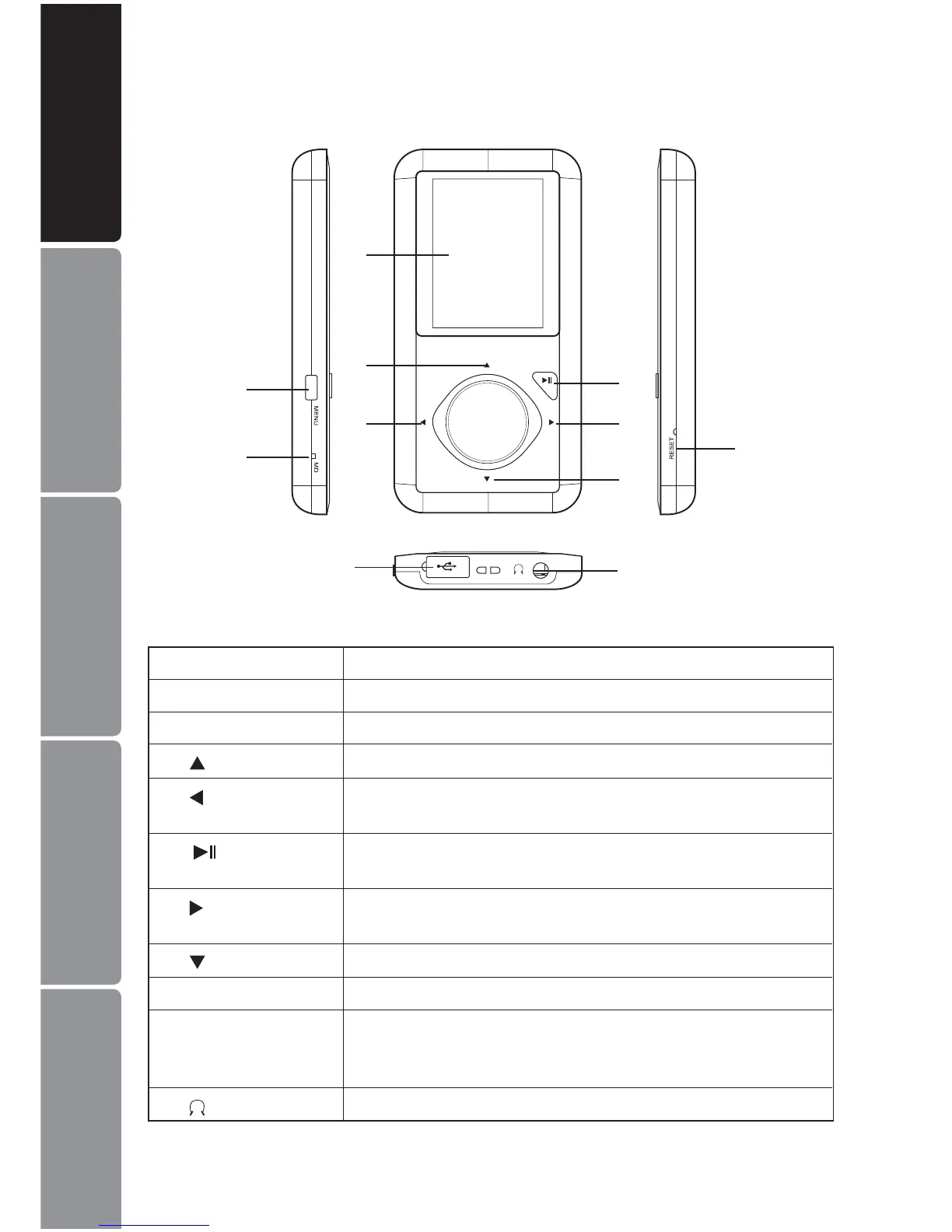
Identication of Parts and Controls
1
10
2
3
4
6
7
9
11
8
5
1 MENU Power on/o; Open or exit sub-menu; Stop recording
2 MIC Microphone for voice recording
3 Screen Screen display area
4
Increase volume; Navigate upwards; Previous picture/line
5
Previous track/page/screen; Fast backward; Navigate
leftwards; Return to previous screen
6
Start /Pause playback; Enter main menu; Conrm selection
in the main menu
7
Next track; Fast forward search; Navigate rightwards;
Conrm and enter next screen.
8
Decrease volume; Navigate downwards; Next picture/line
9 RESET Press the RESET hole/button if a malfunction occurs.
10 USB cable
connection port
with cover
Remove the USB cover and connect to the computer with
the supplied USB cable.
11
Earphones Jack
Connect with the supplied earphones.


 To Next Page