Chapter 14 Operation Examples
14-11
S T E P
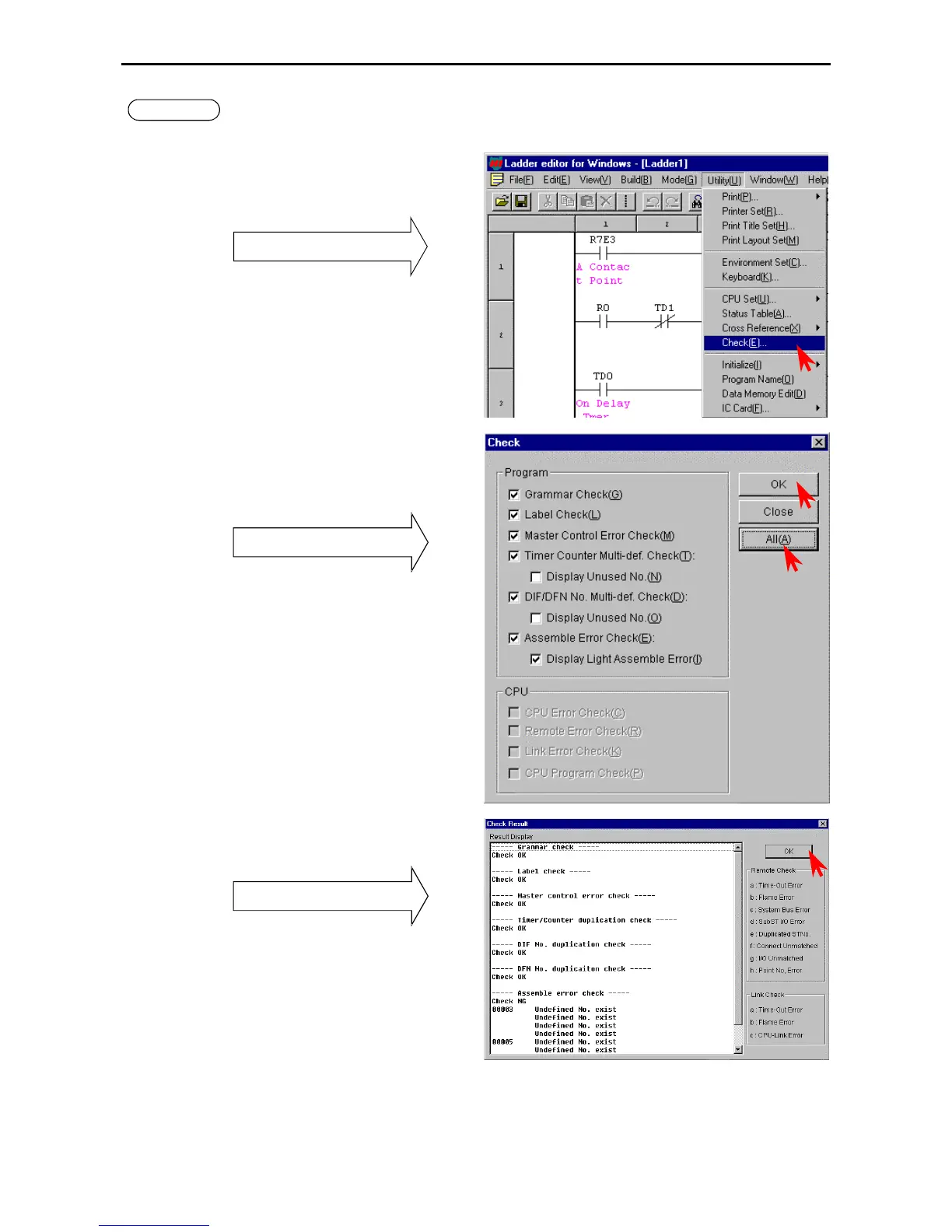
4 Checking Program Errors
Check to see if the program in the memory is correct.
Click [Utility] → [Check] in the Menu bar.
The Check dialogue box is displayed.
Pull-down menu
• Click the [All items] or the individual check
column to specify the items to be checked.
• Click the [Execute] button.
The Check Result dialogue box is displayed.
Check dialogue box
The checking of the CPU can be specified at online
mode.
• Click the [OK] button.
The Check Result dialogue box closes.
Check Result dialogue box
(Note)
For example, if the I/O assignment of bit Y32 is
missing for unit 1, WY10 of the sample is treated
as undefined; the error is displayed as in the figure
to the right.
If there are any errors, correct the errors of the program before check the program again.



 To Next Page