Advanced Techniques - 50 -
Gold Star 1 F.FWD
Toshiba AV DUB
Gold Star 2 STOP
NEC PAUSE (START/STOP)
RCA DISPLAY
Panasonic TITLE ON/OFF
Mitsubishi ZOOM.(T)
JVC COUNTER RESET
Sharp S.EDIT
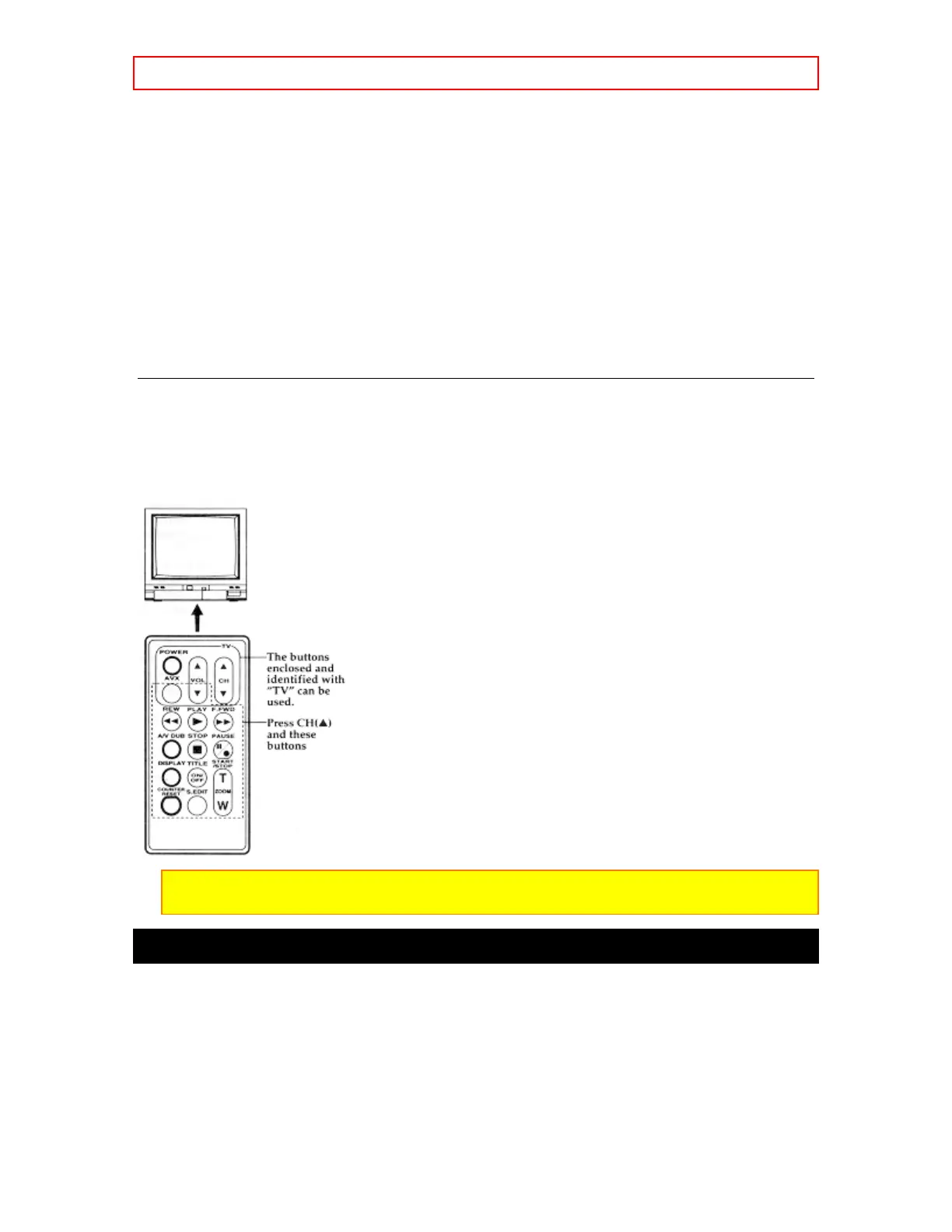
Controlling the TV
Once programmed, the camcorder's remote control is ready to control the TV.
• Press the button of the TV function that you want.
Be aware that not all of your TV's functions may work even though the remote control is correctly
programmed.
Note: It may not be possible to control all TVs listed in the Table.
Note: The AVX Button can't be used with Gold Star 2 and Sharp TVs.
Using Audio/Video Dubbing
Use audio/video dubbing to record audio and video from the camcorder's built-in microphone and
camera onto a previously recorded tape in the camcorder.
Remote Control Audio/Video Dubbing Buttons
1. Connect your camcorder to the television, following "Connecting to a Television with Audio In
and Video In Jacks" on page 28.
2. Turn on your television and place it in the camcorder input mode (consult your television
manual for details).
3. Hold down the red button on the CAM/OFF/VIDEO switch while sliding the switch to VIDEO.



 To Next Page