2
1
14
15
3
4
5
6
7
8
9
10
11
12
13
3
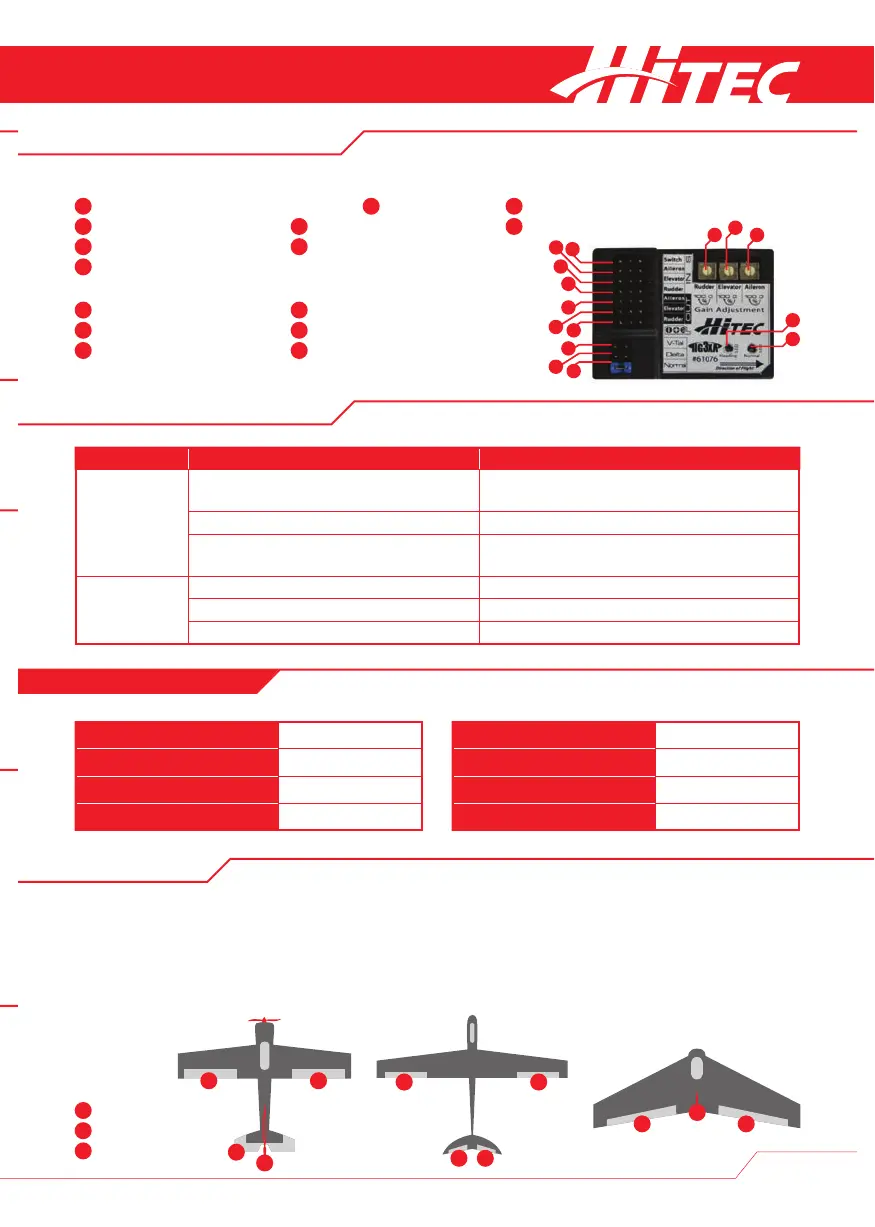
Status LED display Description
Initialization The blue and red LEDs ash rapidly for three
seconds after switching on the gyro.
Initialized. Do not move the aircraft until initialization
has been completed!
Blue LED ashes after initialization. Initialization successful.
Red LED ashes rapidly after initialization. Initialization failed. Unde ned model type. Check the
adjustments J 1-2-3.
Operation Blue LED illuminated permanently. Standard mode. Ready for ight.
Red LED illuminated permanently. Heading hold mode. Ready for ight.
Both LEDs are o . Gyro is deactivated. Ready for ight.
11
2
3
1 1
2 3
Features
LED Display Overview
Standard Aircraft Aircraft with V-tail Delta wing or flying wing
Speci cations
1
3
2
Your HG3XA makes it possible to toggle between three
different flight modes while your model is airborne, “O ff”
mode, “Standard” mode and “Heading Hold” mode.
The following three model types are supported for use
with this system:
Users of the HG3XA also enjoy specialty optimization for 3D
flight, independent gyro adjustment and gyro reversing for
each channel, and a small, lightweight design suitable for
smaller aircraft.
1
Aileron servo
2
Elevator servo
3
Rudder servo
Voltage range 5 - 6V DC
PWM output 50Hz, or 20ms
PWM signal 1520±500µs
Full scale range 970~2070µs
Gyro sample rate 1KHz
Operating temperature -40°C to 85°C
Dimensions 47 x 33 x 14 mm
Weight 11 g
1
1
1
HG3XA Overview
Receiver “IN” area Model type selection (jumper)
1
Flight mode changeover switch
8
J1 – V-tail
2
Aileron
9
J2 – Delta wing or ying wing
3
Elevator
10
J3 – Standard aircraft model
4
Rudder
Servo “OUT” area
Gyro gain adjustment
5
Aileron
11
Potentiometer rudder
6
Elevator
12
Potentiometer elevator
7
Rudder
13
Potentiometer aileron
LED display
14
Red LED
15
Blue LED














 To Next Page