6
MACHINE PRESETS
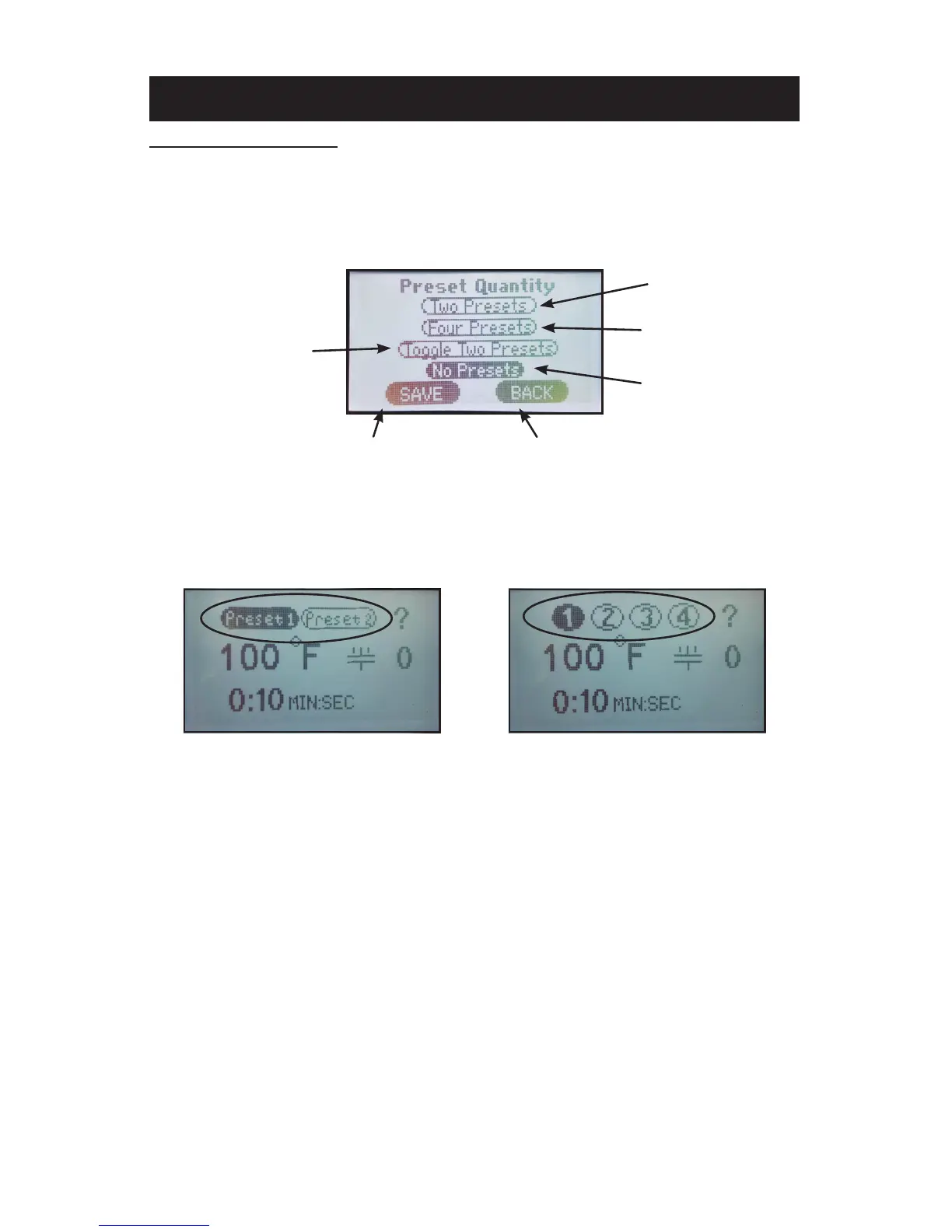
PRESET QUANTITY
Temperature presets can be stored in the memory for different trans-
fer settings. By default two presets are displayed. This setting can be
adjusted to display four presets.
1. From the settings menu press the “Preset Quantity” sub menu title.
2. Press the number of presets to be displayed on the home screen, either
“Two Presets” or “Four Presets.”
3. Press “Save” to save the setting.
4. Press “Back” to return to the previous screen.
NOTE: The “Toggle Two Presets” option will allow the operator to save two
different times in each preset (e.g. 2 seconds in Preset 1 and 8
seconds in Preset 2). Each time the handle is closed and the timer
times out then the controller will automatically “toggle” to the other
preset. This will allow the operator to set a short “pre-press” time.
The “No Presets” option, if selected, will remove the option for any
preset buttons to appear on the Home Menu Screen.
TWO PRESET DISPLAY
ON HOME MENU SCREEN
FOUR PRESET DISPLAY
ON HOME MENU SCREEN
TWO PRESETS
DISPLAYED
FOUR PRESETS
DISPLAYED
SAVE SETTINGS RETURN TO PREVIOUS SCREEN
PRESET QUANTITY DISPLAYED PREFERENCE SCREEN
NO PRESETS
DISPLAYED
TOGGLE BETWEEN
PRESETS



 To Next Page