7
MACHINE PRESETS
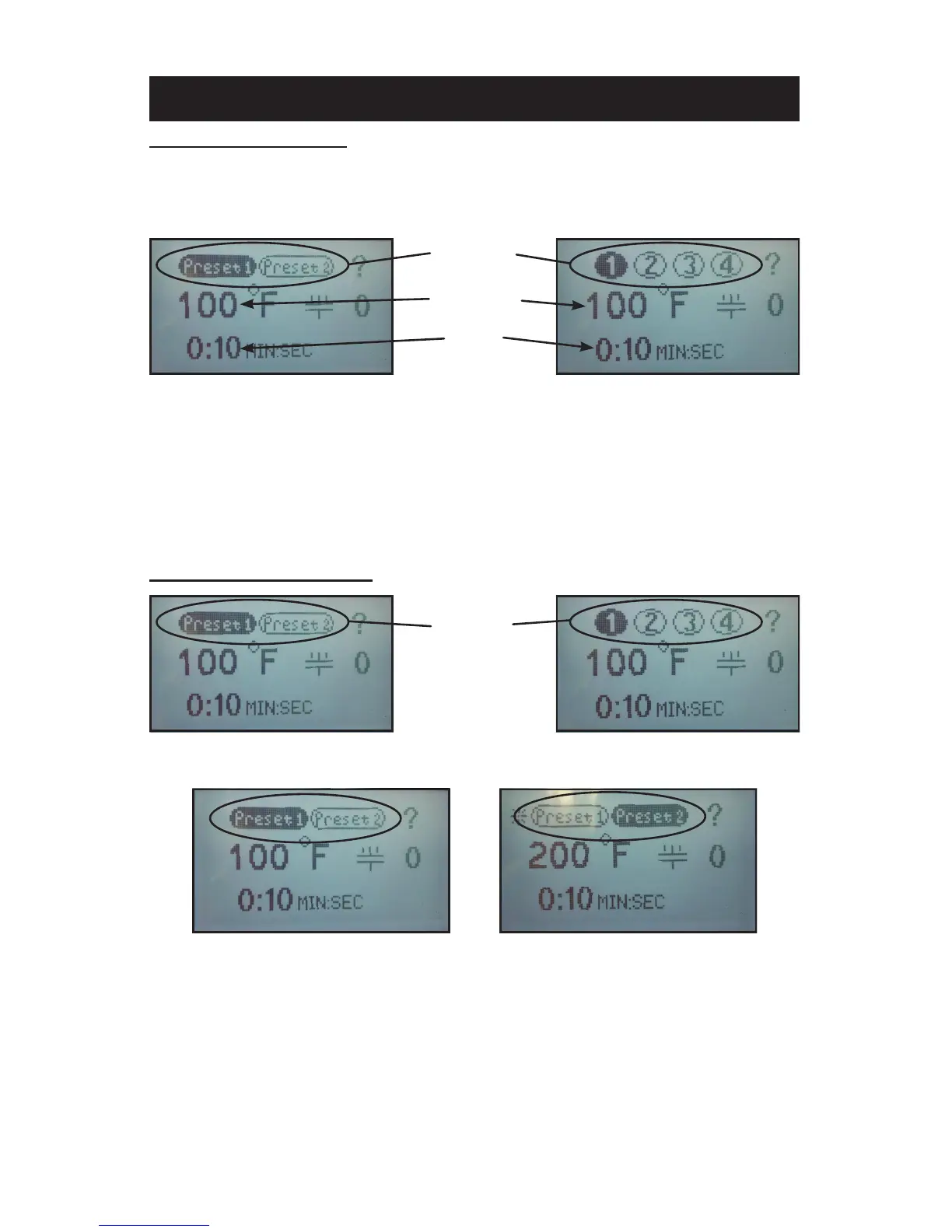
STORING PRESETS:
NOTE: The factory default settings for all presets is set to 200°F and 10
seconds.
1. Set the desired temperature and/or cycle time using the temperature
and time adjustment instructions in this document.
2. Press and hold the desired preset location for two seconds. The con-
troller will beep and the preset location button will display in reverse
indicating the preset is stored in memory.
NOTE: Always refer to specic transfer recommendations for temperature,
time and pressure as instructed by the transfer manufacturer.
RECALLING PRESETS:
1. Press and release for approximately 1/2 second the preset button to
recall. The controller will beep and the preset location button will display
in reverse indicating the preset has been changed.
NOTE: The new set values will display for 1 second before the controller
starts adjusting the temperature or time to match the new set-
point.
PRESET 1 SELECTED
(two preset setting shown)
PRESET 2 SELECTED
(two preset setting shown)
PRESET
LOCATIONS
(press 1/2 second
to recall)
PRESET
LOCATIONS
TEMPERATURE
SETTING
TIME
SETTING
HOME MENU SCREEN



 To Next Page