Frameless Glass Guidelines:
• FG attached to panels may not exceed 80” in height.
• FG may not be attached above glass panels.
• FG cannot be used in variable height congurations
where glass would be next to a taller panel or connector.
FG Must be used on the tallest panel.
NOTE: Failure to fully seat
screws could result
in glass damage
NOTE: Leave end caps off
for inline FG applications
NOTE: Do not press from
center of glass
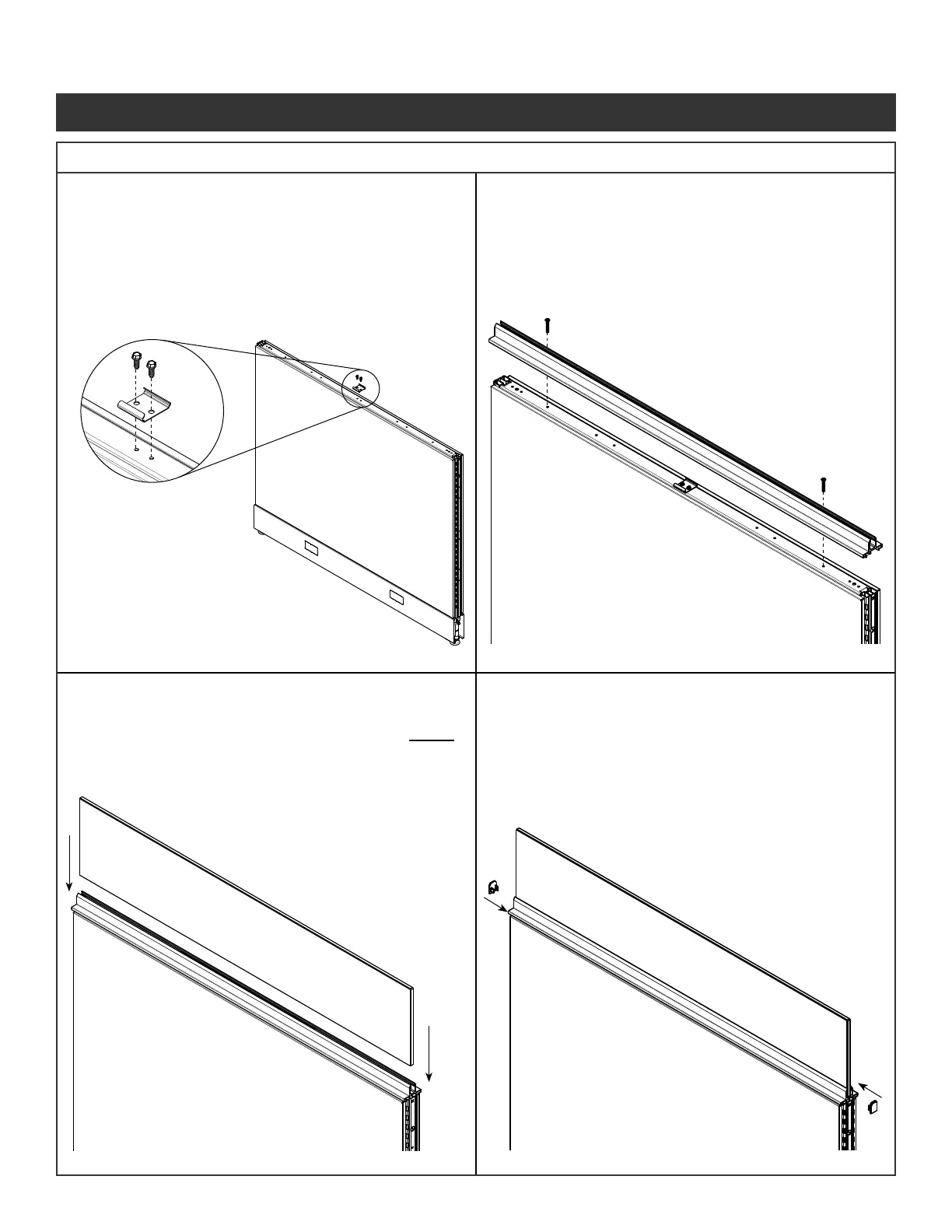
Step 1 - Install and level
all panels before
installing FG.
Step 2 - If not already installed
use two screws
(Fastener #1) to
install center top cap
bracket included with
hardware pack.
Step 3 - Snap FG top cap over
connector and center top
cap brackets. Use two
screws (Fastener #6)
through the countersunk
holes near the ends of the
top cap extrusion into the
of the panel.
Step 4 - Prior to placing glass,
spray rubber gaskets within
extrusion with glass cleaner.
Step 5 - Hold glass rmly on the
outside edges and center
above the panel. Gently
press on the outside comers
and tap glass into top cap
extrusion until fully seated.
Step 6 - Check to make sure glass
is fully seated. Press end
caps back on to each end
of the top cap extrusion.
Illustration 7. Frameless Glass (FG) Installation
7a. Top Cap Clip 7b. Top Cap
7c. Glass 7d. End Caps
Panel System Installation Packet
343-3890A
(03/17)
Page 7 of 27



 To Next Page