EasyManua.ls Logo

HOBBYEAGLE A3 Mini - Connection; Receiver Connection

Default Icon
12 pages
Print Icon
To Next Page IconTo Next Page
To Previous Page IconTo Previous Page
Loading...
WWW.HOBBYEAGLE.COM 4 / 12
CONNECTION
Receiver Connection
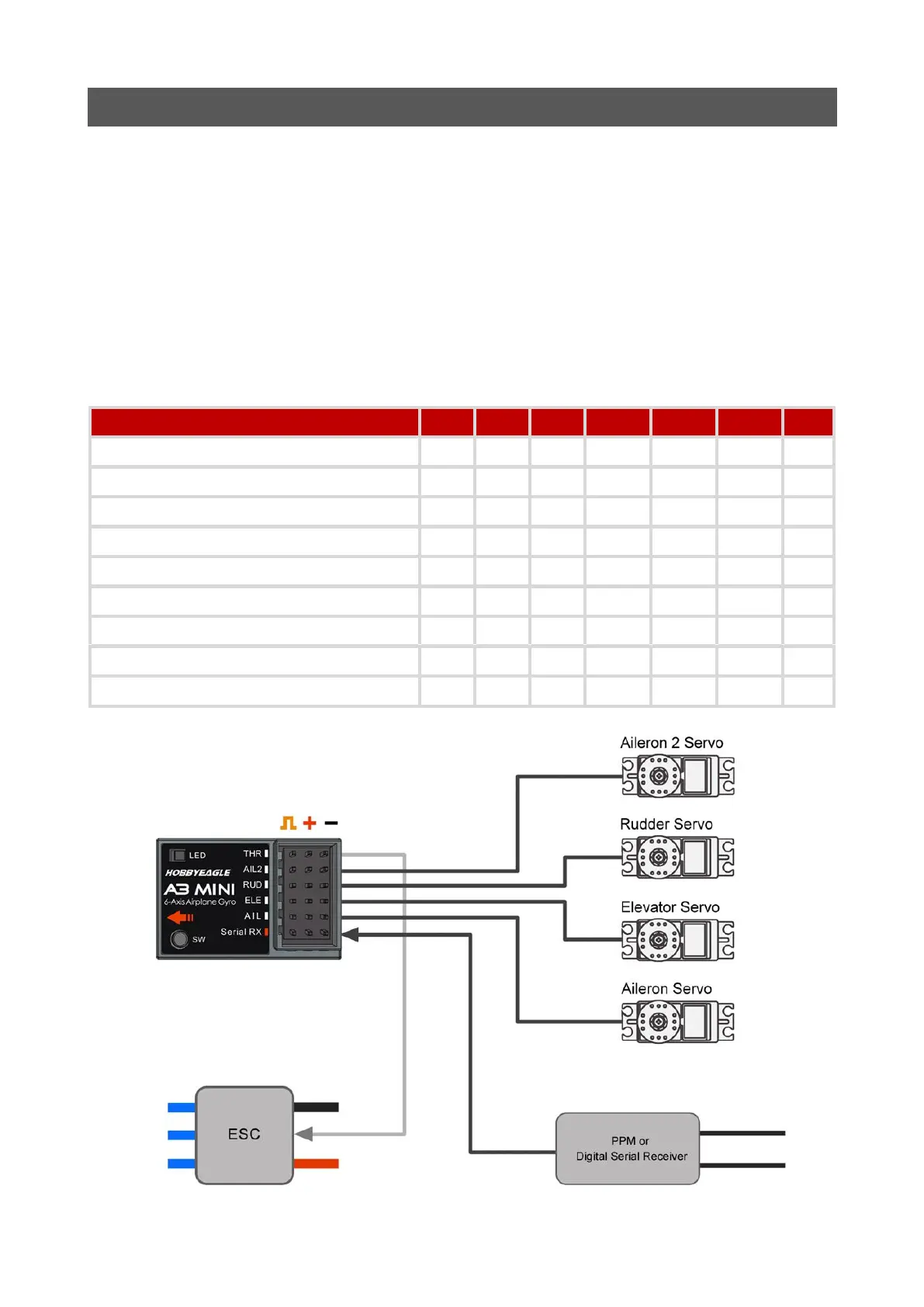
A3 Mini supports PPM and multi-protocol digital serial receivers which allows you to connect the receiver
to the gyro with one single wire on the slot [Serial RX]. Depending upon the receiver type selected, A3
Mini uses the preset channel assignment to recognize the channels from the receiver. Refer to the table
below and check if your radio transmits the channels in the correct order. After each time you have
changed the receiver type the current channel settings will be reset to the default. Choose Nonefor
those channels you do not use.
Table 1: Serial Receiver Protocols Supported and Default Channel Assignment

Serial Protocol (Maximum channels)
AIL
ELE
RUD
AIL2
MODE
GAIN
THR
PPM Receiver (16)
CH1
CH2
CH4
CH6
CH5
None
CH3
Futaba S.Bus / WFLY WBUS (16)
CH1
CH2
CH4
CH6
CH5
None
CH3
FrSky / RadioLink SBUS (16)
CH1
CH2
CH4
CH6
CH5
None
CH3
Spektrum DSM2/X 1024 Satellite (7)
CH2
CH3
CH4
CH6
CH5
None
CH1
Spektrum DSM2/X 2048 Satellite (9)
CH2
CH3
CH4
CH6
CH5
None
CH1
Spektrum SRXL (16)
CH2
CH3
CH4
CH6
CH5
None
CH1
Multiplex SRXL/JR XBUS Mode B (16)
CH2
CH3
CH4
CH6
CH5
None
CH1
Graupner SUMD (16)
CH2
CH3
CH4
CH6
CH5
None
CH1
FlySky iBUS (10)
CH1
CH2
CH4
CH6
CH5
None
CH3

Related product manuals