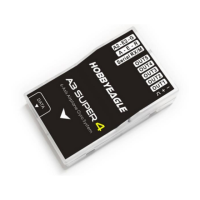
The Hobbyeagle A3 Super is a 6-axis flight control system designed for fixed-wing RC airplanes. It integrates a high-precision MEMS sensor (3 gyros + 3 accelerometers) and an advanced attitude and PID control algorithm to detect angular velocity and attitude, issuing commands to servos for flight balance and stability. The system supports various RC plane types, including delta-wing (flying-wing) and V-tail configurations, and offers features like remote master gain adjustment and separate dual aileron and elevator control.
Function Description:
The A3 Super offers four distinct flight modes:
- Normal Stabilization Mode (NORM): This is the basic gyroscope function, where the system senses roll velocity and provides momentary compensation to improve flight stability.
- 3D Attitude Locking Mode (3DAL): Also known as AVCS Mode, this mode is specifically designed for 3D flight. It uses an active angular velocity control algorithm to lock the plane's attitude when no commands are received from the radio.
- Self-balance Mode (SBAL): Ideal for junior pilots or FPV applications, this mode automatically commands the plane to maintain level flight when the sticks are released.
- Gyro Deactivated Mode (DACT): In this mode, the gyros for all channels are disabled, and the plane is entirely controlled by the radio.
The device also provides three control behaviors: Stable Mode, Normal Mode (default, suitable for most pilots), and Sport Mode, catering to various user preferences.
Important Technical Specifications:
- Gyroscope: ±2000 dps
- Accelerometer: ±4g
- Input Voltage: DC5V~6V
- Supported Servo Type: 1520µs analog and digital servo
- Operating Temperature: -40 °C ~ 85 °C
- Size: 43×27mm
- Weight: 10g (excluding wires)
The A3 Super features an integrated 6-axis (3 gyro + 3 acc) MEMS sensor for self-stability and self-balance. It boasts advanced brown-out fast recovery, enhancing security and reliability. The system supports 5 operating frequencies for servos (50Hz, 63Hz, 83Hz, 125Hz, 250Hz), compatible with both analog and digital servos. Analog servos typically tolerate only 50Hz, while digital servos can handle higher frequencies. Users should verify their servo's maximum frequency tolerance, as higher driving frequencies can lead to servo failure. The default setting is 50Hz.
Usage Features:
- Installation: The controller can be mounted flat, upright, or even upside down. The longer side of the unit must align with the heading direction, and the pin side can face either forwards or backwards. It should be placed on a stable horizontal platform, as close to the plane's center of gravity (CG) as possible. A level calibration is required after installation to offset any deviation.
- Connection: The A3 Super requires at least 3 receiver channels (AIL, ELE, RUD) to function, supporting up to 7 channels. It can be powered via the [BATT] pins, connected to an idle receiver channel or an independent BEC (5-6V).
- AUX Modes: Four functional combinations are available for the second group of input pins (AUX1, AUX2, AUX3), allowing them to be used for AIL2, ELE2, Flight Mode (FMOD), or Master Gain Control (GAIN).
- Transmitter Preparation: Users should create a new model in their transmitter, setting the type as fixed-wing (e.g., 2AIL+1ELE). All trimming buttons and sub-trims should be set to 0%. Any delta-wing or V-tail mixing functions in the radio system must be disabled, as the A3 Super handles these. Servo travel (End Point), Dual Rate, and EXP settings can be adjusted after installation.
- Flight Mode Channel (FMOD): A 3-position switch can be assigned to this channel to switch between preset flight modes (Normal Mode, 3D Mode, Self-balance). If left unconnected, the system defaults to the mode assigned to position-1.
- Master Gain Control Channel (GAIN): A knob or 3-position switch can be assigned to remotely adjust the master gain during flight. If this pin is disabled or unconnected, the master gain can only be modified via the program card or PC config tool.
- Dual Aileron & Dual Elevator: The A3 Super supports true dual aileron (OUT4 for 2nd aileron) and dual elevator (OUT5 for 2nd elevator) systems. OUT4 automatically mirrors OUT1, and OUT5 mirrors OUT2, eliminating the need for Y-extension cables. Both channels share the same settings (servo limits, gyro direction, gain).
- Wing Type & Mixing: Built-in mixing functions for delta-wing (flying-wing) and V-tail eliminate the need for transmitter-side mixing. The radio should be set to a single 4-channel fixed-wing mode.
- Servo Limits: Mechanical limits for aileron, elevator, and rudder servos can be set from 0-100% (1020-2020µs pulse length). When adjusting, the controller should be in 3D flight mode, and sticks moved to one side to set the limit without binding.
- Gyro On-off: Gyro functions can be individually enabled or disabled for each channel.
- Gyro Direction: It is critical to verify that gyros compensate in the correct direction before flight. The gyro directions for Aileron 2 and Elevator 2 can be set separately.
- Response Rate: Five levels of response rate are available, affecting gyro sensitivity. The default "Standard" is suitable for most planes. Higher rates improve performance but require reduced plane vibration.
- Control Behavior: Users can select between Stable, Normal, and Sport modes.
- Stick Deadband: This parameter (0-10%, default 5%) defines the range around the stick center where the A3 Super will not react, useful for transmitters with stick centering issues.
- Level Offset: This function corrects absolute angle errors from installation, preventing the plane from dropping or rising in self-balance mode. It can be performed via automatic calibration or manual adjustment.
Maintenance Features:
- Brown-out Fast Recovery: In case of power failure (voltage drop <2.7V) or BEC interruption, the controller performs a fast startup by skipping self-test and gyro calibration, ensuring quick recovery during flight. However, a reliable BEC is crucial.
- LED Indicator: An RGB LED displays working status and error reports (e.g., White for initialization, Red for failure, Blue for Normal stabilization, Violet for 3D flight, White for Self-balance, Green for stick centering, Yellow for level calibrating).
- Start-Up Steps: Before each flight, turn on the transmitter, place the plane horizontally, and power on. The LED will indicate initialization (rapid white flash), followed by a single white flash for success. A rapid green flash indicates stick centering.
- Firmware Upgrade: The included USB adapter is used to upgrade the firmware for both the A3 Super and the program card. Updates are available on the Hobbyeagle website.
- Program Card: The program card allows easy setup of all functions and parameters without a PC, even outdoors. It supports Simplified Chinese and English.
- Buttons: UP/+, DN/-, ESC (exit without saving), ENT (enter/save, hold for 2s to restore defaults).
- Device Connection: Connects to the controller's DATA port, reads data, and allows immediate adjustments.
- PC Config Tool: An alternative to the program card, available for download with the PC suite and USB driver from the Hobbyeagle website.
- Stick Centering: Calibrates and re-learns stick center positions. This should be done after first-time use, replacing a radio system, or changing transmitter trims. It can be performed automatically at startup, by fast toggling the flight mode switch, or manually via the program card/PC tool. Never perform stick centering during flight.
- Data Save/Load: The program card can save up to 5 copies of settings to its internal memory for backup or sharing. Saved data can be loaded back into the controller.
- Device Info/Card Info: Displays firmware version numbers for the controller and program card.
- Data Reset: Restores the controller to factory default settings, useful for resolving software-related issues.

 Need help?
 General

 To Next Page