A3SuperUserManualVer.2.6
HTTP://WWW.HOBBYEAGLE.COM Feb.20,2014
6.ConnectionCase
6.1.Description
AstherearemanydifferentwayswhileconnectingbetweenA3Superandthereceiversincever.2.x,hereweneed
totakeanexampletogiveyouabetterunderstandingaboutit.Let'sassumethattheplanehastwoaileronservos
and one elevator servo, which is the most common application. And you are going to enable both features of
remotemastergainandflightmodeswitchduringtheflight.Insuchcase,AUXMode3shouldbeusedforthe
controllerandyouneeda7channelreceiveratleast,forexampleFUTABA'sR6008HS.
6.2.AUXMode
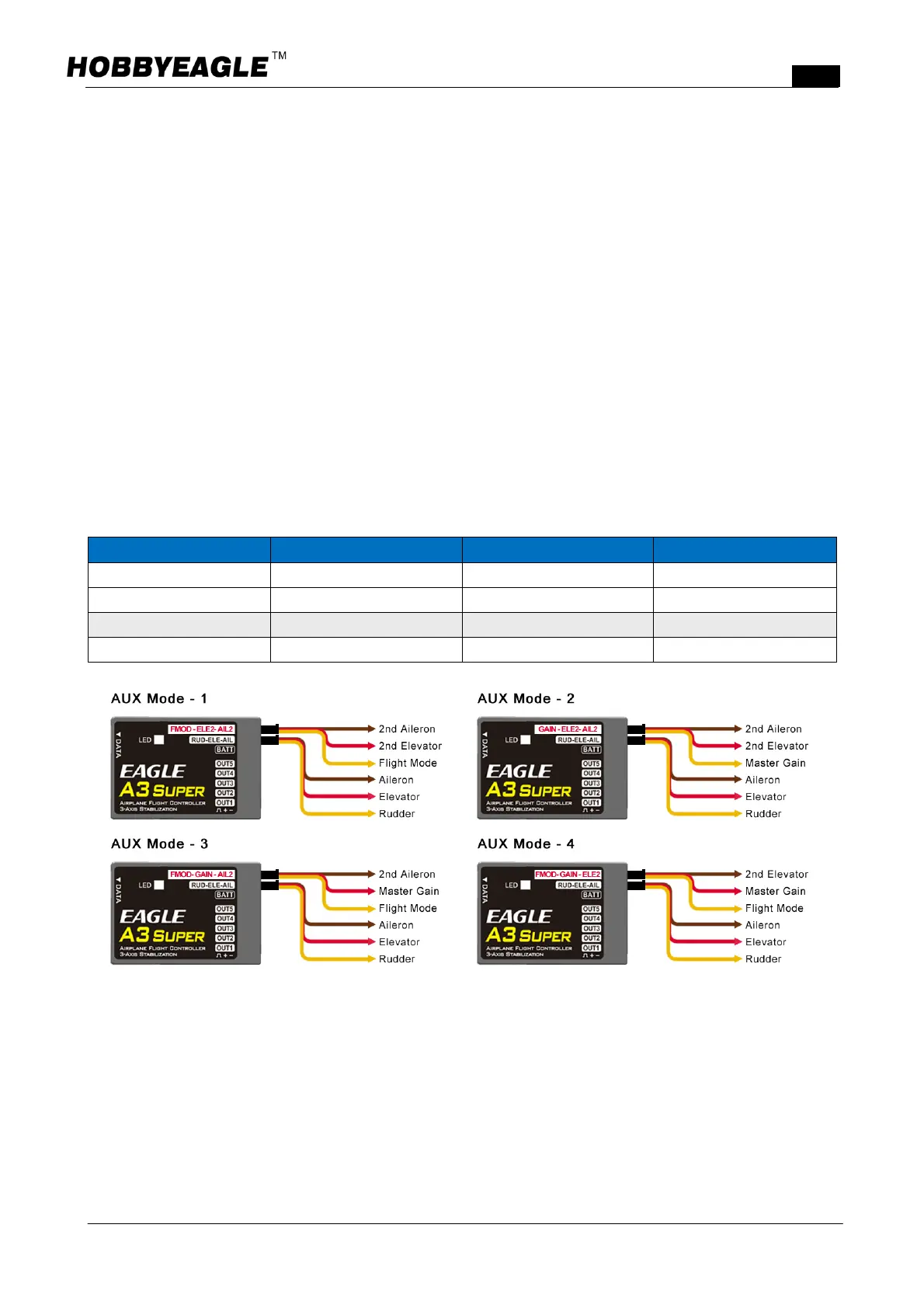
Ver.2.1provides4functionalcombinationsforthesecondgroupofinputpins,includingAUXMode1,Mode2,
Mode3andMode4.These3 pinscanbeusedasAIL2,ELE2,Flight Mode(FMOD) or MasterGainControl
(GAIN)asthechartbelowshows.Inthiscase,wechooseAUXmode3.
AUXMode AUX3 AUX2 AUX1
Mode1 FMOD ELE2 AIL2
Mode2 GAIN ELE2 AIL2
√ Mode3
FMOD GAIN AIL2
Mode4 FMOD GAIN ELE2
6.3.TransmitterPreparing
Createa new model andsetthe modeltypeas fixedwingwith2AIL+1ELEin your transmitter. Verifythatall
trimmingbuttonsandsubtrimsaresetto0%.Disableanymixingfunctionsfordeltawingorvtailinyourradio
system,thesewillbedonebyA3Super.LetothersettingsstayatdefaultthismomentsuchasServoTravel(End
Point), Dual Rate and EXP etc. They can be adjusted as usual after installation. Make a channel mapping
accordingtothetablebelow:



 To Next Page