Back
03
Charging
Please fully charge iSteady V3 before using it for the rst time.
Charging Method:
Please use the standard USB-Type C charging cable to connect to
the Type-C charging port on the gimbal handle for charging.
*It is recommended to use a 5V-2A USB charger (not included).
USB Charger
(5V-2A)
*NOT included
USB -Type C
Charging Display:
① Battery indicator light ashing slowly indicates charging
(dierent colors correspond to the current battery level).
② Battery indicator light staying solid green indicates charging is
complete.
03
㉗
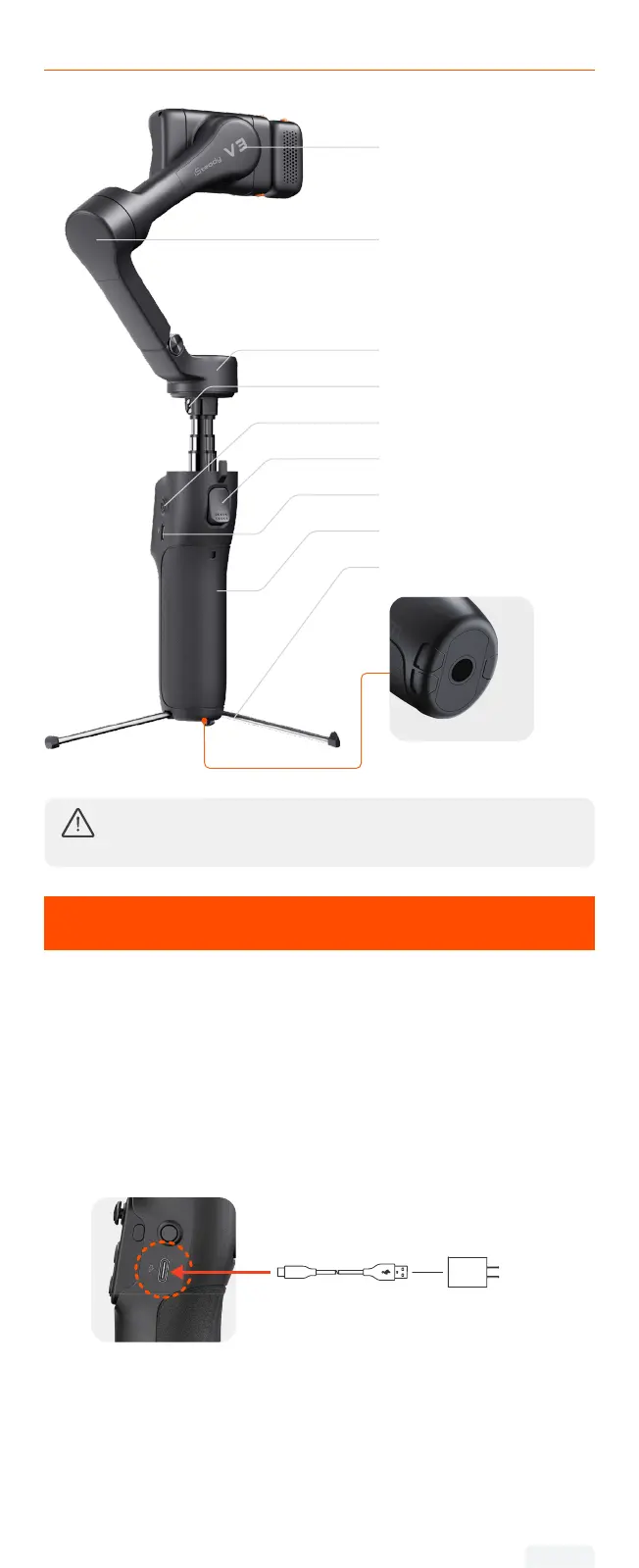
Roll Motor
㉛
Power Button
㉜
Trigger
㉝
Type-C Charging Port
㉞
Handle
㉟
Built-In Tripod
㊱
1/4"-20 Screw Hole
㉘ Tilt Motor
㉙ Pan Motor
㉚
Hex Screw
㉕
Shutter Button
If the pan motor's base is loose, use the included
hex key to tighten the hex screw clockwise.


 To Next Page