Folding
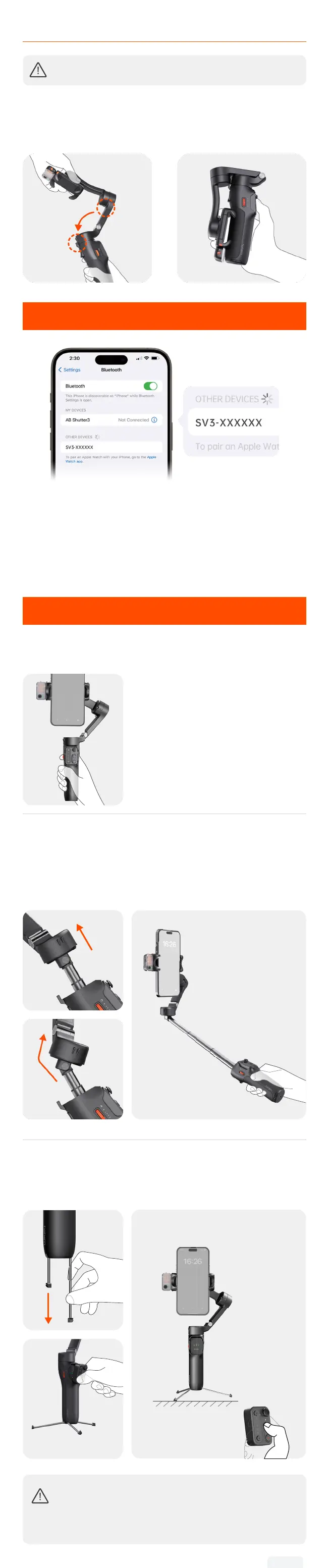
Ensure the gimbal is powered o before folding it.
Remove the phone. Hold the handle and fold the arm downward
and snap the folding lock and the mounting hole together as
shown.
①
Folding
lock
Mounting
hole
②
05
Bluetooth Connection
① Make sure the gimbal is powered on.
② Activate Bluetooth on your smartphone and select the device
named "SV3-XXXXXX" from the list of available devices.
③ Follow the on-screen instructions to connect and pair.
④ A steady light on the Bluetooth indicator signies a successful
connection.
06
Usage Modes
There are 3 usage modes of iSteady V3: Handheld Mode, Extended
Mode, and Remote Mode.
Handheld Mode
Simply unfold the gimbal for on-the-go
shooting.
Extended Mode
Pull out the built-in extension rod upwards and slightly tilt the
hinge area to the preferred angle for shooting.
*The extension rod includes three segments with a maximum
length of 205mm. Adjust the angle from 0° to 90° .
①
②
③
Remote Mode
Fully pull out the legs and unfold. Stand the gimbal on a desktop
surface and remove the remote controller for long-distance remote
shooting.
①
②
③
*Ensure that Bluetooth
is connected.
•For increased stability in a wider range of scenarios
and conditions, you can also connect iSteady V3 to an
external tripod via the 1/4"-20 Screw Hole.
•To retract the tripod, carefully push the legs in.


 To Next Page