21
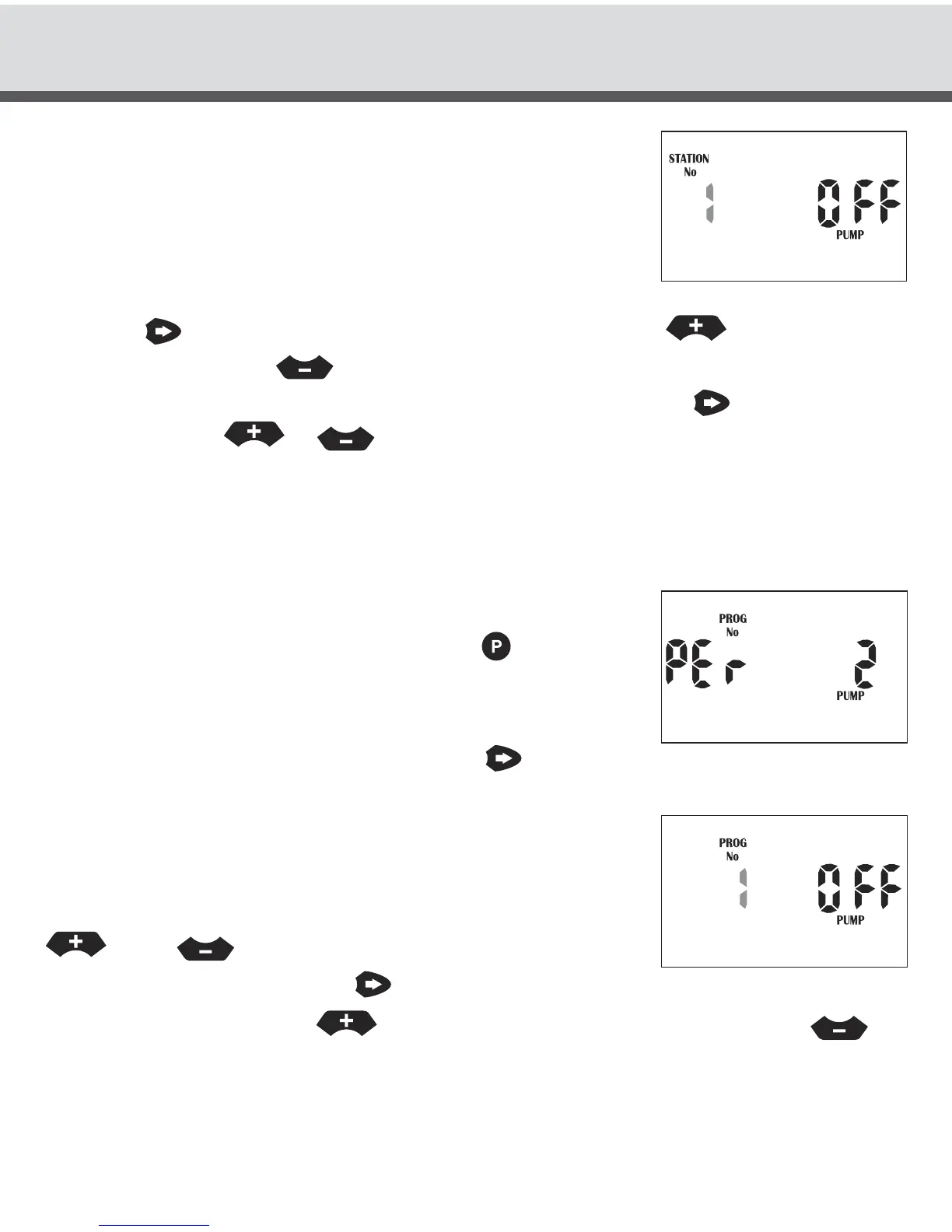
Station No 1 will now be flashing and it will be OFF.
The display will show:
This means that pump will not turn on when station No 1 is
running. To turn a pump ON or OFF for a particular station
press the
button so that “OFF” is now flashing. Press the
button to turn the
pump ON or press the
button to turn the pump OFF for that particular station
number. Complete this sequence for all station No’s by pressing
and adjust “ON”
or “OFF” with the
or
buttons.
Pump No.2 Selection
The PRO 1248 Controller comes with a second pump / master option.
To set Pump No. 2 per program:
Turn the dial to “Set Auxiliaries”. Press the button 3
times. The display will show:
This means we are in the pump per program menu for
Pump No.2 (master valve No.2). Press the button to
enter this menu option. Program 1 will now be flashing.
The display will show:
This means that Pump No.2 will not turn on when program 1
is running. To select a different program number press the
or the
button. To turn a pump ON or OFF for
a particular program press the button so that the “OFF”
is now flashing. Press the button to turn Pump No.2 ON or press the
button to turn Pump No.2 OFF for that particular number.
Complete this sequence for all program No’s.
SPECIAL FUNCTIONS



 To Next Page