Need help?
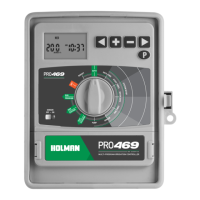
Do you have a question about the Holman PRO469 and is the answer not in the manual?
Steps to correctly power up the controller, including battery installation for clock backup.
Identification of the main parts of the irrigation controller, including the LCD display and control dial.
Configures automatic watering for groups of stations by setting start times, watering days, and run times.
Instructions to set the controller's current time, day, and date for accurate scheduling.
How to set multiple start times for each program for sequential station watering.
Options for selecting watering days, including individual, even/odd, and interval days.
Defines the duration each station will water for a specific program.
Instructions for setting up more than the initial three programs.
Instructions for manually watering a single irrigation station.
How to change the default run time for manual station operation.
Steps to manually run a complete program or multiple stacked programs.
Explanation of how to manually run multiple programs sequentially without overlap.
How to stop automatic or manual watering cycles by turning the dial to OFF.
Details about permanent memory and battery backup for retaining settings.
Installation and configuration of a rain sensor for automatic watering interruption.
Setting a delay time after rain stops before watering resumes.
How to assign individual stations to a pump or master valve.
Adjusting the LCD display contrast for better visibility.
Adjusting run times by percentage based on season or water saving needs.
Explains fault codes like NO AC and FAULT BAT displayed by the controller.
How to run a diagnostic test to check each station's operation.
Steps to clear all programmed settings and reset the controller.
Function to upload or re-install program recall features.
Guidelines for physically installing the controller unit in a suitable location.
Safety precautions and general advice for electrical connections to the unit.
Instructions for preparing and connecting field wires to the controller terminals.
Recommendations for connecting the controller to the main power supply.
Identification and function of terminals on the controller's connection block.
Explains the purpose of a master valve and its connection to the system.
Guidance on connecting solenoid valves to station outputs and common wire.
How the controller signals a pump relay or contactor to start a pump.
Safety measures for system tests, especially with pumps and unused stations.
Wiring diagram and recommendations for single-phase pump setup.
Possible causes and solutions for the display not showing anything.
Diagnosing and fixing issues with a single station not operating.
Troubleshooting why the controller is not starting automatic programs.
Solutions for when the controller's buttons are unresponsive.
Identifying and resolving unexpected random watering cycles.
Troubleshooting simultaneous station operation.
Diagnosing issues with the pump relay or contactor.
What to do if the display screen is physically damaged.
Troubleshooting rain sensor input failures or incorrect operation.
Resolving issues with the pump not operating for a particular station or program.
Details on voltage and current ratings for solenoid valves and pump start.
Information about fuses and built-in protection mechanisms.
How the controller retains data during power outages via batteries.
Guidelines for electrical wiring installation and protection.
Steps for returning the controller for servicing or repair by an authorized agent.
Details of the manufacturer's 3-year guarantee and consumer rights.
 General
| Type | Irrigation Controller |
|---|---|
| Number of Stations | 6 |
| Mounting | Wall Mount |
| Voltage | 24VAC |
| Display | LCD |
| Indoor/Outdoor Use | Indoor |

 To Next Page