20
SPECIAL FUNCTIONS
Pump ON/OFF Selection
In most systems the water supply will be from a bore or from the mains. This
controller will turn on either a pump (bore supply) or master valve (mains supply)
input each time an automatic or manual start occurs. Normally the pump or master
valve input is activated for all stations. However if there is a dual water supply or
some of the stations may be used to run garden lights, the pump master valve
input may need to be turned off for selected stations. Pumps can be assigned to be
activated by a program or alternatively by individual stations, not both. The standard
default is that all programs are set to pump “ON”.
To set pumps per program:
Turn the dial to “Set Auxiliaries”.
Press the
button once.
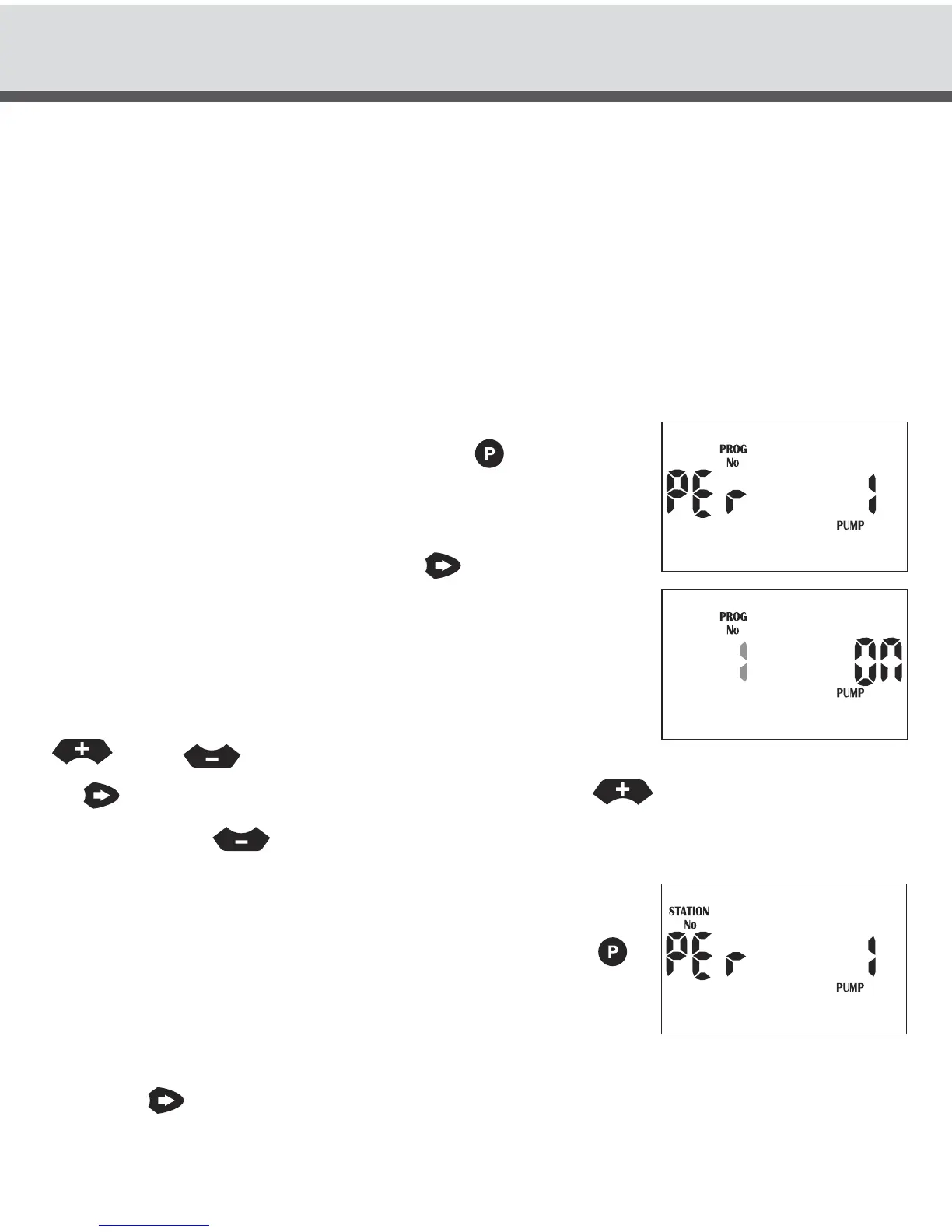
The display will show:
This means we are in the pump per program menu for
Pump No 1 (master valve). Press the
button to enter
this menu option. Program 1 will now be flashing.
The display will show:
This means that the pump will turn on when program 1 is
running. To select a different program number press the
or the
button. To turn a pump ON or OFF for a particular program press
the
button so that “ON” is now flashing. Press the
button to turn the pump
ON or press the
button to turn the pump OFF for that particular number.
Complete this sequence for all program No’s.
To set pumps per stations
Turn the dial to the “Set Auxiliaries” position. Press the
button twice and the pump per station menu will be
displayed. The display will show:
This means we are in the Pump per Station menu for Pump No 1 (master valve).
Press the
button to enter this menu option.



 To Next Page