-8-
-9-
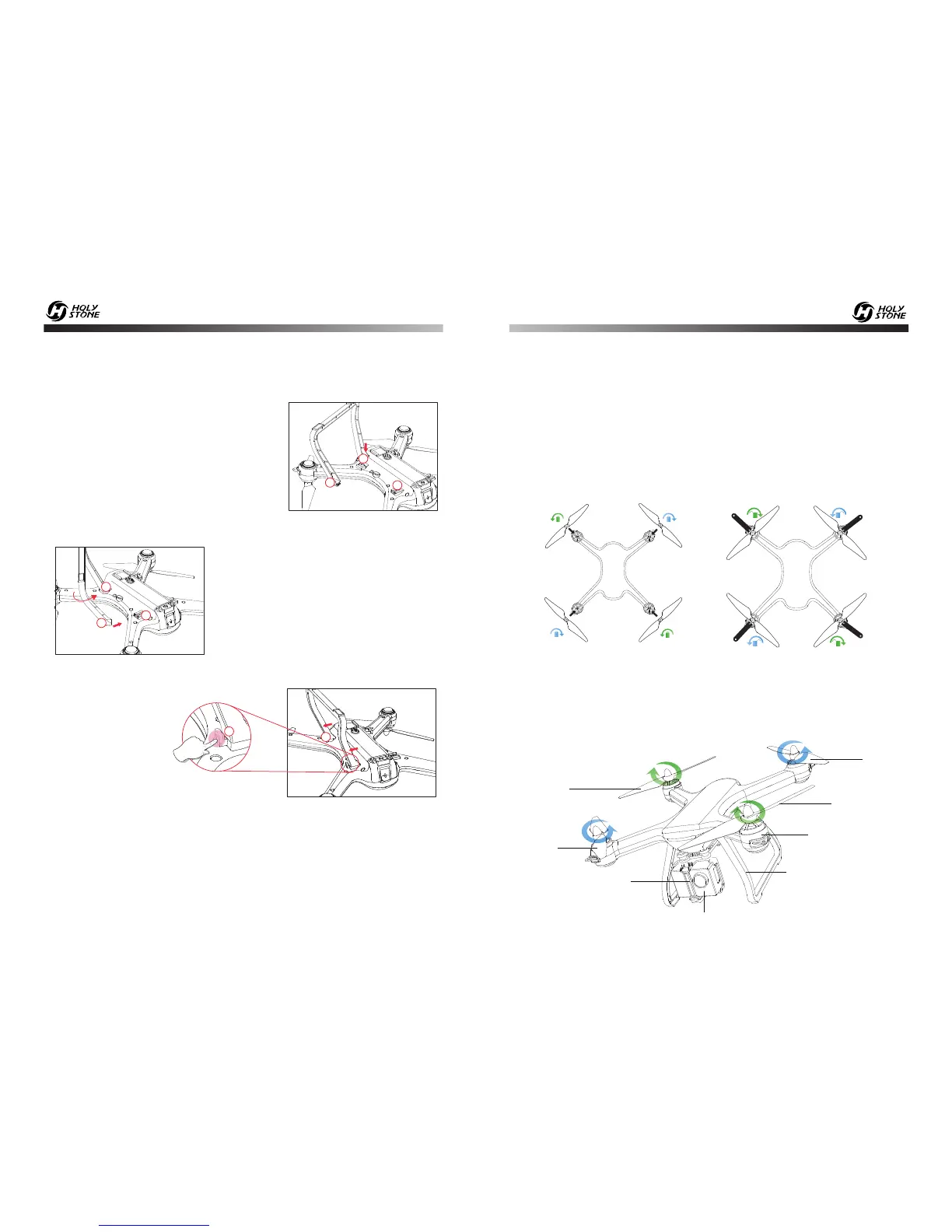
Pic 9
A
Pic 8
A
B
B
② Rotate the landing gear inward, then
push the “B” side of landing gear into the
“B” hole on the drone to complete instal-
lation. (Pic 8)
③ Press the buckle on the side of the landing gear to remove. (Pic 9)
B
Pic 7
A
B
B
① Make the “A” side of the landing gear
aim is inserted in the “A” hole on the
drone. (Pic 7)
5.3 Landing Gear
5.4 Propellers
① Installation: Install the propeller on the motor shaft according to the “A/
B” corresponding position, and rotate to tighten the propeller according to
the “Lock” icon on the propeller. (Pic 10)
②
Removal: Grip the brushless motor with propeller spanner tool and
rotate according the “unlock” icon on the propeller to remove. (Pic 11)
B
B
A
A
Pic 10 Pic 11
B
B
A
A
6.0 DRONE’S DETAILS
Propeller A
Propeller A
Propeller B
Landing Gear
Motor Base
Camera Holder
HD Camera
Propeller B
- - - - - - - - - - - - - - - - - - - - - - - - - - - - - - - - - - - - - - - - - - - - - - - - - - - - - - - - - - -













 To Next Page