-10-
-11-
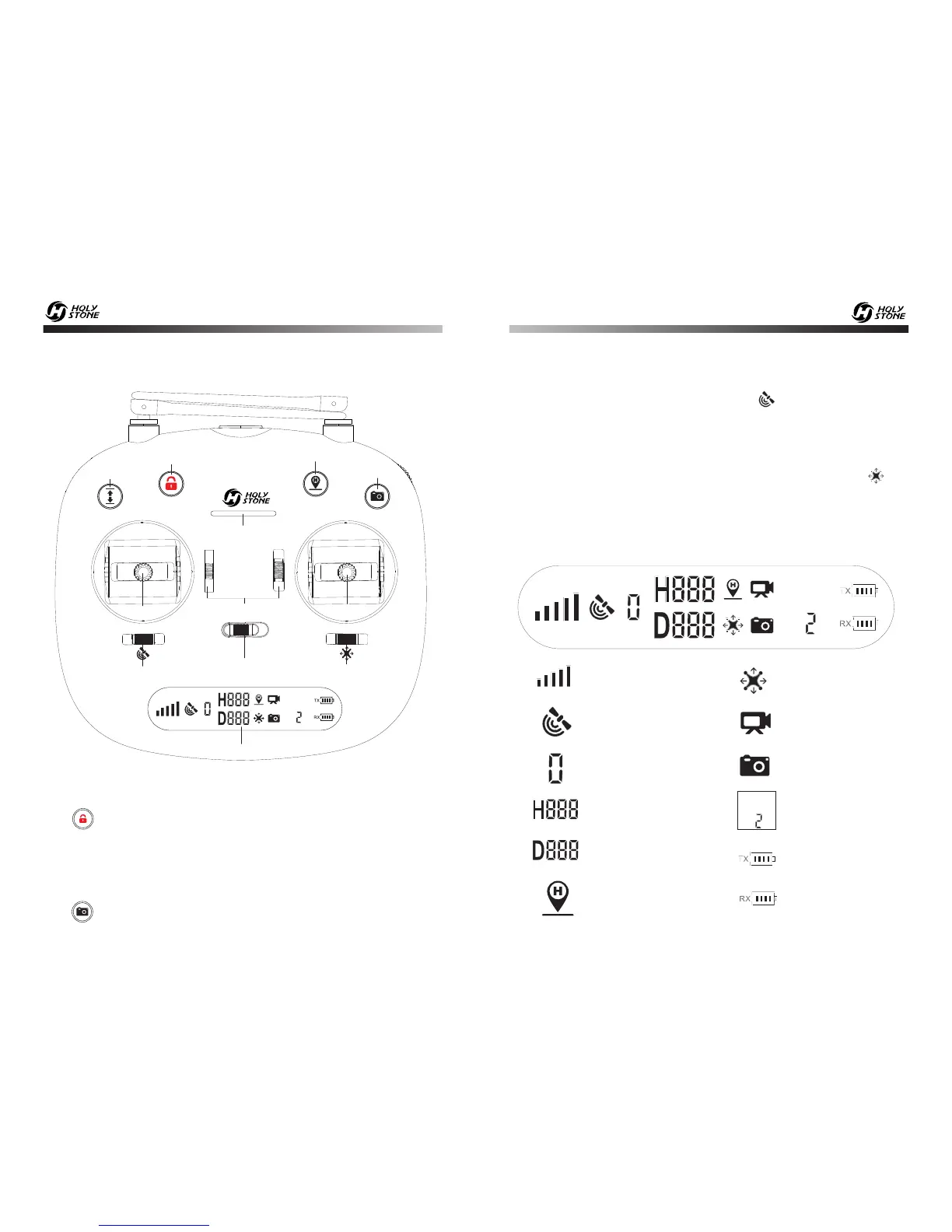
7.0 TRANSMITTER DETAILS
7.1 Transmitter Functions
7.2 LCD Screen Functions
- - - - - - - - - - - - - - - - - - - - - - - - - - - - - - - - - - - - - - - - - - - - - - - - - - - - - - - - - - -
Model
Model
Altitude (Meter)
Distance(Meter)
GPS Mode
Signal Strength
Headless Mode
Photo
Transmitter
Throttle Mode
Drone Battery Level
Video
Satellite Number
One Key Return
Transmitter
Battery Level
- - - - - - - - - - - - - - - - - - - - - - - - - - - - - - - - - - - - - - - - - - - - - - - - - - - - - - - - - - -
Return to Home:The Return to Home function brings the drone back to
the last recorded Home Point.
Unlock / Emergency Stop:
Click ” “, the motors rotate and the drone is unlocked.
Hold the button 3 seconds for Emergency Stop.
One Key Take off / Landing:One button take off, one button landing.
Photo / Video:
Click ” “ to take a photo, hold the button for 2 seconds to take video.
GPS Mode Switch:
Turn on the transmitter, the default state is GPS mode. You can turn off the
GPS by sliding the button. Check the icon “ ” on the LCD screen to
confirm GPS on or off.
Headless Mode Switch:
Turn on the transmitter, the default state is Non-headless mode. You can
turn on the headless mode by sliding the button. Check the icon “ ” on
the LCD screen to confirm headless mode on or off.
Model
OFF ON
One Key
Takeoff / Landing
Return to Home
Photo / Video
Power Switch
Power Indicator
GPS Mode Switch
Headless Mode Switch
Null Button
Unlock/
Emergency Stop
LCD Screen
Left Joystick
Right Joystick













 To Next Page