8
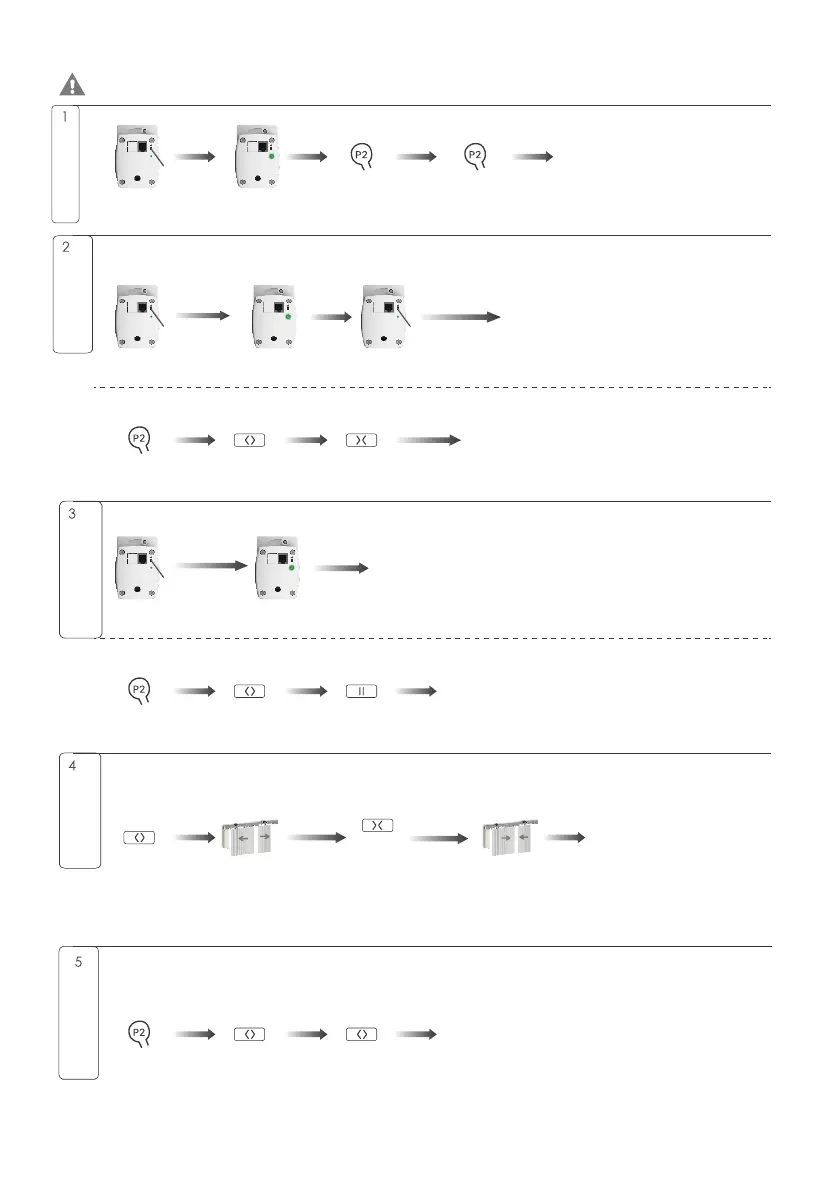
Press 1S
Press 1S
Flash once
Flash 5times
The emitter paired successfully
Release button
Press for 2S
Flashes 5times
Flashes twice
Press for 5S
Release button
Flash once
Press 2S
The direction has been switched successfully
The curtain will
open until stop
against obstacle
The new open limit has
been set successfully
The direction has been switched successfully
The limit has been set successfully
Pariingg
Switch Rotating
Directiong
Press for 1S
Press for 1S
Press for 1S
Flashes once
Flashes once
Flashes 5times
Intelligent module
distribution network
Press for 8S
Release button
Flashes 3times
Flashes once
Flashes once
Flashes 5times
Press for 1S
Press for 1S
Press for 1S
Setting limits
automatically
Press for 1S
The curtain will
close until stop
against obstacle
Press for 1S
Manually Set
The Open Limits
Press for 1S
Press for 1S
Press for 1S
Flashes once
Flashes 5times
Flashes once
A and B channel use the same operation. The 'flash' is a prompt from the motor LED indicator. During the
button combination settings, all key operations need to be completed within 10 seconds - they cannot be
completed after 10 seconds.
1. Press 'UP' to close the motor, try below to switch direction.
2. After the switch is successful, the motor limit will be deleted.
Enter the pairing mode.
The red LED indicator flashes quickly, indicating the
motor is ready to be paired.
Enter the pairing mode.
The red LED indicator flashes quickly,
indicating that the motor is ready to be
paired.
Do not control the motor during the automatic limit setting, otherwise the setting will fail. After the limit
is automatically set, the motor automatically runs to the position desired.
1. When the open limit has been set and the curtain is moves to the set position, the following operations
can be performed.
2. Repeat this operation to cancel the manually set open limit.


 To Next Page
 Loading...