23
Laden Sie zunächst die aktuelle Installationsdatei der Software
auf der Website www.homematic.com im Downloadbereich
herunter.
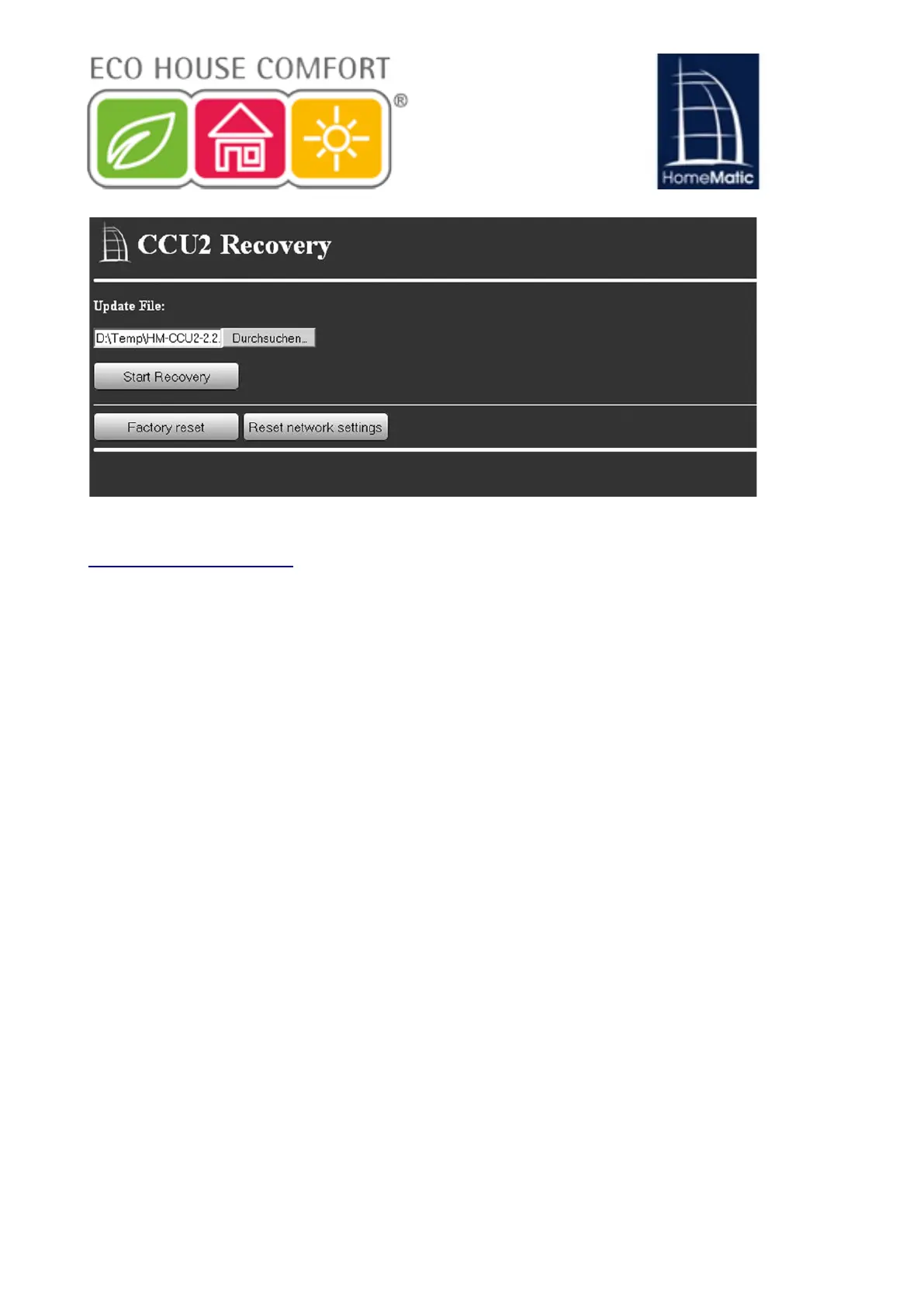
Klicken Sie im Recovery System auf „Select File“ und wählen Sie
die Installationsdatei aus.
Klicken Sie anschließend auf „Start Recovery“, um die Software
wieder herzustellen.
Nachdem die Software wieder hergestellt wurde, müssen Sie sich
erneut an der Zentrale anmelden. Anschließend steht der volle
Funktionsumfang Ihrer Zentrale zur Verfügung.
Über den Button „Factory reset“ können Sie Ihre Zentrale
LQGHQ:HUNV]XVWDQG]XUFNVHW]HQ$OOH.RQ¿JXUDWLRQHQ
Einstellungen und Programmierungen werden dabei
gelöscht.
Über den Button „Reset network settings“ können Sie
nur die Netzwerkeinstellungen in den Werkszustand der
Zentrale zurücksetzten.
• First download the latest installation file of the software from the site
www.homematic.com (in the download area).
• On the System Recovery to "Select File" and select the installation file.
• Then click on "Start Recovery" to restore the software.
After the software is restored, you must log into CCU2 again to gain access
to full functionality.
INFO: using the Factory reset button will reset your CCU to the factory
defaults. All configurations, settings and programming will be erased.
INFO: using the "Reset network settings" button will only reset the network
settings to the CCU’s factory defaults.
10.3. Achieving Duty Cycle limit
The duty cycle describes a statutory limitation of transmission time of devices
in the 868 MHz range. The aim of this regulation is to ensure the functioning
of all the 868 MHz band working devices.
When using the frequency range 868 MHz, the maximum transmission time
of each unit is 1% of an hour (or 36 seconds in an hour); if the units reach the
1% limits, they will not send radio signals until this time limit is over.
According to this directive, HomeMatic devices are designed and
manufactured to 100% standard-compliant.
18


 To Next Page