Need help?
Do you have a question about the Homtime C12 and is the answer not in the manual?
Product supports music playback from SD cards.
Device includes an integrated FM radio receiver.
Enables wireless music streaming via Bluetooth technology.
Allows for hands-free phone calls using Bluetooth connectivity.
Features two USB ports for charging multiple devices at once.
Large LCD display with user-adjustable brightness settings.
Melodic alarm feature with customizable volume levels.
Alarm can be triggered by FM radio, SD card, or preset melodies.
Includes a snooze function for temporary alarm silencing.
Integrated thermometer displays temperature in Celsius or Fahrenheit.
Provides a 3.5mm AUX-in port for audio input.
Lists the main C12 unit, power adapter, user manual, warranty, and certification.
Specifies Bluetooth version 2.1+EDR and a 10m range.
Details audio output power (3W+3W) and frequency response (70Hz-20KHz).
Lists the supported FM radio frequency range from 87.5-108MHz.
Covers standby/max power consumption, S/N ratio, and distortion level.
Specifies 100-240V AC power input, net weight, and dimensions.
Identifies large rotary knob, alarm set, mode/on-off knob, and small knob.
Locates USB ports, DC socket, AUX-in, and various selector switches.
Details its use for setting time, alarm, snooze, volume, and brightness.
Explains functions of the Alarm Set button and Mode/On-Off knob.
Describes its use for music skipping, FM tuning, and playback control.
How to turn the unit on/off and activate Bluetooth pairing.
Steps for playing music via AUX-in and SD card connections.
Instructions for selecting and using the FM radio function.
Explains indicators for alarm setting, 24hr mode, and time setting.
Shows indicators for temperature unit and AM/PM in 12-hour mode.
Details indicators for USB charging, Bluetooth, AUX-in, SD card, and FM radio.
Describes the display of clock minutes and FM radio frequency.
Guide on installing the backup battery for power retention.
Instructions on how to plug in the device using the power adapter.
Steps to turn the unit on and off using the specified control.
Detailed guide for setting the clock time and choosing between 12/24 hour formats.
How to choose between buzzer, FM, or SD card for alarm sounds.
Instructions for activating snooze and its repeat interval.
Explanation of how alarm volume gradually increases and can be adjusted.
Procedures for canceling or resetting an alarm.
Information on how the last set alarm time is stored for easy recall.
Guide to pairing devices and playing music wirelessly via Bluetooth.
How to play or pause music playback using the designated button.
Instructions for skipping tracks and fast-forward/rewind using the rotary knob.
Steps for playing music by connecting an audio source via the AUX-in jack.
Instructions for playing music files stored on an SD card.
How to adjust the volume of music playback using a specific control.
How to accept an incoming phone call using the device.
Instructions for terminating an ongoing phone call.
How to switch the device to FM radio mode.
Guide to automatically searching for available FM radio frequencies.
How to manually tune to adjacent FM radio stations.
Instructions for rapid scanning of FM stations and reception tips.
How to plug in USB devices to charge them via the unit's ports.
Explains how the device indicates that a USB device is being charged.
Steps to change the brightness level of the LCD screen.
How to cycle through the available four backlight brightness settings.
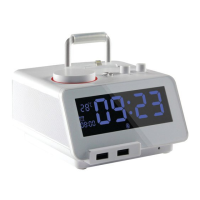
The Homtime C12 is an alarm clock with a range of versatile features, designed to enhance your daily routine with convenience and entertainment. This device combines the functionalities of an alarm clock, Bluetooth speaker, FM radio, and a charging station, all in one compact unit.
At its core, the C12 functions as a digital alarm clock, displaying the time on a large LCD screen. It offers multiple alarm sources, allowing users to wake up to preprogrammed melodic alarms, FM radio, or music from an SD card. The alarm volume is adjustable and gradually increases, ensuring a gentle wake-up experience. A snooze function is also included, providing an extra few minutes of rest. Beyond timekeeping, the C12 integrates a built-in thermometer, displaying the temperature in either Celsius or Fahrenheit.
As a Bluetooth speaker, the C12 allows for wireless music streaming from any Bluetooth-enabled device. This feature transforms the alarm clock into a personal audio system, perfect for listening to music, podcasts, or audiobooks. The device also supports hands-free calling via Bluetooth, enabling users to answer and end calls directly from the unit.
For those who prefer traditional radio, the C12 includes a built-in FM radio. Users can scan for stations manually or use the auto-scan function to find available frequencies. Music playback is further expanded through an SD card slot, allowing users to play stored music directly from an SD card. Additionally, a 3.5mm AUX-in jack provides a wired connection option for devices without Bluetooth capabilities.
The C12 also serves as a practical charging station, featuring dual USB ports that allow for simultaneous charging of two devices. This eliminates the need for extra wall adapters, making it a convenient bedside companion.
Operating the C12 is intuitive, primarily relying on a large rotary knob and a small rotary knob, along with several dedicated buttons and switches.
The C12 is designed for straightforward setup and operation.
The Homtime C12 is a comprehensive and user-friendly device that integrates essential functions for a modern lifestyle, from waking up on time to enjoying music and staying connected.
 General
| Display Type | LED |
|---|---|
| Alarm Function | Yes |
| Snooze Function | Yes |
| USB Charging Port | Yes |
| Radio Function | No |
| Alarm Sound | Buzzer |
| Brightness Adjustment | Yes |
| Power Source | USB |
| Type | Digital |

 To Next Page