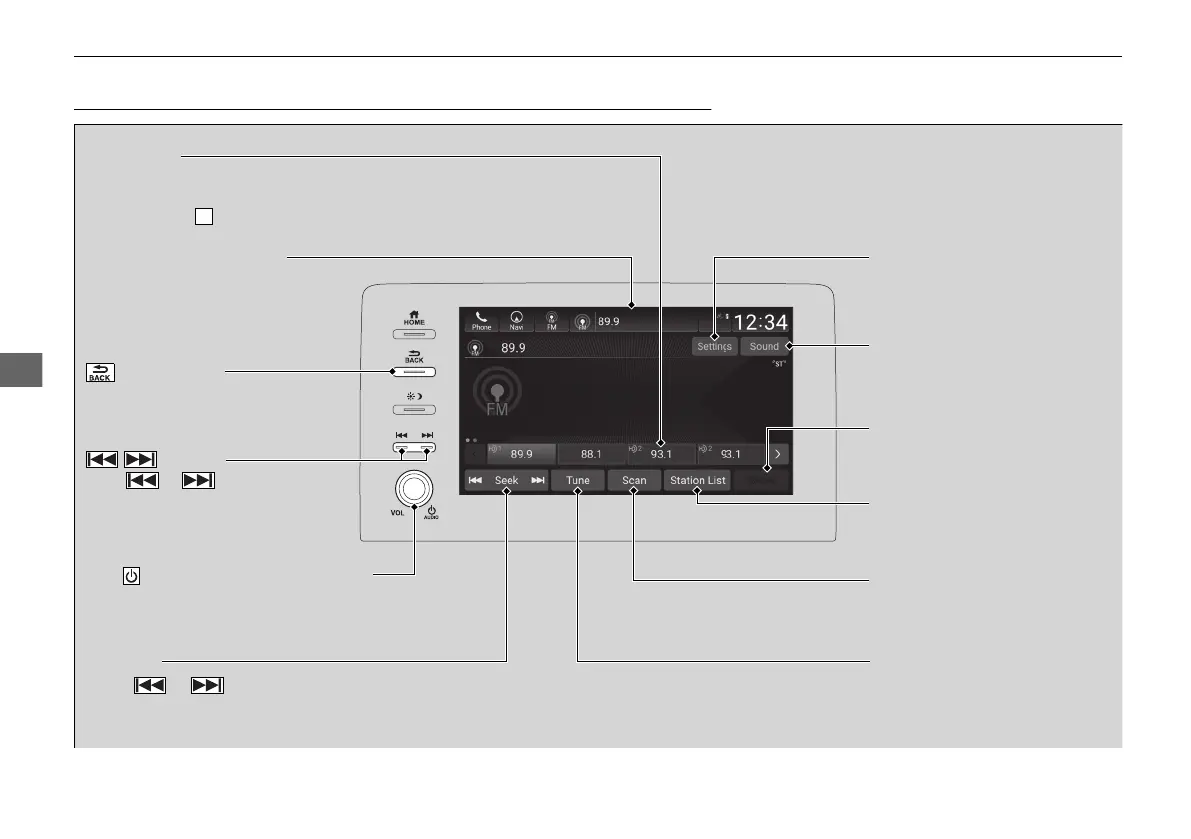
(Back) Button
Press to go back to the previous
display.
/ Buttons
Press or to search up and
down the selected band for a
station with a strong signal.
VOL/ AUDIO (Volume/Power) Knob
Push to turn the audio system on and off.
Turn to adjust the volume.
Tune Icon
Select to use the on-screen
keyboard for entering the
radio frequency directly.
Audio/Information Screen
Scan Icon
Select to scan eac
h station
with a strong signal.
Preset Icons
Tune the radio frequency for preset memory.
Select and hold the preset icon to store that
station. Select to display beyond preset 5.
Settings Icon
Select whether to tune to HD
Radio
TM*
automatically.
Seek Icon
Select or to search the selected band
up or down for a station with a strong signal.
Sound Icon
Select to display the sound
settings.
HD Radio Icon
*
Select to displays the
subchannel list screen.
Station List Icon
Select to displays the station
list screen.














 To Next Page